Table of Contents
Outlook offers more than one kind of email template. My Templates stores short reusable message text. New Outlook’s Mail Templates can save a fuller draft, while classic Outlook for Windows uses local .oft files. The right method depends on your Outlook version and whether you need only body text or also a subject, recipients, and attachments.
Template options at a glance
| Option | Best for | Important limitation |
|---|---|---|
| My Templates | Reusable paragraphs and short replies | May be disabled by an administrator; not a full message file |
| Mail Templates in new Outlook | Reusable drafts with more message fields | Availability depends on the current client and account |
| OFT in classic Outlook | Full local Outlook message templates | Classic Windows workflow; local files need management |
| Quick Parts in classic Outlook | Reusable text blocks inside a draft | Not the same as a complete template |
Create a template in Outlook on the web or new Outlook
Use My Templates for reusable text
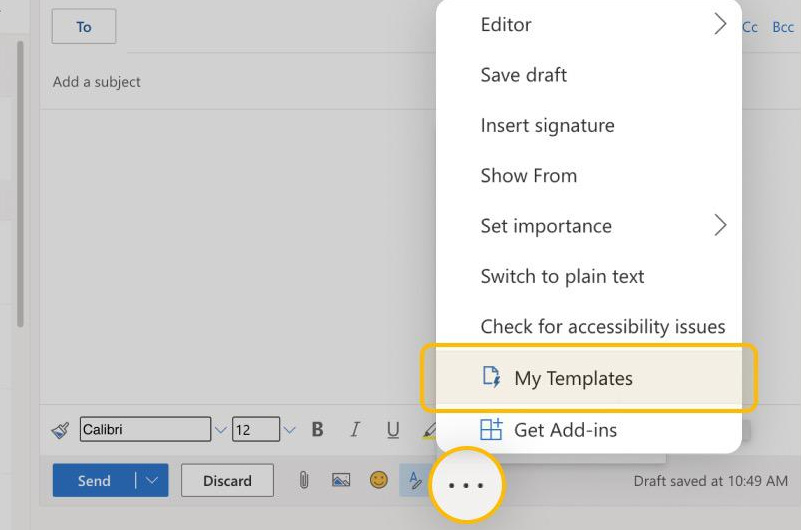
Step 1: Create a new message. On the Message ribbon, choose My Templates or View Templates. In some layouts it is under Apps or the three-dot menu.
Step 2: In the task pane, choose + Template, enter a descriptive title and the reusable body text, then save it. Keep placeholders obvious, such as [CLIENT NAME] and [DEADLINE].
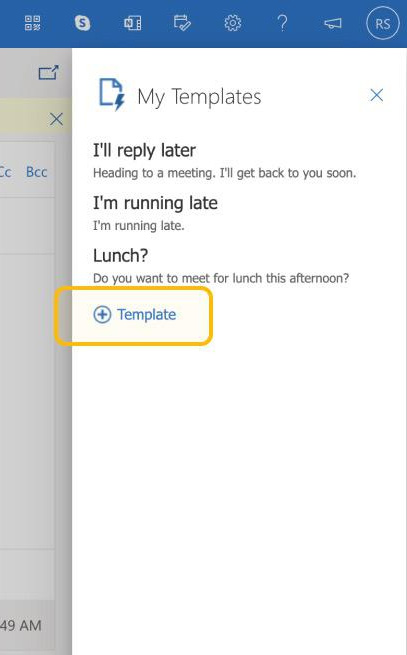
Step 3: When composing a message, reopen My Templates and select the saved item to insert its text at the cursor. It does not send automatically. Add the subject, recipients, attachments, greeting, and signature as required.
If My Templates is missing, your organization may have Outlook add-ins disabled. Ask the administrator rather than installing an unapproved substitute. Microsoft’s current Outlook template guide lists the supported paths.
Use Mail Templates in new Outlook
Where available, compose the fields you want to retain, then choose Mail template > Save email as template on the Message ribbon. Name it clearly. Open saved items with New > Mail from template or from Settings > Mail > Templates, depending on the version.
This option can retain more than a My Templates text block. That makes it convenient but riskier: do not leave a real customer address, an outdated attachment, or a confidential thread in a broadly reused template.
Create an OFT template in classic Outlook for Windows
Step 1: Select New Email and create the reusable subject, body, and formatting. Remove your signature if Outlook will add it automatically later. Leave recipients and attachments blank unless they must always be the same and the risk has been approved.
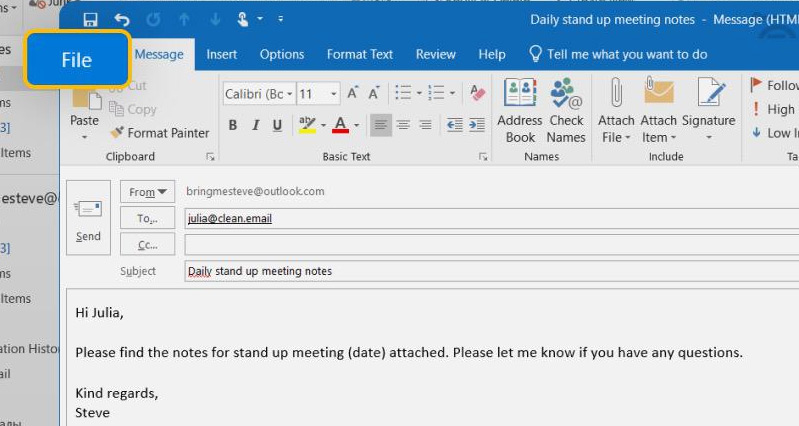
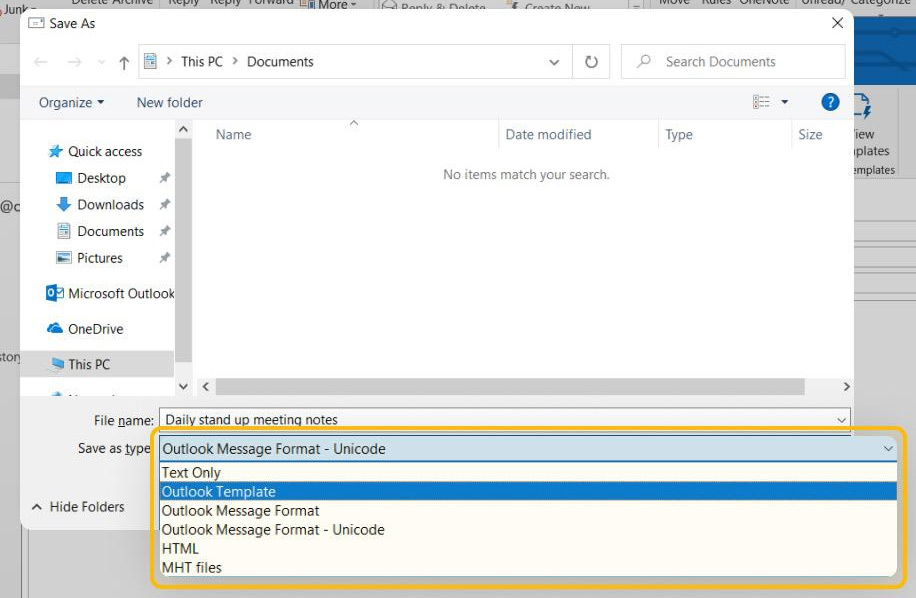
Step 2: Choose File > Save As. Set Save as type to Outlook Template (*.oft), give the file a clear name, and save it. Outlook normally suggests the user Templates folder.
Open an OFT template in classic Outlook
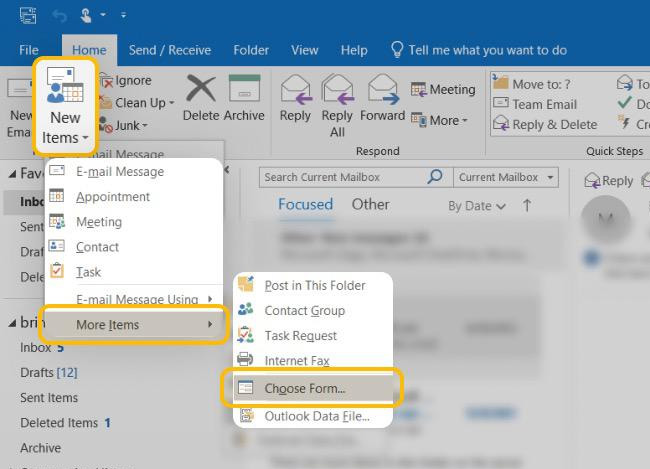
Step 1: Choose New Items > More Items > Choose Form.
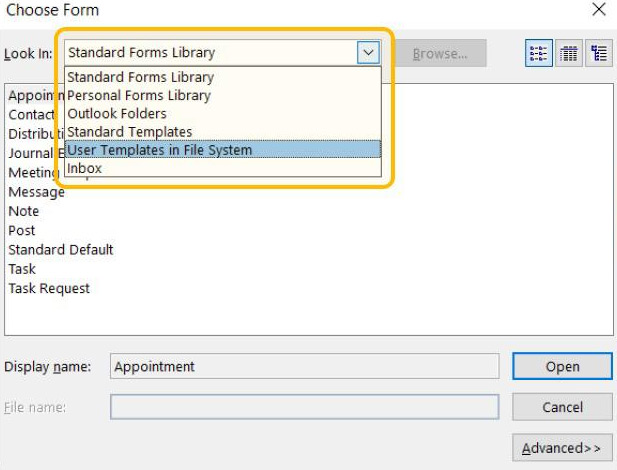
Step 2: Set Look In to User Templates in File System. Browse if the OFT was saved elsewhere.
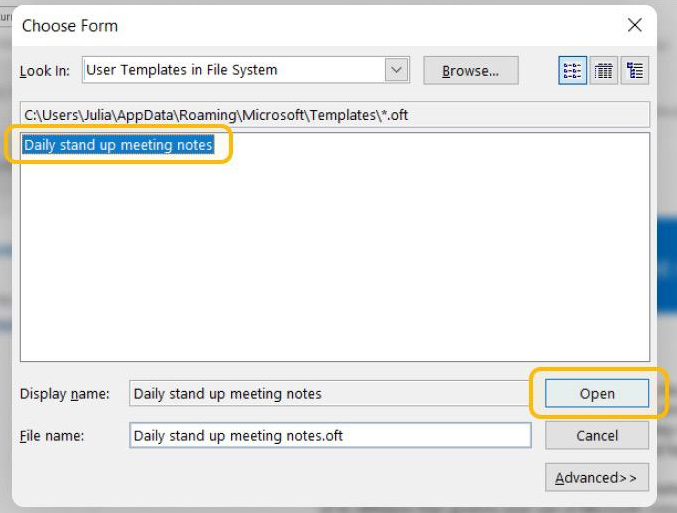
Step 3: Select the template and open it. Outlook creates a new message based on the file; editing that message does not automatically update the template.
Some current versions also show New > Mail from template. If moving to new Outlook, Microsoft provides a supported way to add existing OFT files through Settings > Mail > Templates where that feature is available.
Design a template that is safe to reuse
- Use visible placeholders and search the final message for
[before sending. - Do not store passwords, access tokens, payment details, or unnecessary personal data.
- Avoid fixed dates such as “this Friday”; use a placeholder or calculate the date when composing.
- Keep legal, policy, pricing, and support statements under version control and assign an owner to review them.
- Use accessible formatting: meaningful link text, readable colors, simple tables, and alt text for essential images.
- For shared mailboxes, verify who can see and edit a template. My Templates items may be personal even when used while viewing a shared mailbox.
Review every message before sending
A template saves typing, not judgment. Confirm To, Cc, Bcc, subject, attachments, names, dates, figures, links, tone, and the correct signature. If the content must be approved or updated centrally, use an organization-managed template system instead of distributing personal OFT files.
Related Articles
 Create and Use the Template in Outlook 20102 minutes read
 How to Create a Group Email in Outlook: Step-by-Step Guide4 minutes read
 How to Print Email in Outlook3 minutes read
 How to Set Up an Out of Office Email on Outlook3 minutes read
 How to Print Emails on Outlook3 minutes read
 Add New, Delete, Edit Outlook Email Alias like?: Outlook Alias3 minutes read
Reader Comments 0
Sign in with email or Google to join the discussion.