Table of Contents
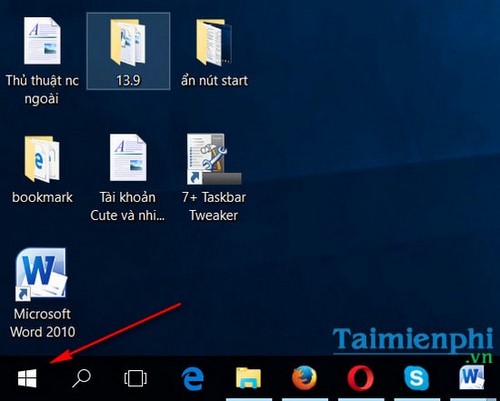
7+ Taskbar Tweaker can hide the Start button on some older Windows taskbars, but this is now a legacy tweak. The developer states that the option no longer works properly on current builds, and the application does not support the native Windows 11 Taskbar. Use the steps below only on a compatible Windows 7, 8.1, or Windows 10 setup.
Before you change the Taskbar
- Download 7+ Taskbar Tweaker only from the official Ramen Software page.
- Create a restore point or note the current settings before installing any shell-customization utility.
- Remember that hiding the button does not disable the Start menu. Press the Windows key or Ctrl + Esc to open it.
- If the option has no effect or hides the wrong button, your Windows build is not compatible; do not keep forcing the setting.
Windows 10 reached the end of standard support on October 14, 2025. This guide remains useful for legacy systems, but upgrading to a supported release is the safer long-term choice.
Hide the Start button with 7+ Taskbar Tweaker
Install and open 7+ Taskbar Tweaker. Its settings normally appear in a compact window divided into Taskbar behavior groups.
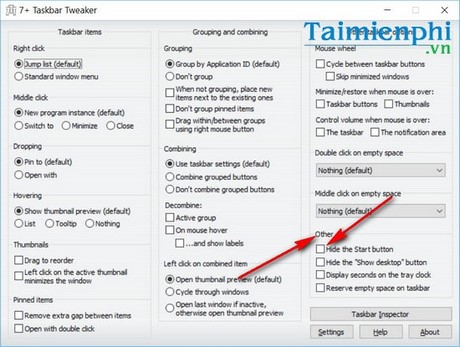
Find the Other section and select Hide the Start button.
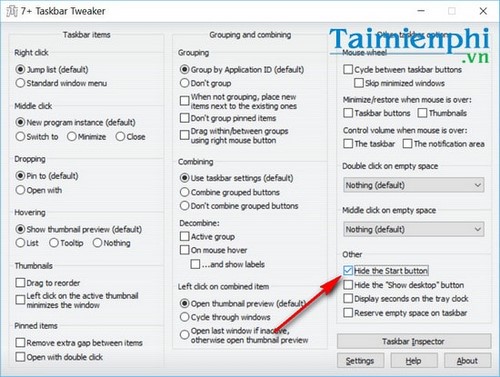
The change should take effect immediately on a compatible Taskbar. Press the Windows key and confirm that the Start menu still opens before closing the settings window.
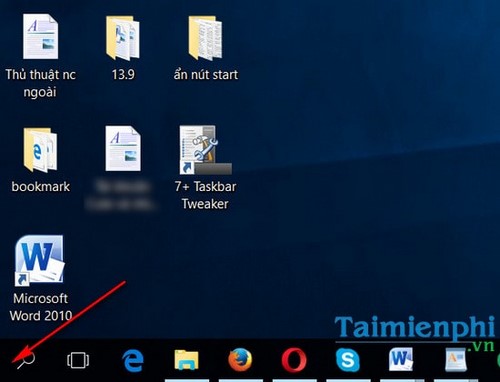
Restore the Start button
Open 7+ Taskbar Tweaker and clear Hide the Start button. If the button does not return, exit the utility and restart Windows Explorer from Task Manager, or sign out and back in. Uninstalling the tool should also remove its active Taskbar changes.
If the option does not work
The Windows shell changes between releases, so behavior that worked on one Windows 10 build may fail on another. Update 7+ Taskbar Tweaker from its official site, but do not install unrelated downloads that claim to patch it. On the native Windows 11 Taskbar, use the built-in settings and supported customization methods instead; see useful Windows 11 Taskbar features.
If your goal is simply to gain more screen space, hiding the entire bar is usually more effective than removing one button. You can also maximize display space in Windows 10. For notification icons rather than the Start button, follow the guide to show or hide Windows 10 system tray icons.
Related Articles
 How to Install and Set Up 7+ Taskbar Tweaker on Your Computer3 minutes read
 Trick to Rearrange Stacking Windows on Windows Taskbar3 minutes read
 Refresh the Windows 10 Interface with 11 Custom Tools11 minutes read
 Hide the Search Button and the Task View Button on the Taskbar on5 minutes read
 How to Move Windows 11 Start Menu to the Left6 minutes read
 How to Hide the Search Button on the Windows 11 Taskbar4 minutes read
Reader Comments 0
Sign in with email or Google to join the discussion.