Table of Contents
NotebookLM can speed up lesson planning when you give it authoritative curriculum documents and ask it to show where each recommendation comes from. Treat the output as a draft: the teacher still needs to confirm the learning outcomes, classroom fit, assessment method, and school policy before using it.
What to prepare before opening NotebookLM
A useful notebook starts with a small, reliable source set. Gather the documents that actually govern the lesson:
- the current curriculum or subject standards;
- the relevant textbook chapters, teacher guide, and course schedule;
- your school's assessment, safeguarding, and acceptable-use policies;
- an official AI-literacy framework, if AI education is part of the lesson;
- notes about available time, devices, accessibility needs, and students' prior knowledge.
Teachers in Vietnam who are working under the pilot framework should use the official Decision 3439/QĐ-BGDĐT and its attached framework, issued on December 15, 2025, rather than a repost or an AI-generated summary. For other locations, replace it with the standards and policies that apply to your school.
Do not upload student names, contact details, grades, health information, or other personally identifiable records. Describe the class in general terms—for example, “Grade 7 students with mixed reading levels”—unless your institution has explicitly approved a more detailed use.
Build a source-grounded lesson plan
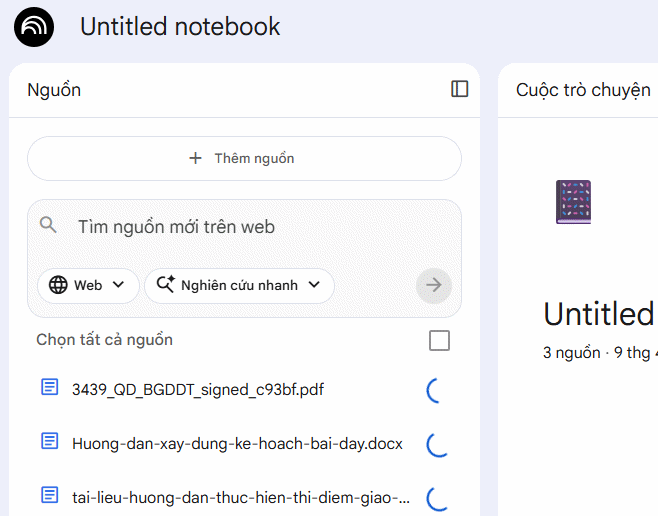
1. Create a notebook and add the source documents
In NotebookLM, create a new notebook and add the curriculum, lesson materials, and policy documents. NotebookLM supports common document, presentation, spreadsheet, image, audio, web, and public YouTube sources; the available options and limits can change, so check the official source-support guide if an upload fails.
Name each source clearly. A label such as “Grade 7 science curriculum—official” is more useful than “document1.pdf.” Open the uploaded files and confirm that tables, page headings, and non-English text were imported correctly.
2. Ask for a standards map before a full lesson
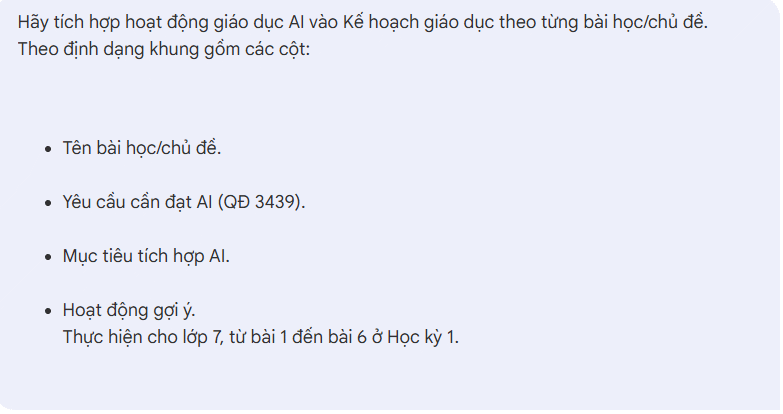
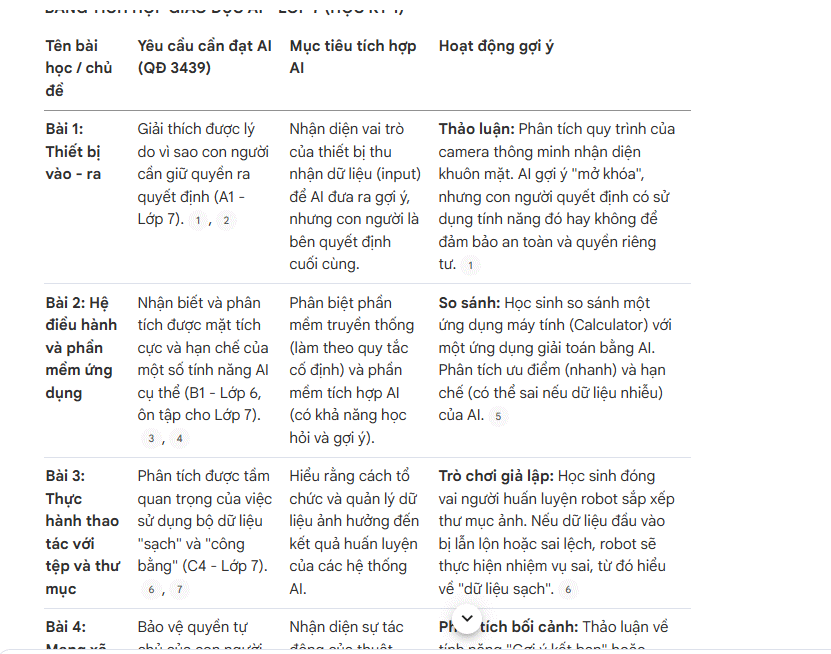
Start by asking NotebookLM to map the requirements found in the selected sources. This separates source extraction from creative lesson design and makes errors easier to spot. A prompt such as the following works well:
Using only the selected sources, create a planning table for Grade 7, lessons 1–6 in semester 1.

Columns:
1. Lesson or topic
2. Required curriculum outcome
3. Exact source title and page/section
4. AI-literacy objective
5. Suggested teacher and student activity
6. Evidence of learning or assessment
7. Time and materials
8. Risk, accessibility, or safeguarding note

If a requirement is not stated in the sources, write "Not found in the provided sources." Do not invent a standard or citation.
If you prefer to prompt in Vietnamese, make the same constraints explicit:
Chỉ sử dụng các nguồn đã chọn. Hãy lập bảng kế hoạch cho lớp 7, từ bài 1 đến bài 6 của học kỳ 1.

Các cột gồm:
- Tên bài học/chủ đề
- Yêu cầu cần đạt
- Tên nguồn và trang/mục trích dẫn
- Mục tiêu tích hợp giáo dục AI
- Hoạt động của giáo viên và học sinh
- Minh chứng hoặc cách đánh giá
- Thời lượng và học liệu
- Lưu ý về rủi ro, khả năng tiếp cận hoặc an toàn

Nếu nguồn không nêu thông tin, hãy ghi "Không tìm thấy trong nguồn đã cung cấp". Không tự tạo chuẩn hoặc trích dẫn.
Select only the sources relevant to this task before sending the prompt. Narrowing the source set reduces the chance that NotebookLM mixes requirements from a different grade, subject, or policy.
3. Expand one lesson at a time
Review the standards map, then ask for a complete plan for one lesson. Include the lesson duration, class context, available equipment, and expected evidence of learning. Ask for a sequence that distinguishes teacher actions from student actions and includes a realistic fallback when devices or internet access are unavailable.
A useful follow-up prompt is: “Expand Lesson 1 into a 45-minute plan. Use the cited outcomes, include a five-minute check for prior knowledge, an active learning task, an assessment aligned to the outcome, differentiation for students who need additional support, and a no-device alternative.”
Continue lesson by lesson only after checking the first output. You can then repeat the process for semester 2. NotebookLM can also turn a verified source set into study aids; see TipsMake's guide to NotebookLM Audio and Video Overviews. Those formats can support revision, but they should not replace accessible written materials.
Check the draft before teaching
| Check | What to verify |
|---|---|
| Standards | Every quoted requirement matches the official source, grade level, subject, and page or section. |
| Learning design | The activity gives students a meaningful task rather than adding AI merely for novelty. |
| Assessment | The evidence of learning measures the stated outcome and can be completed in the available time. |
| Accuracy | Examples, definitions, and instructions are fact-checked against the source material. |
| Access | Students without a device, reliable internet, or the same reading ability have a workable alternative. |
| Safety | No sensitive student data is required, and the activity follows the school's AI and safeguarding rules. |
| Academic integrity | Students know when AI use is allowed, what they must produce themselves, and how to acknowledge assistance. |
Open NotebookLM's citations and compare the relevant passage with the uploaded document. A citation shows where an answer came from, but it does not prove that the interpretation is correct or that the source is current. If the draft combines several documents, confirm that they do not conflict.
NotebookLM and a general chatbot serve different planning needs. The former is most useful when the answer must stay anchored to a defined source collection; the latter may be better for open-ended brainstorming. The comparison in NotebookLM vs. ChatGPT explains the distinction.
Use AI where it improves the lesson
AI integration should support a clear learning goal. For example, students might compare an AI summary with a source passage, identify unsupported claims, improve a prompt through evidence-based revisions, or discuss privacy and bias. Simply asking a chatbot for an answer does not by itself teach AI literacy.
After the plan is verified, NotebookLM can help create discussion questions, a study guide, or a first-pass quiz from the same sources. Check every answer key and revise questions that are ambiguous or test trivia rather than the intended outcome. For a broader view of age-appropriate options, see TipsMake's overview of AI tools for high school and university students.
The best result is a source-grounded draft that saves preparation time while leaving professional decisions with the teacher. Keep the authoritative documents visible, verify every important claim, and adapt the plan to the actual students and classroom.
Related Articles
 Instructions on Converting Videos into Lesson Plans Using NotebookLM4 minutes read
 Guide to Building AI-integrated Lesson Plans4 minutes read
 Guide to Converting Videos into Lectures Using NotebookLM4 minutes read
 Guide to Creating Lesson Plans Using NotebookLM4 minutes read
 Guide to Creating Integrated NLS Lesson Plans Using AI4 minutes read
 Prompt Template for Building Lesson Objectives in NotebookLM4 minutes read
Reader Comments 0
Sign in with email or Google to join the discussion.