Table of Contents
“Limited” or “No internet” means the PC has connected to the local Wi-Fi network but cannot reach the internet. First determine whether the problem affects only this computer or every device. If phones and other computers are also offline, troubleshoot the modem, router, or internet service rather than changing Windows settings.
Support note: Standard Windows 10 support ended on October 14, 2025. The system still runs, but PCs without an applicable Extended Security Updates program no longer receive regular security fixes. Upgrade to a supported Windows version when the hardware allows; Microsoft's Windows 10 support notice explains the available paths.
1. Confirm where the fault is
- Connect another phone or computer to the same Wi-Fi network.
- If every device lacks internet, check the modem and router lights, cables, and provider status.
- If only the Windows PC is affected, restart it and continue with the steps below.
- If the PC works on a phone hotspot but not the home router, focus on the saved profile, router compatibility, or IP assignment.
2. Restart the network equipment
Turn off the modem and router according to the provider or manufacturer's instructions. Wait briefly, power the modem first, and allow it to establish service before powering the router. Reconnect after the status lights stabilize. Avoid pressing a physical Reset button; a factory reset is different from a restart and can erase configuration.
3. Forget and rejoin the Wi-Fi network
Open Settings > Network & Internet > Wi-Fi > Manage known networks. Select the affected network, choose Forget, then return to the Wi-Fi list and connect with the current password. This replaces a stale profile after a password or security-mode change.
4. Check IP and proxy settings
Most home networks should obtain an address automatically. Open the connected Wi-Fi network's properties and confirm IP assignment is set to Automatic (DHCP) unless an administrator supplied manual values. Under Settings > Network & Internet > Proxy, turn off an unknown manual proxy. Disconnect a VPN while testing.
An address beginning with 169.254 usually means Windows could not obtain an address from the router. Restart the router, renew the address, and check its DHCP service.
5. Renew the IP address and reset the network stack
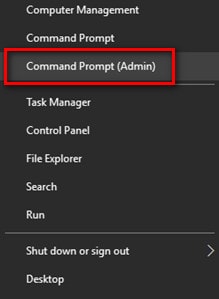
Open Command Prompt as administrator and run these commands one at a time:
netsh winsock reset
netsh int ip reset
ipconfig /release
ipconfig /renew
ipconfig /flushdns
Restart the PC after they finish. Microsoft includes these commands in its current Wi-Fi connection troubleshooting guide.
6. Adjust wireless-adapter power saving
If the connection becomes limited after sleep or when running on battery, test the older Control Panel power setting:
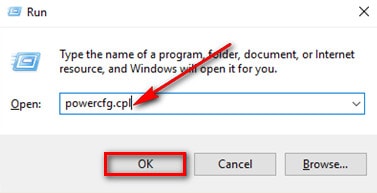
- Press Windows + R, enter
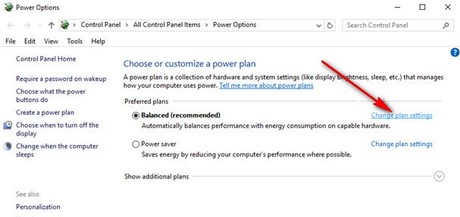
powercfg.cpl, and select OK. - Beside the active plan, select Change plan settings.
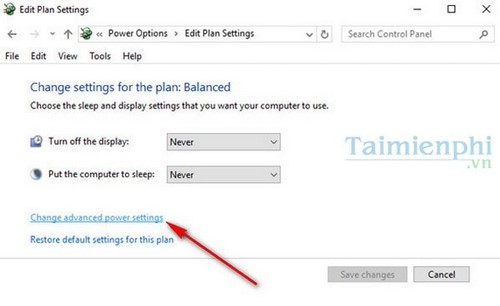
- Select Change advanced power settings.
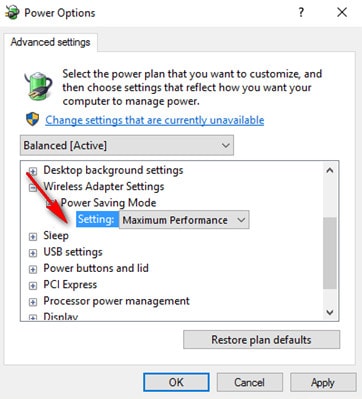
- Expand Wireless Adapter Settings > Power Saving Mode.
- Choose Maximum Performance temporarily for testing, then select OK.
This can reduce battery life. Another targeted option is Device Manager > Network adapters > the Wi-Fi adapter > Properties > Power Management, then clear Allow the computer to turn off this device to save power if the option exists.
7. Update or reinstall the Wi-Fi driver
Before uninstalling the driver, download the correct current package for the exact laptop or adapter model from its manufacturer's official support page. Then:
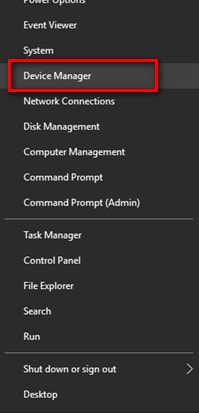
- Right-click Start and open Device Manager.
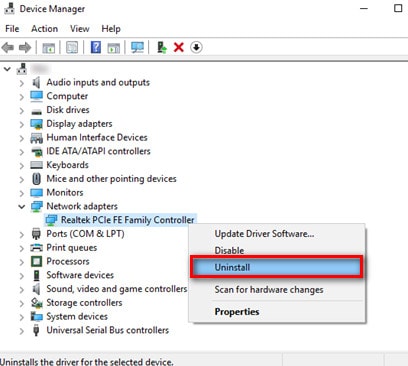
- Expand Network adapters.
- Right-click the wireless adapter and open Properties > Driver.
- If the problem started immediately after an update, try Roll Back Driver when available.
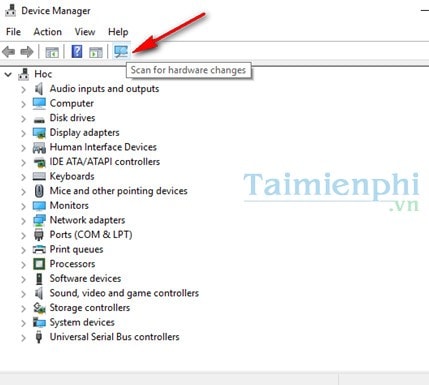
- Otherwise choose Uninstall device, restart the PC, and let Windows detect it again. Install the downloaded package if required.
8. Do not disable TCP auto-tuning as a general fix
Older advice sometimes recommends commands that disable TCP heuristics and receive-window auto-tuning. These settings control network performance and are not a general remedy for a missing internet route, bad DHCP lease, or Wi-Fi authentication problem.
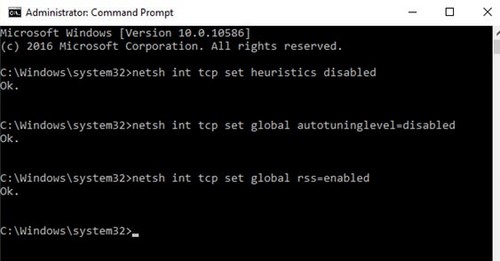
If a previous guide set auto-tuning to disabled, Microsoft documents normal as the default level. An administrator can review the current values and restore that setting with:
netsh int tcp show global
netsh int tcp set global autotuninglevel=normal
netsh int tcp set global rss=enabled
Do not change other global TCP parameters without a diagnosed reason.
9. Use Network reset only after the targeted fixes
Open Settings > Network & Internet > Status > Network reset, select Reset now, and restart. Windows removes and reinstalls network adapters and returns their settings to defaults. VPN clients, virtual switches, and other networking software may need to be configured again.
10. Check the router or provider
If Windows receives a valid local address but cannot reach the router, use TipsMake's guide to find the default gateway and test that address. If the router opens but no device can reach the internet, contact the provider. If only this computer fails after all software steps, test Ethernet or a known-good USB Wi-Fi adapter to separate an internal hardware fault from a Windows configuration issue.
For a broader decision sequence, see TipsMake's Windows 11 Wi-Fi troubleshooting guide; most adapter, driver, profile, and IP checks also apply to Windows 10.
Related Articles
 The 'Connected with Limited Access' Error in Windows4 minutes read
 Instructions for Fixing Wi-Fi Errors with Yellow Exclamation5 minutes read
 Fixing the Error 'Wi-Fi Doesn't Have a Windows 10 Configuration2 minutes read
 The Way to Fix Windows 8 Error Does Not Catch Wi-Fi5 minutes read
 Instructions for Fixing Wifi Error with Yellow Exclamation6 minutes read
 How to Fix Wi-Fi Errors on Windows 10, Simple and Effective10 minutes read
Reader Comments 0
Sign in with email or Google to join the discussion.