Table of Contents
Compare five AI workflow management tools for 2026: Zapier, Make, Workato, n8n, and Microsoft Power Automate. Compare their features, advantages.
The best workflow automation tool depends on who will build the workflows, which systems must connect, how much code and infrastructure you want to manage, and how much governance the process requires. Zapier and Make are approachable visual platforms; n8n offers deeper technical control and deployment choices; Workato targets enterprise integration and orchestration; and Power Automate fits naturally into Microsoft-centered environments and desktop automation.
Evaluate a real workflow before choosing
- Triggers and connectors: Confirm the exact apps, API operations, authentication methods, and data fields you need—not just the number of advertised integrations.
- Reliability: Test retries, rate limits, timeouts, idempotency, error branches, and how failed runs are replayed.
- AI controls: Keep deterministic steps for critical business rules, restrict tool permissions, validate model output, and add human approval before high-impact actions.
- Operations: Compare logs, versioning, environments, secrets management, role-based access, audit trails, and data residency.
- Total cost: Model task or operation volume, premium connectors, AI usage, seats, support, self-hosting work, and maintenance. Public prices and plan limits change.
Review each vendor's current product information: Zapier AI tools, Make AI automation, Workato agentic orchestration, n8n AI workflows, and Microsoft Power Automate.
For additional comparisons, see TipsMake's n8n alternatives, Power Automate alternatives, and introduction to Zapier.
This is where workflow management tools come into play. Workflow management platforms help businesses manage, monitor, and automate the entire workflow from start to finish, while also handling errors, assigning permissions, and optimizing operational performance. In this article, let's explore the TOP AI workflow management tools for 2026, including Zapier, Make, Workato, n8n, and Microsoft Power Automate.
A quick comparison of workflow creation tools
- Zapier - Building Secure AI Processes
- Make - Design workflows using a visual interface.
- Workato - An iPaaS platform for large enterprises
- n8n - Self-hosted solution
- Microsoft Power Automate - The ideal choice for Microsoft users.
| Tools | Best suited for | Key features | Price |
| Zapier | Building a secure AI process. | Zapier MCP connects AI with over 9000 applications. | |
| Make | Intuitive logic design | Make Grid displays the entire workflow system. | |
| Workato | Enterprise-grade iPaaS | Workato ONE AI automation toolkit | |
| n8n | Self-storage | Supports JavaScript and Python directly. | |
| Microsoft Power Automate | Microsoft users | Process Mining proposes processes that need automation. |
Detailed workflow automation tool comparison
Zapier: accessible no-code automation
Advantage
- Supports Zapier MCP, SDK, and CLI for workflow integration with AI assistants.
- Integrates over 9000 applications.
- Numerous administrative features such as activity monitoring, detailed permission management, and OAuth authentication.
Disadvantages
- The free plan only supports 100 tasks per month and a maximum of 2 workflows.
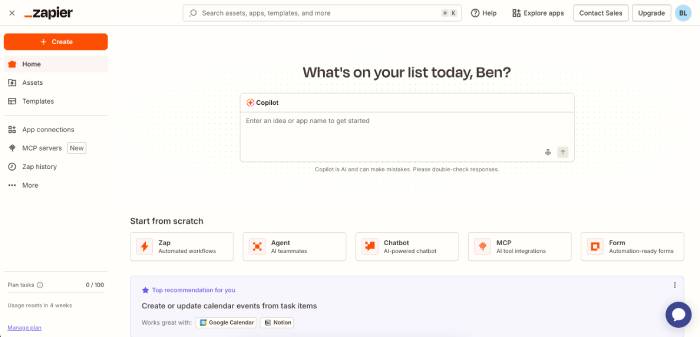
Zapier is not just a conventional process orchestration tool, but also an AI orchestration platform that enables the building of secure automation systems across more than 9,000 applications – more than any other tool on this list.
Việc tạo workflow đầu tiên cũng rất đơn giản. Người dùng có thể xây dựng từ đầu, sử dụng mẫu có sẵn hoặc nhờ Zapier Copilot tạo workflow bằng ngôn ngữ tự nhiên. Từ quy trình bán hàng đến hỗ trợ CNTT, Zapier có thể kết nối mọi phần trong doanh nghiệp và các ứng dụng bên thứ ba.
Ngoài ra, với Zapier MCP, người dùng có thể kích hoạt các quy trình tự động hóa trực tiếp từ Claude, ChatGPT hoặc các công cụ AI khác mà không cần rời khỏi cửa sổ trò chuyện. Sau đó, Zapier sẽ thực hiện các hành động trên hơn 9000 ứng dụng với hệ thống xác thực OAuth và quản trị đạt chuẩn SOC 2.
Zapier cũng rất chú trọng đến bảo mật dữ liệu. Các tính năng như nhật ký kết nối, hạn chế hành động và luồng ghi log giúp theo dõi ai đang truy cập dữ liệu. AI Guardrails còn bổ sung các lớp bảo vệ như phát hiện thông tin cá nhân (PII) và chống tấn công Prompt Injection.
Make: visual scenarios and AI agents
Ưu điểm
- Trình xây dựng workflow dạng canvas trực quan
- Make Grid tự động tạo sơ đồ tổng quan toàn bộ hệ thống
Nhược điểm
- Khó dự đoán chi phí khi workflow trở nên phức tạp
- Tính năng quản trị doanh nghiệp còn hạn chế
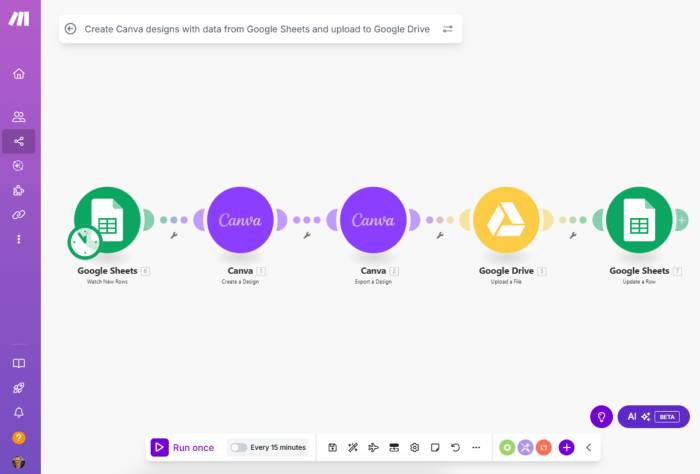
Trong khi các công cụ khác hoạt động phía sau hậu trường, Make cho phép nhìn thấy toàn bộ luồng dữ liệu đang chạy theo thời gian thực.
Tính năng nổi bật nhất là Scenario Canvas. Đây là nơi người dùng xây dựng workflow bằng cách kéo thả các module trên một bảng trực quan. Make hỗ trợ kết nối hơn 3000 ứng dụng và cho phép theo dõi luồng dữ liệu khi workflow đang thực thi.
Một tính năng đáng chú ý khác là Make Grid, tạo bản đồ trực quan cho toàn bộ hệ thống tự động hóa. Người dùng có thể xem tất cả workflow, AI agent, kết nối ứng dụng và luồng dữ liệu trong một giao diện duy nhất.
Tuy nhiên, Make sử dụng mô hình tính phí theo credit. Những workflow đơn giản khá tiết kiệm, nhưng các quy trình phức tạp có thể tiêu tốn lượng credit rất lớn.
Workato: enterprise integration and orchestration
Ưu điểm
- Kiểm soát quyền truy cập theo vai trò cho AI Agent
- Hơn 1200 trình kết nối với SAP, Oracle, Workday, Salesforce.
Nhược điểm
- Cần đội ngũ CNTT chuyên trách để triển khai
- Thời gian triển khai khá dài
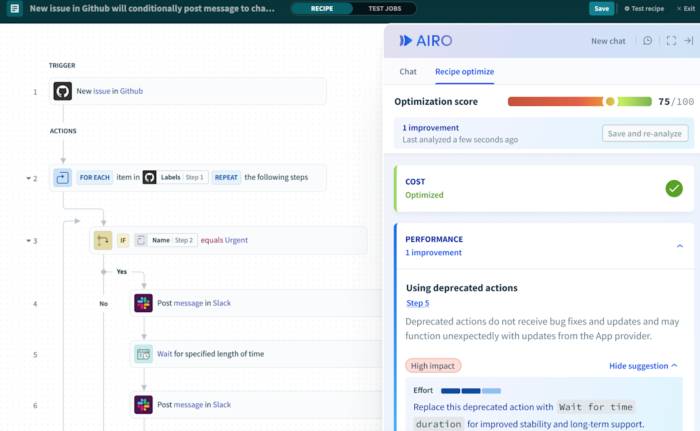
Workato được xây dựng dành riêng cho các doanh nghiệp lớn cần điều phối quy trình phức tạp giữa nhiều hệ thống khác nhau.
Nền tảng này sử dụng các workflow gọi là Recipes, giúp kết nối ứng dụng và luân chuyển dữ liệu giữa các hệ thống. Workato có thể xử lý các luồng công việc phức tạp với nhiều điều kiện, cơ chế thử lại khi lỗi và ánh xạ dữ liệu quy mô lớn.
Bộ công cụ Workato ONE mang đến khả năng tự động hóa bằng AI. Doanh nghiệp có thể xây dựng AI Agent tùy chỉnh, tạo quy tắc ra quyết định tập trung và cho phép các hệ thống AI bên ngoài truy cập vào thư viện workflow theo cách được kiểm soát.
n8n: technical control and deployment flexibility
Ưu điểm
- Hỗ trợ JavaScript và Python trực tiếp
- Phiên bản Community mã nguồn mở hoàn toàn miễn phí
Nhược điểm
- Đòi nhiều thời gian tìm hiểu để sử dụng thành thạo
- Hỗ trợ chuyên nghiệp chỉ có trong gói Enterprise
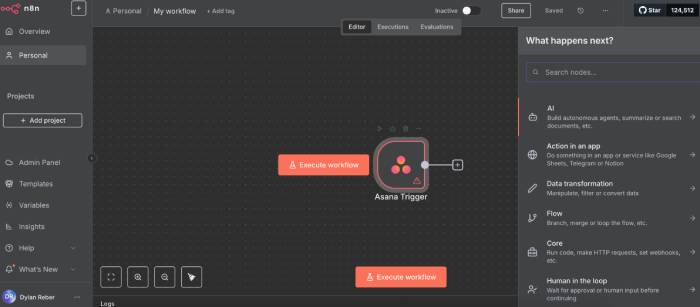
n8n is a suitable choice for programmers and technical users. Like many other platforms, n8n offers a visual workflow designer, but what sets it apart is the ability to embed JavaScript or Python code directly into workflows.
Unlike platforms that only support simple expressions, n8n allows you to write complete code for each step of data processing. This tool also integrates LangChain, making it easier to build AI and RAG systems.
Another major advantage is self-hosting capability. In addition to cloud packages, you can download the Community Edition from GitHub and deploy it on their own server.
However, without experience in systems or DevOps, self-hosting can become a significant challenge.
Microsoft Power Automate: Microsoft ecosystem and RPA
Advantage
- Includes Microsoft 365 at no extra cost.
- RPA support for legacy Windows applications
Disadvantages
- Connecting with applications outside the Microsoft ecosystem requires a Premium plan.
- Efficiency decreases significantly when working outside of a Microsoft environment.
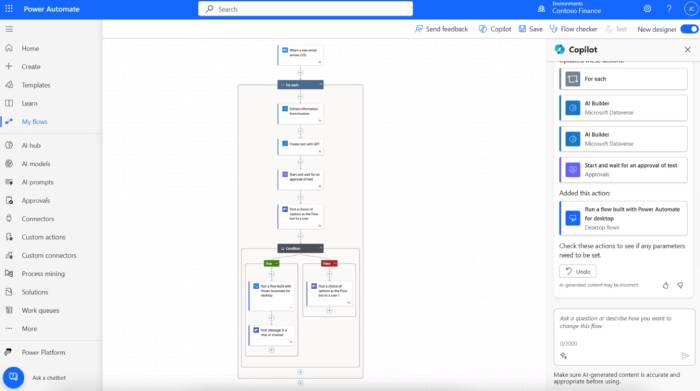
Microsoft Power Automate is the automation component of the Microsoft Power Platform suite, along with Power Apps, Power BI, and Copilot Studio.
If your business uses SharePoint, Teams, and Outlook daily, Power Automate is a very worthwhile option. The workflows between Microsoft services are extremely well integrated and work seamlessly.
The most notable feature is Process Mining. Instead of requiring users to define the processes that need automation, Power Automate analyzes current operational data to identify bottlenecks and suggest automation opportunities.
Additionally, Desktop Flows allows for the automation of legacy Windows applications that don't support the API, something many other platforms can't do.
However, when businesses need to integrate Salesforce, SAP, or custom APIs, users will have to upgrade to the Premium plan. Therefore, Power Automate is best suited for organizations that operate primarily within the Microsoft ecosystem.
Related Articles
 6 Must-Have Productivity Tools for Windows7 minutes read
 Guide to Building AI Workflows6 minutes read
 How Claude Cowork Helps You Automate Your Familiar Workflows8 minutes read
 How to Create Themed Images Based on Clothing Using Microsoft AI Tools3 minutes read
 11 Free Tools That Support Creating Simple Infographic13 minutes read
 Guide to Creating Infographics on Manus4 minutes read
Reader Comments 0
Sign in with email or Google to join the discussion.