Table of Contents
Explore when should you use reasoning mode on an AI chatbot, including the key concepts, practical examples, important considerations, and useful guidance.
What is AI's Reasoning Mode?
AI's Reasoning Mode allows AI chatbots to solve a question through a structured, step-by-step process, rather than directly providing the statistically most likely answer. The model simulates breaking down your question into a series of intermediate reasoning steps that guide the final answer. This process significantly reduces the risk of errors or AI illusions.
Essentially, the reasoning mode uses a thought-based prompt generation method, guiding the AI to 'think aloud' by explicitly stating each intermediate calculation, fact-checking, or logical inference. This step-by-step process ensures each piece of information is validated before the chatbot reaches a conclusion.
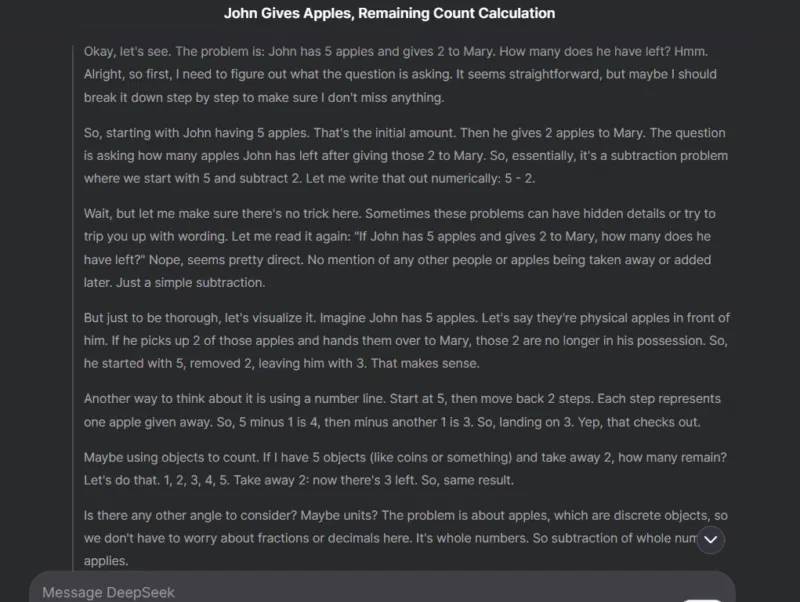
For example, the author of the article asked DeepSeek, with DeepThink enabled, a simple subtraction: 'If John has 5 apples and gives Mary 2, how many apples does he have left?' In the screenshot below, you can see the detailed reasoning process it used to ensure the correct answer to such a simple question.
When should you not use inference mode?
Before discussing when to use inference mode, it's important to understand that for many everyday questions, simple mode is sufficient. For most daily questions, inference mode offers nothing special. In fact, it slows down the process, uses unnecessary server/token resources, and can provide lengthy answers to simple questions.
It's unnecessary to enable inference mode for common questions like simple definitions, factual information, basic conversions, and yes/no questions. For such simple requests, using inference mode would be impractical, as they don't require any complex reasoning.
Keeping the inference mode constantly enabled will lead to long delays for simple answers and consume your data plan limit (if any). Not to mention, it puts extra strain on the AI chatbot's server without providing any real benefit. For example, DeepSeek often reports a 'server busy' error under heavy load if DeepThink (R1) is enabled, but works normally when it's disabled.
In addition to deep thinking ability, it's crucial to formulate clear questions so the chatbot understands what you're really asking. Here are some expert tips for creating perfect prompts for AI.
When should you use inference mode?
The reasoning mode is particularly effective when questions lack clear/actual answers, often due to the presence of multiple variables. The reasoning mode can analyze such questions and provide compelling responses. Furthermore, most complex questions with many details also benefit from a step-by-step reasoning process.
To help you understand better, the following article lists some common questions that would benefit from having reasoning mode enabled:
- Solving complex problems : Reasoning helps solve mathematical, programming, or engineering problems with many variables and dependencies. For example: 'Find the derivative of f(x) = (3x² + 2x) / ln(x)'.
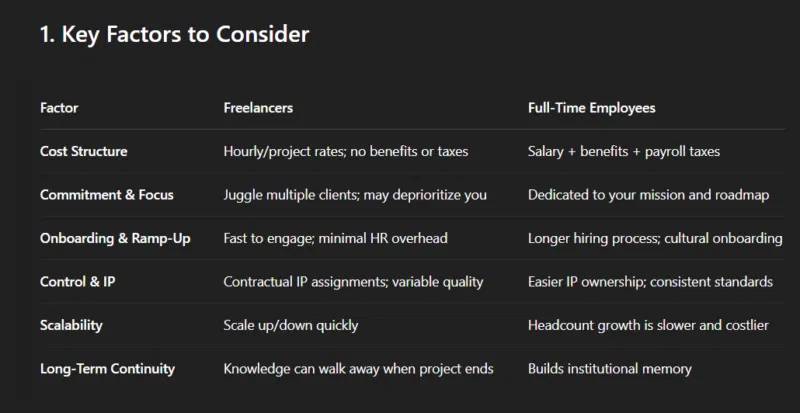
- Strategic decision-making : Decisions involving trade-offs include weighing pros and cons and predicting outcomes. A mode of reasoning can minimize the possibility of making false assumptions and misjudging the truth. An example of a question might be, 'Should I hire freelancers or full-time employees to develop a minimum viable product (MVP) for a startup? '
- Technical troubleshooting : While normal mode may be suitable for common software issues, you'll need to enable inference mode for complex software and mechanical problems, especially if the cause is unknown.
- Creative Brainstorming : Questions designed to generate new ideas often involve considering multiple variables to create original concepts. These reasoning steps ensure all variables are properly considered to produce innovative ideas. For example, a prompt like 'Suggest 10 unique and surprising plot twists for a science fiction novel about artificial intelligence' would benefit from reasoning to avoid repetitive or boring ideas.
- Hypothetical scenarios : Exploring 'what if' scenarios can benefit from inference because it involves simulating outcomes based on different assumptions. An example prompt might be, 'How would a four-day work week affect productivity in a technology company? '
In addition to handling complex questions better, the reasoning process also helps users understand and verify how the AI arrived at the answer. Most AI chatbots display the reasoning steps they have taken (which may need to be displayed manually), and users can review these steps to understand the AI's thought process, ensuring the AI is error-free.
Choosing the right mode for your AI queries will ensure you get accurate answers without wasting time or resources. You can also copy/paste the same question into separate conversations to see which method yields the best answer. By the way, remember to leverage these tips for better results.
Final Thoughts
Use this guide as a practical checklist for when should you use reasoning mode on an ai chatbot. Work through the steps in order, verify each result, and adjust the options to match your needs.
FAQ
What do you need before following this When Should You Use Reasoning Mode on an AI Chatbot guide?
Review the required tools, accounts, settings, or materials mentioned in the article. Explore when should you use reasoning mode on an AI chatbot, including the key concepts, practical examples, important considerations, and useful guidance.
What are the main steps for when should you use reasoning mode on an ai chatbot?
Follow the sections in order, especially What is AI's Reasoning Mode?, When should you not use inference mode?, When should you use inference mode?. Complete each step before continuing and verify the result as you go.
What should you do if the process does not work as expected?
Recheck the prerequisites, update the relevant app or service, review the settings, and repeat the step that caused the issue. Use any troubleshooting notes included in the guide.
Related Articles
 The Trend of Chatbot Will Explode in the Future5 minutes read
 What Is Google AI Mode? How Does It Work?9 minutes read
 How to Create an AI Chatbot for Design in Canva3 minutes read
 How to Create Prompts Based on Inference Sequences11 minutes read
 OpenAI Announces O3 Pro, Its Smartest Reasoning Model Ever3 minutes read
 What Is Chatbait? the New Version of Clickbait in the AI Era: What to Know4 minutes read
Reader Comments 0
Sign in with email or Google to join the discussion.