Table of Contents
This updated guide explores OpenAI announces O3 pro, its smartest reasoning model ever with practical details, clear explanations, and useful takeaways. OpenAI has officially launched o3-pro, a leading AI reasoning model that uses higher computing power to 'think deeper' and provide answers with superior quality.
To optimize the user experience, o3-pro supports tool calling. Based on the request, the model can perform web searches, analyze files, process image data, use Python, personalize responses using memory, and more. This is a big improvement over o1-pro, which does not support this feature. Still, o3-pro will take longer to respond. OpenAI recommends users prioritize o3-pro when they want to access content that emphasizes reliability over response speed.
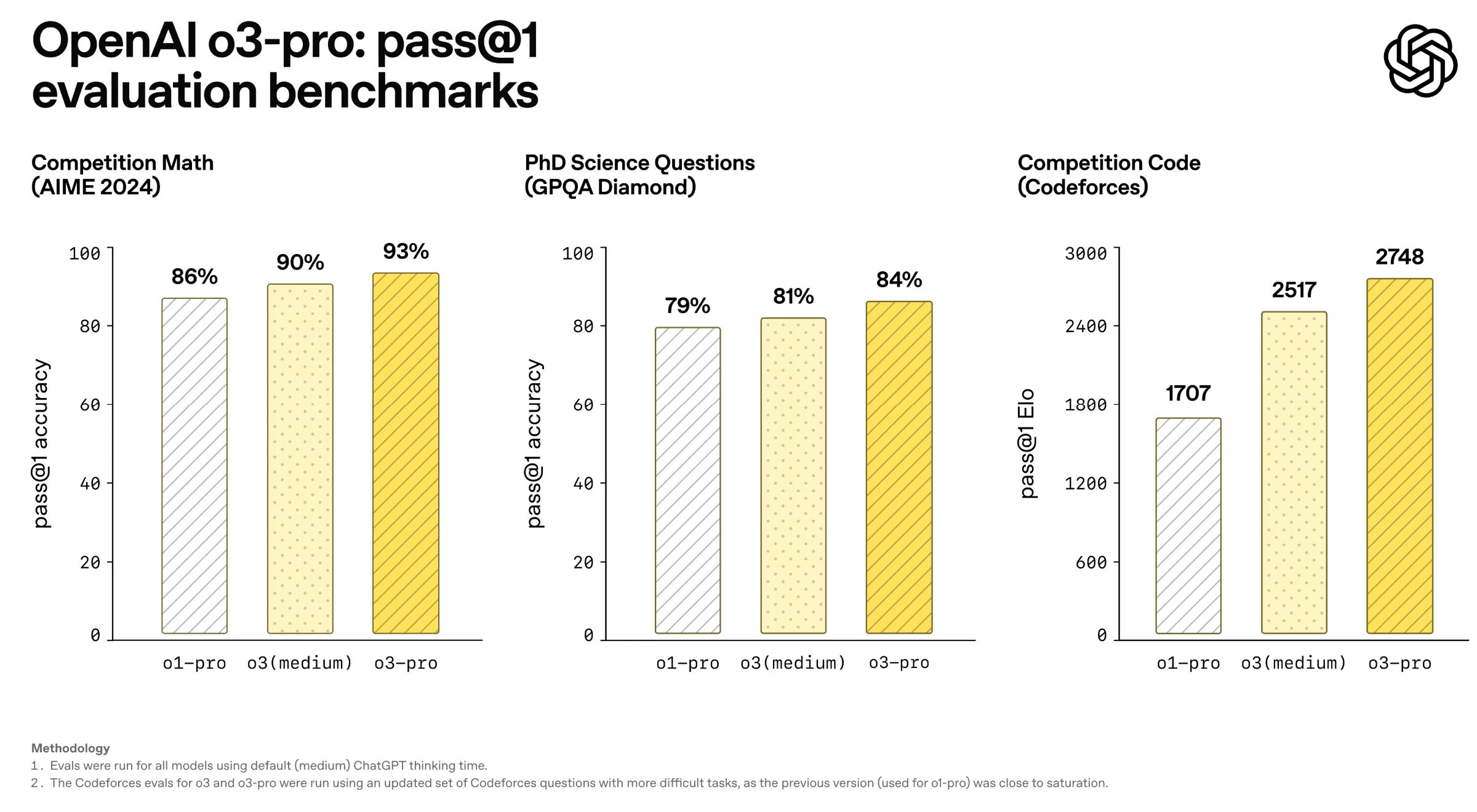
According to internal evaluation, o3-pro's response quality was significantly better than o3's in key areas such as science, education, programming, business, and writing support. o3-pro was also noted to be superior in clarity, comprehensiveness, adherence to instructions, and accuracy.
The new o3-pro model is available in the ChatGPT model selector for Pro and Team plans. Enterprise and Edu users will get access to this model next week.
For developers, o3-pro comes with a 200,000 token context window at $20/million input tokens, and $80/million output tokens. OpenAI recommends using background mode to avoid timeouts. The model has a knowledge limit until May 31, 2024.
The OpenAI team also highlighted the current limitations of o3-pro:
- Temporary chats are temporarily unavailable because of technical issues.
- Image generation is not supported in o3-pro — please use GPT-4o, OpenAI o3, or OpenAI o4-mini to generate images.
- Canvas is not supported on this version.
As OpenAI continues to refine its models, the balance between speed and reliability will remain key to choosing the right tool for your needs.
FAQ
What is the main takeaway about OpenAI Announces O3 Pro, Its Smartest Reasoning Model Ever?
The key is to understand the core idea, compare the available options, and apply the practical guidance that matches your situation.
What should beginners know about OpenAI Announces O3 Pro, Its Smartest Reasoning Model Ever?
Start with the essential steps and terminology. Avoid changing advanced settings until you understand how they affect performance, privacy, cost, or compatibility.
How can I use this information in practice?
Follow the relevant section in order, test one change at a time, and confirm the result before moving to the next step or recommendation.
Related Articles
 Google Announces Gemini 2.5 Pro Deep Think, Beats OpenAI's O3 and O4 Models4 minutes read
 OpenAI's Smartest ChatGPT Model Behaves Strangely4 minutes read
 Use Deep Reasoning Models for Complex Tasks6 minutes read
 OpenAI Announces Operator, an AI Agent That Automatically Performs3 minutes read
 OpenAI Unveils Deep Research, a New AI Agent That Can Complete4 minutes read
 Smarter Free ChatGPT to Take on DeepSeek4 minutes read
Reader Comments 0
Sign in with email or Google to join the discussion.