Table of Contents
A virtual machine (VM) is a software-defined computer that runs a guest operating system on virtual CPU, memory, storage, network, and other devices. A hypervisor maps those virtual resources to the physical host while keeping each VM in a separate environment.
How a virtual machine works
The physical computer is the host. The operating system inside the VM is the guest. A hosted hypervisor runs as an application on the host OS, while a bare-metal hypervisor runs directly on server hardware.
A VM typically stores its configuration and virtual disks in files. Starting the VM presents virtual hardware to the guest, which boots much like an operating system on a physical computer. CPU virtualization features in modern processors help the hypervisor run guest instructions efficiently.
What virtual machines are used for
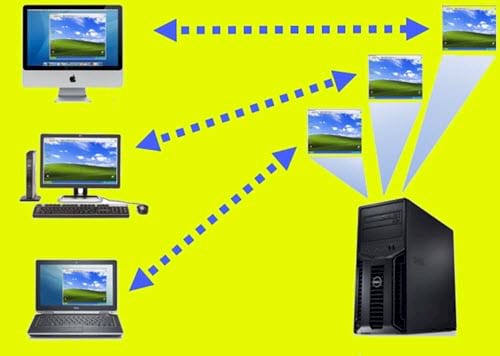
Testing software and operating systems
Developers and administrators can reproduce environments, test updates, compare OS versions, and discard a VM when the test ends. Snapshots provide convenient rollback points, although they are not independent backups.
Running legacy or incompatible applications
A VM can host an older or different operating system when an application cannot run on the host. The guest still needs a valid license, security updates, and hardware support from the hypervisor.
Server consolidation and cloud infrastructure
Organizations can run multiple server workloads on one physical host, allocate resources separately, and move supported VM workloads between compatible hosts. Isolation reduces interference, but it does not eliminate the need for patching, access control, monitoring, and backups.
Training and repeatable labs
VM templates and clones help classrooms, support teams, and developers start from the same known configuration without preparing a separate physical computer for each exercise.
Security research
Specialists may analyze suspicious software in hardened, isolated labs. A normal desktop VM is not automatically safe for malware analysis: shared folders, clipboard integration, network access, vulnerable hypervisors, and user mistakes can expose the host or other systems. Unknown malware should not be tested casually.
Advantages of virtual machines
- Run multiple guest operating systems on one host.
- Clone, snapshot, export, and automate reproducible environments.
- Separate workloads and control their virtual networks and resources.
- Use a VM without repartitioning the host's physical disk.
Limitations
- The host and guests compete for CPU, memory, storage bandwidth, and sometimes graphics resources.
- 3D graphics, low-latency hardware, and specialized USB or PCI devices may be limited.
- A host failure can affect every VM running on it.
- Snapshots can grow and create dependencies; they should not replace backups.
- Moving a VM between products may require conversion and configuration changes.
Common desktop hypervisors
VirtualBox
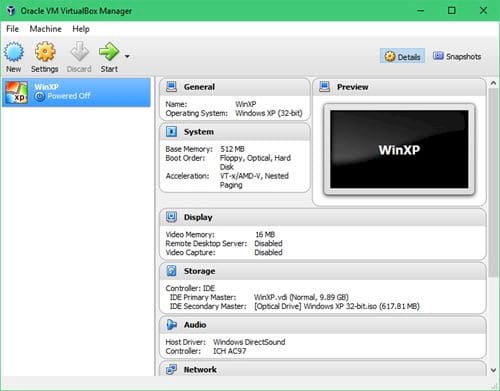
Oracle VirtualBox runs on several desktop host operating systems and provides common VM, snapshot, networking, and guest-integration features. Its base package and Extension Pack use different licenses, so check current terms for your use case.
VMware Workstation
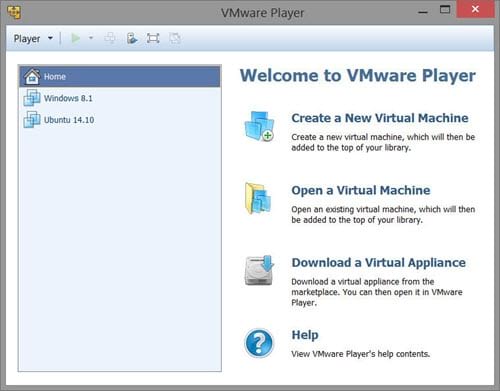
VMware Workstation runs desktop VMs on Windows and Linux and integrates with VMware's broader virtualization ecosystem. The older Workstation Player distinction in the source article is no longer a reliable way to describe the current product.
Hyper-V and other options
Microsoft Hyper-V is integrated into supported Windows editions, while Parallels Desktop focuses on Mac hosts. The best choice depends on the host OS, required guest, hardware access, networking, portability, and license.
See TipsMake's comparison of VirtualBox, VMware, and Hyper-V for platform tradeoffs. If you want to build a desktop VM, follow the walkthrough for creating a Windows virtual machine.
Related Articles
 How to Speeding up Virtual Machines in Full Set10 minutes read
 Learn About Virtual Machines: Tips and Examples8 minutes read
 How to Import Hyper-v Virtual Machines in Windows 1014 minutes read
 How to Export Hyper-v Virtual Machines in Windows 106 minutes read
 Create Virtual Machines in Hyper-v on Windows Server 20082 minutes read
 Should I Use Docker or a Virtual Machine: Explained6 minutes read
Reader Comments 0
Sign in with email or Google to join the discussion.