Table of Contents
Microsoft Paint is the quickest built-in Windows tool for placing a caption, label, or short message on a photo. Open the image, choose the Text tool, format the text while its box is active, then use Save as to create a separate copy.
Before you add text
Make a copy of the original photo or plan to use File > Save as. This prevents an accidental overwrite. Paint turns text into pixels after you click outside the text box, so finish the wording and formatting before deselecting it. If you make a mistake immediately afterward, press Ctrl + Z.
How to add text in Paint
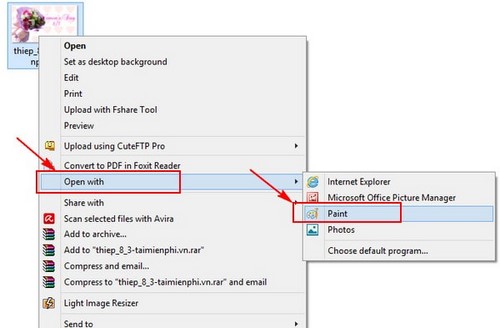
- Open the photo. In File Explorer, right-click the image, choose Open with, and select Paint. You can also open Paint first and use File > Open.
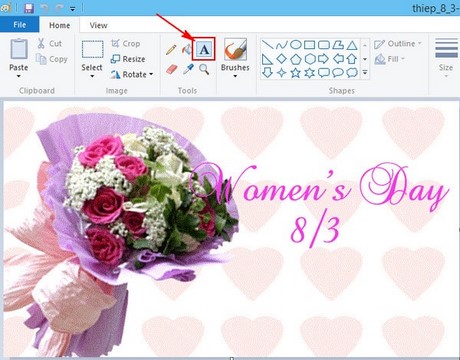
- Select the Text tool. Click the A icon in the toolbar, then click or drag on the image to create a text box.
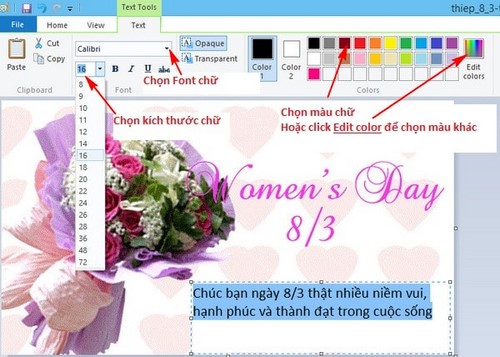
- Type the caption. Enter the text you want to place on the image. Drag the text box to position it while it is still active.
- Format the text. Select the text inside the box, then choose a font, size, bold or italic style, and color. Use a transparent background when the photo should remain visible behind the words, or an opaque background when the text needs stronger separation.
Save the finished image
Choose File > Save as rather than Save. Enter a new file name and choose a location so the untouched original remains available.
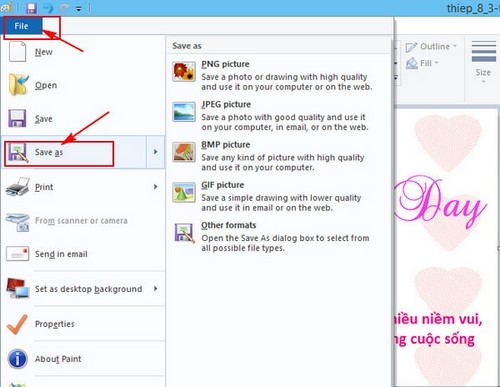
Select the format that suits the image:
- PNG is usually best for screenshots, diagrams, logos, and images with sharp text.
- JPEG is suitable for ordinary photographs and generally produces a smaller file, but repeated saving can reduce quality.
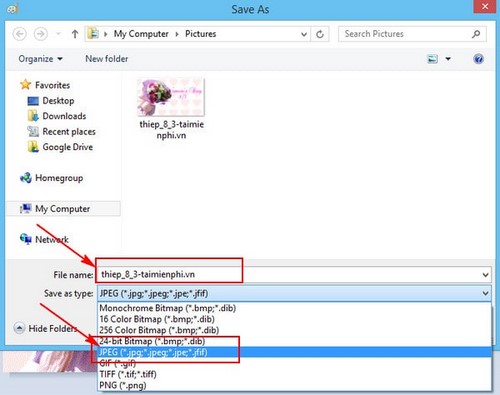
Open the saved copy and check that the caption is legible at normal viewing size and has not been cropped.

Tips for readable text
- Use a text color that contrasts with the background.
- Keep the caption away from the image edges.
- Choose a simple font and avoid very small type.
- Place text over a relatively uncluttered area or use an opaque text background.
Paint works well for simple labels and captions. For layers, effects, or text that remains editable, consider Paint.NET. If you prefer a browser-based editor, compare the options in this guide to free online photo editors.
Related Articles
 Top 6 Top Tools to Erase Text on Photos Today: Top Picks and Buying Guide10 minutes read
 Instructions for Inserting Text into Photos in Photoshop5 minutes read
 How to Insert Text into Photos4 minutes read
 Synthesize Applications to Write Text on Photos on the Phone: Phonto12 minutes read
 Stitch Text into Photos with Paint Available on Windows3 minutes read
 How to Check the Name of Computer, Laptop3 minutes read
Reader Comments 0
Sign in with email or Google to join the discussion.