Table of Contents
This updated guide examines Stubborn Malware Removal with Superantispyware and organizes the essential facts, background, and practical takeaways in clear American English.
Responsible-use note: Apply security techniques only to systems you own or are explicitly authorized to test.
Setting
Installing this program is easy to implement. During the installation process, remember to check for updates to the database. This is always an effective feature in security software. So you should update all programs. Another feature that needs to be turned on during the installation process is to always connect to the SuperAntiSpyware home page to avoid possible problems.

Use SuperAntiSpyware
The Main Menu will control all features and functions. Of course, not everything is integrated in the free version, but it can still block and destroy malware.

The features of this program are as powerful and effective as any other antivirus program. To perform the normal installation, go to Preferences > Automatic Updates , click Check for Updates Now .
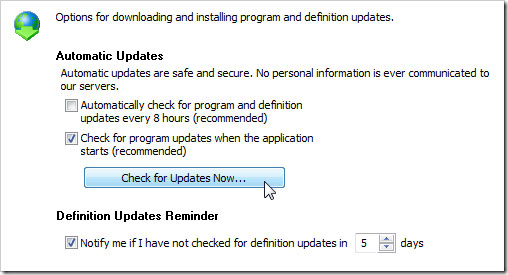
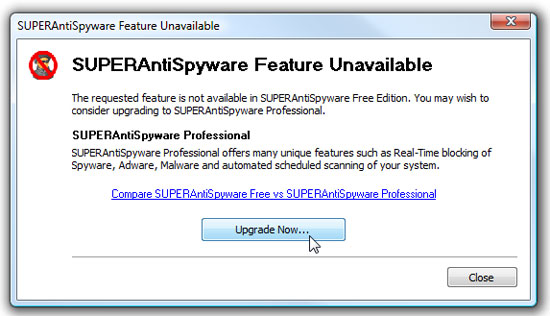
Although it is a free version, it is full of features to protect your computer. However, some high-end settings in Profestional version will still be better for just $ 29.95. Profestional versions include Real-Time Blocking, scheduled scans, Registry Protection, automatic virus scans, automatic daily updates, and free email support.
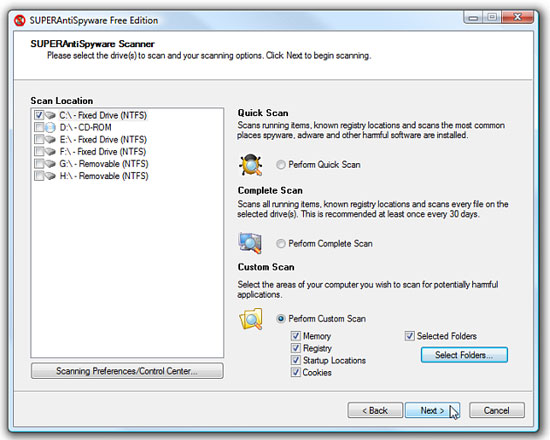
In testing, Quick Scan mode takes 20 minutes to run. This is quite a long time but can be scanned in a full and safe way. The best option is still custom scan (virus scanning with options) because it won't take long to scan music or video files. There are 3 options for you to be Quick, Complete, or Custom Scan.
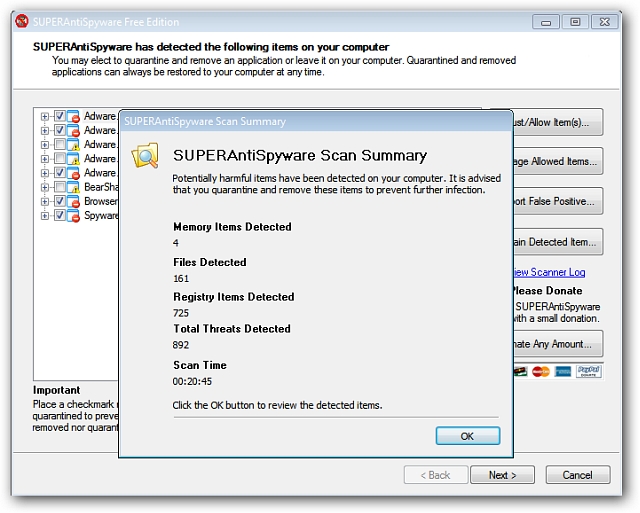
SuperAntiSpyware performs control functions and can remove malicious software. This program can identify and kill as many as 900 types of junkware containing malicious code. (Junkware is demo software, advertising. These software are sometimes the spyware handlers on computers.)
SuperAntiSpyware is proud to be able to block and destroy over 1,000 viruses such as Spyware, Adware, Spyware, Adware, Malware, Trojans, Dialers, Worms, KeyLoggers, HiJackers, Parasites, Rootkits. This is an effective anti-virus program that is easy to use with anyone. If virus infection annoys you, this is a useful tool to use.
FAQ
What is Stubborn Malware Removal with Superantispyware about?
It provides a structured overview of SuperAntiSpyware, explains the main context, and highlights practical takeaways for readers.
Why does this topic matter?
Understanding the main concepts helps readers evaluate the issue, avoid common mistakes, and make better-informed decisions.
How should readers use this information?
Use the guidance as a practical starting point, confirm details that may have changed, and follow current product, safety, or security recommendations.
Related Articles
 How to Remove the 'Junk' Search Bar from Chrome and Firefox Browsers3 minutes read
 5 Best Best Stubborn File Deletion Software6 minutes read
 How to Use Unlocker Software5 minutes read
 Instructions to Remove Malware on the Computer4 minutes read
 Download the Malware Removal Tool and Clean up Malware Hunter PRO4 minutes read
 5 Best Best Malware Removal Software 20205 minutes read
Reader Comments 0
Sign in with email or Google to join the discussion.