Table of Contents
This updated guide examines Engineering: Some Popular Fake Security Software -- Part 3 and organizes the essential facts, background, and practical takeaways in clear American English.
>> Some popular fake security software - Part 1 >> Some popular fake security software - Part 2
27. SafePcAv
Quite familiar to us, SafePcAv is an unfamiliar variant of Winiguard / Winisoft series, spread and spread widely via the website www.safepcav.com (this address no longer exists). Besides, we can mention the following types:
PcsSecure, APcSafe, APcSecure, ProtectSoldier, ProtectDefender, ArmorDefender, DefendAPc, SysDefenders, InSysSecure, SysProtector, APcDefender, PcProtectar, PcsProtector, GreatDefender, APCProtect, ProtectPcs, SysDefence, TheDefend, GuardPcs, IGuardPc, SiteAdware, AntiTroy, AntiKeep, AntiAdd, RESpyWare, REAnti, KeepCop, SecureKeeper, LinkSafeness, AntiAid, SystemFighter, SystemVeteran, BlockProtector, BlockKeeper, BlockScanner, BlockWatcher, SoftStronghold, ShieldSafeness, SoftVeteran, SoftSoldier, SoftCop, TrustFighter, TrustSoldier, SafeFighter, SecureVeteran.
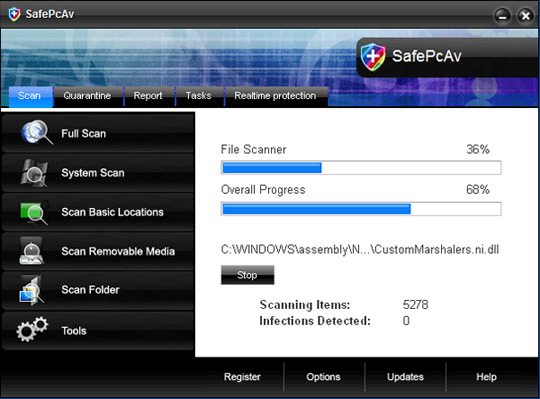
When SafePcAv enters a victim's computer, it will constantly generate a certain number of empty files with different names on the system. And when the user activates the feature to scan all partitions, SafePcAv will detect these files themselves maliciously and ask the user to purchase the full license activation key of the program.
The following files will be generated and copied to the system drive when installing SafePcAv:
% ProgramFiles% SafePcAv SoftwareSafePcAvalways_delete.xml % ProgramFiles% SafePcAv SoftwareSafePcAvalways_skip.xml % ProgramFiles% SafePcAv SoftwareSafePcAvmain_config.xml % ProgramFiles% SafePcAv SoftwareSafePcAvSafePcAv.exe % ProgramFiles% SafePcAv SoftwareSafePcAvuninstall.exe % ProgramFiles% SafePcAv SoftwareSafePcAvquarantinequarantine.xml % AllUsersProfile% DesktopSafePcAv.lnk % AllUsersProfile% Start MenuProgramsSafePcAv1 SafePcAv.lnk % AllUsersProfile% Start MenuProgramsSafePcAv2 Homepage.lnk % AllUsersProfile% Start MenuProgramsSafePcAv3 Uninstall.lnk
and the following registry keys:
HKEY_LOCAL_MACHINEsoftwaremicrosoftWindowsCurrentVersionUninstallSafePcAv HKEY_LOCAL_MACHINEsoftwareSafePcAv HKEY_CURRENT_USERsoftwareSafePcAv HKEY_LOCAL_MACHINEsoftwaremicrosoftWindowsCurrentVersionRun, 'SafePcAv' HKEY_CURRENT_USERsoftwareMicrosoftWindowsCurrentVersionRun, 'SafePcAv'
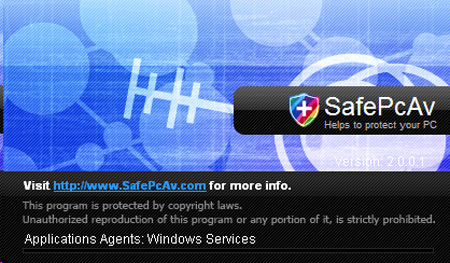
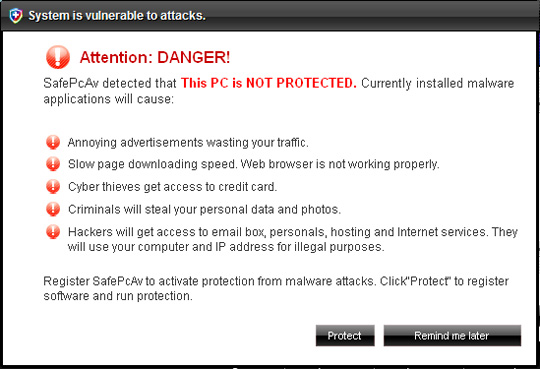
Some pictures of SafePcAv:
28. Spy Doc Pro
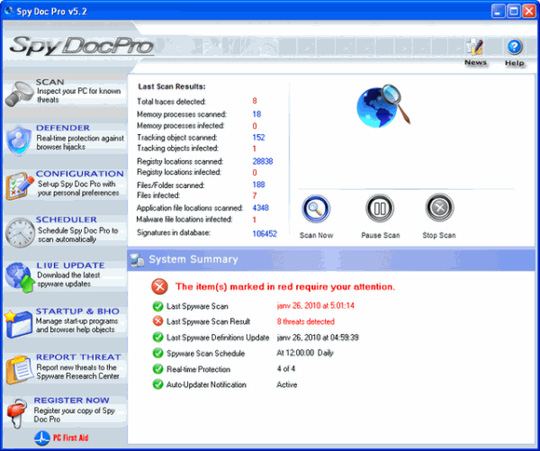
There is not much to say about Spy Doc Pro, distributed and spread by the following websites: www.pcssecure.com, www.spydocpro.com, www.spyresearchcenter.com (these addresses are no longer available). in). After successfully installing on the user's computer, Spy Doc Pro will constantly generate false alerts about viruses, malware and other attacks from the Internet.
Main interface of the program:
29. SpyEraser
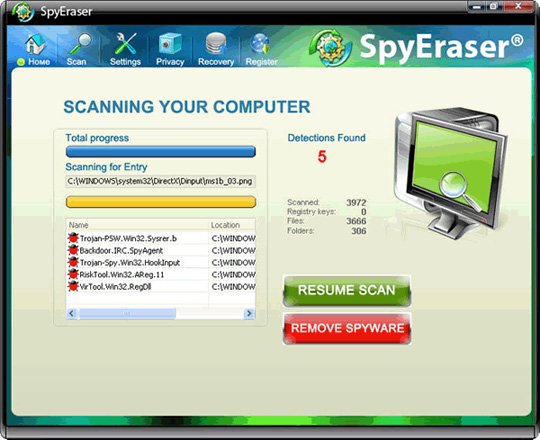
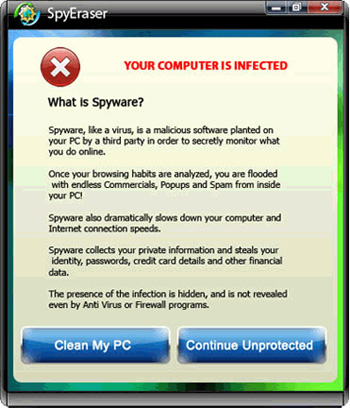
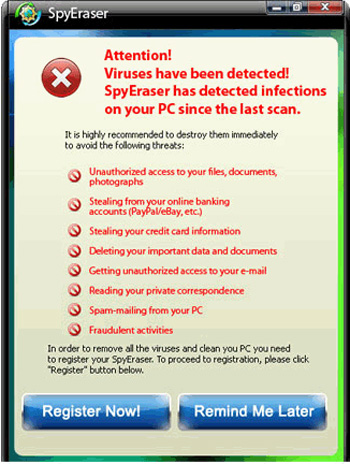
The next member in this list is SpyEraser - detected by Kaspersky Lab, but not listed as variant FraudTool. Win32. SpyEraser.b. This fake software is developed and spread through www.spyeraser-security.com and www.spyeraser-trial.com . After successfully installing SpyEraser on the computer, the program will automatically generate a certain number of empty files with different names in system folders such as C: Windows and C: WindowsSystem32 . When conducting a scan, SpyEraser will automatically detect these files as malicious code and ask the user to purchase a program activation key.
When installed, SpyEraser will copy the following files to the hard drive:
% Program Files% SpyErasermsctrl32.exe % Program Files% SpyEraserSpyEraser.exe % Program Files% SpyEraserSpyEraserdata.dll % Program Files% SpyEraserdata.dll % Program Files% SpyEraserstat_file.dll % StartMenu% ProgramsSpyEraserSpyEraser.lnk % StartMenu% ProgramsSpyEraserLaunch SpyEraser.exe.lnk % StartMenu% ProgramsSpyEraserSpyEraser Uninstall.exe.lnk
And the following registry keys:
HKEY_LOCAL_MACHINESOFTWAREMicrosoftSpyEraser HKEY_LOCAL_MACHINESOFTWAREMicrosoftWindowsCurrentVersionRun "SpyEraser"
Some pictures of SpyEraser:
30. User Antivirus 2010
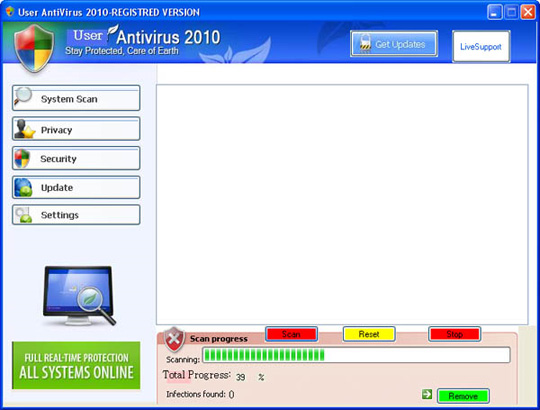
User Antivirus 2010 and New Antivirus 2010 were created by the same 'author', and of course the same way of spreading and spreading. When scanning the entire system, User Antivirus 2010 will create fake messages about viruses, Trojans and worms discovered on the system, only when the user buys the activation code of the program, can the user get rid of those This annoying notification.
When installing, User Antivirus 2010 will create the following files:
% Documents and Settings% All UsersApplication DataMicrosoftMachineWStech.dll % Documents and Settings% All UsersStart MenuProgramsUser Antivirus 2010 % Documents and Settings% All UsersDesktopUserAntivirus 2010.lnk
and the following registry keys:
HKEY_LOCAL_MACHINESOFTWAREUser Antivirus 2010 HKEY_CURRENT_USERSoftwareMicrosoftWindowsCurrentVersionRun "User Antivirus 2010"
Main interface of the program:
31. User Protection
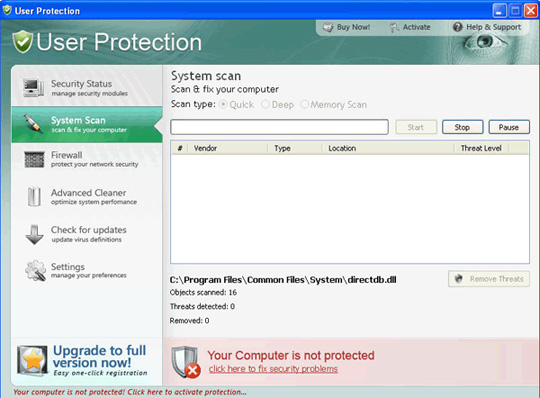
One of the most recent variations of the Dr. Guard and PaladinAntivirus. Every time the computer starts up, User Protection will issue a warning that the system is seriously affected by Trojans, worms and viruses, and ask the user to buy the license or activation key for the program to handle thoroughly. these errors.
When installing to a victim computer, User Protection will copy the following files to the hard drive:
% ProgramFiles% User Protectionscan.ico % ProgramFiles% User Protectionsettings.ico % ProgramFiles% User Protectionsplash.mp3 % ProgramFiles% User Protectionuninstall.exe % ProgramFiles% User Protectionupdate.ico % ProgramFiles% User Protectionusr.db % ProgramFiles% User Protectionusrext.dll % ProgramFiles% User Protectionusrhook.dll % ProgramFiles% User Protectionusrprot.exe % ProgramFiles% User Protectionvirus.mp3 % ProgramFiles% User Protectionabout.ico % ProgramFiles% User Protectionactivate.ico % ProgramFiles% User Protectionbuy.ico % ProgramFiles% User Protectionhelp.ico % UserProfile% Application DataMicrosoftInternet ExplorerQuick LaunchUser Protection.lnk % UserProfile% DesktopUser Protection.lnk % UserProfile% DesktopUser Protection Support.lnk % UserProfile% DesktopLicense.txt % UserProfile% Local SettingsTemp4otjesjty.mof % UserProfile% Local SettingsTempusr.dat % UserProfile% Local SettingsTempusrr.dat % UserProfile% Start MenuProgramsUser ProtectionSettings.lnk % UserProfile% Start MenuProgramsUser ProtectionUpdate.lnk % UserProfile% Start MenuProgramsUser ProtectionUser Protection.lnk % UserProfile% Start MenuProgramsUser ProtectionUser Protection Support.lnk % UserProfile% Start MenuProgramsUser ProtectionAbout.lnk % UserProfile% Start MenuProgramsUser ProtectionActivate.lnk % UserProfile% Start MenuProgramsUser ProtectionBuy.lnk % UserProfile% Start MenuProgramsUser ProtectionScan.lnk
and create the following registry keys:
HKEY_LOCAL_MACHINEsoftwaremicrosoftWindowsCurrentVersionUninstallUser Protection HKEY_LOCAL_MACHINEsoftwareUser Protection HKEY_CURRENT_USERsoftwareMicrosoftWindowsCurrentVersionRun, 'User Protection'
Main interface of User Protection:
32. Antivirus Vista
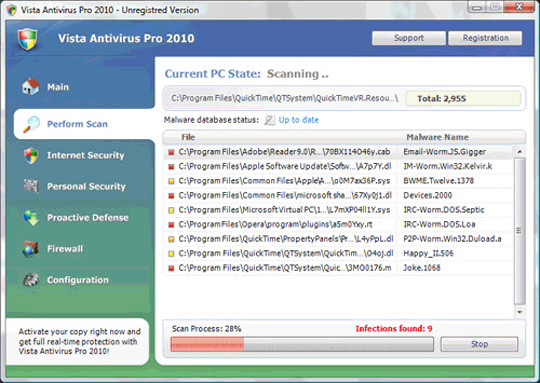
Vista Antivirus 2010 is also known as Vista Antivirus Pro or Vista Antivirus Pro 2010. When successfully entering the victim's computer, the program will continuously generate a certain number of empty files with multiple names. Calling different in C: Windows and C: WindowsSystem32 directory . When it comes to scrutinizing the entire system, Vista Antivirus 2010 will automatically detect these files as malicious code and require users to register the full license of the application.
When installed, Vista Antivirus 2010 will copy the following files to the hard drive:
av2010.exe AntivirusPro2010.exe AV2010Install.exe Program Files% Antivirus Vista 2010 Program Files% LabelCommand Documents and Settings% All UsersStart MenuProgramsVista Antivirus 2010 Documents and Settings% All UsersApplication DataVista Antivirus 2010
Also continue to create the following key in the registry:
HKEY_CURRENT_USERSoftwareMicrosoftWindowsCurrentVersionRun 'Vista Antivirus 2010' HKEY_CURRENT_USERSoftwareVista Antivirus 2010 HKEY_LOCAL_MACHINESOFTWAREMicrosoftWindowsCurrentVersionUninstallVista Antivirus 2010 HKEY_LOCAL_MACHINESOFTWAREVista Antivirus 2010
Main interface of Antivirus 2010 program:
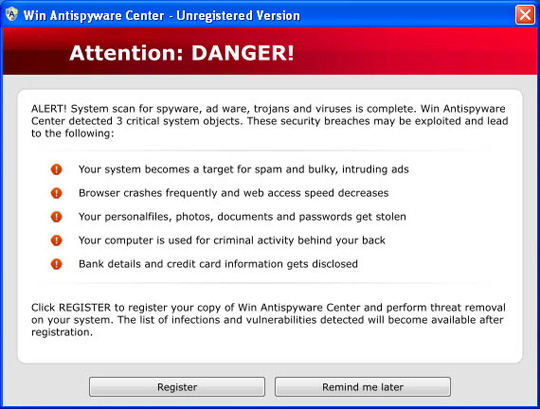
33. Win Antispyware Center
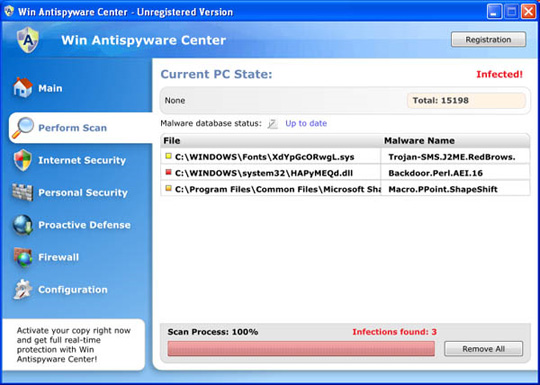
With the ability to cleverly disguise and give warning messages quite wisely and appealing about the presence of viruse, Trojan and worm in the system.
During the installation process, Win AntiSpyware Center will automatically copy the following files:
% ProgramFiles% WinAntispywareCenterav.exe % UserProfile% Local SettingsTemp10.tmp
And create the following keys in the registry:
HKEY_LOCAL_MACHINEsoftwareClassessecfile HKEY_LOCAL_MACHINEsoftwareClassessecfileDefaultIcon HKEY_LOCAL_MACHINEsoftwareClassessecfileshell HKEY_LOCAL_MACHINEsoftwareClassessecfileshellopen HKEY_LOCAL_MACHINEsoftwareClassessecfileshellopencommand HKEY_LOCAL_MACHINEsoftwareClassessecfileshellrunas HKEY_LOCAL_MACHINEsoftwareClassessecfileshellrunascommand HKEY_LOCAL_MACHINEsoftwareClassessecfileshellstart HKEY_LOCAL_MACHINEsoftwareClassessecfileshellstartcommand HKEY_CURRENT_USERsoftwareWin Antispyware Center HKEY_LOCAL_MACHINEsoftwareClasses.exeshellopencommand (Default) = 'C: Program FilesWinAntispywareCenterav.exe' / START '% 1 ″% * IsolatedCommand = '% 1 ″% * HKEY_LOCAL_MACHINEsoftwareClassessecfileshellopencommand (Default) = 'C: Program FilesWinAntispywareCenterav.exe' / START '% 1 ″% * IsolatedCommand = '% 1 ″% * HKEY_LOCAL_MACHINEsoftwaremicrosoftWindowsCurrentVersionRun Win Antispyware Center = C: Program FilesWinAntispywareCenterav.exe HKEY_CURRENT_USERsoftwareMicrosoftWindowsCurrentVersionRun Win Antispyware Center = C: Program FilesWinAntispywareCenterav.exe
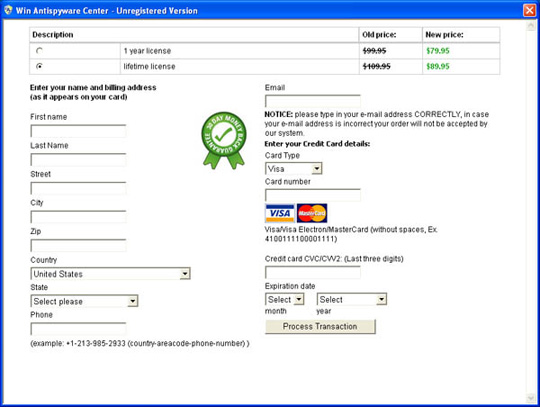
Some pictures of Win AntiSpyware Center:
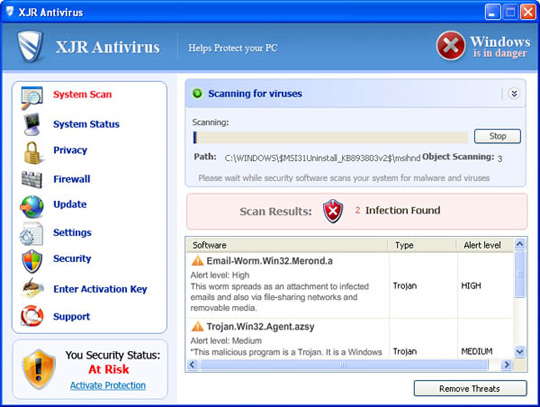
34. XJR Antivirus In essence, XJR Antivirus can be considered as another variant of AKM Antivirus 2010 Pro and RST Antivirus 2010. Every time XJR Antivirus operation will display completely false messages about the status and quantity of the virus, Trojan and worm on computer system.
When installed, XJR Antivirus will copy the following files to the system hard drive:
% ProgramFiles% wp4.dat % ProgramFiles% adc_w32.dll % ProgramFiles% alggui.exe % ProgramFiles% skynet.dat % ProgramFiles% svchost.exe % ProgramFiles% wp3.dat % ProgramFiles% XJR AntivirusXJR Antivirus.exe % UserProfile% DesktopXJR Antivirus.lnk % UserProfile% Start MenuProgramsXJR AntivirusXJR Antivirus.lnk
And continue to create the following Registry keys:
HKEY_LOCAL_MACHINEsoftwareClassesCLSID {149256D5-E103-4523-BB43-2CFB066839D6} HKEY_LOCAL_MACHINEsoftwareClassesCLSID {149256D5-E103-4523-BB43-2CFB066839D6} InprocServer32 HKEY_LOCAL_MACHINEsoftwaremicrosoftWindowsCurrentVersionExplorerBrowser Helper Objects {149256D5-E103-4523-BB43-2CFB066839D6} HKEY_LOCAL_MACHINESYSTEMCurrentControlSetServicesAdbUpd HKEY_CURRENT_USERsoftwareXJR Antivirus HKEY_CURRENT_USERsoftwareXJR Antiviruswpp HKEY_CURRENT_USERsoftwareXJR AntiviruswppRegistration HKEY_CURRENT_USERsoftwareXJR Antiviruswppsetdata HKEY_CURRENT_USERsoftwareXJR AntivirusXJR Antivirus HKEY_CURRENT_USERsoftwareXJR AntivirusXJR AntivirusRegistration HKEY_CURRENT_USERsoftwareXJR AntivirusXJR Antivirussetdata
The main interface of XJR Antivirus program:
35. XP Antivirus Pro 2010
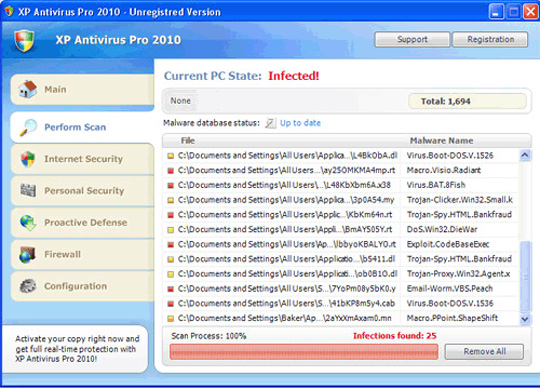
XP Antivirus Pro 2010 - aka XP Antivirus Pro 2010 or Antivirus XP Pro, is also listed on the rogue security software - Rogue Security Software, with the spread mechanism and the level of trouble they cause user. When XP Antivirus Pro works, they will detect all system files in the C: Windows and C: WindowsSystem32 folders as viruses. And only if the user agrees to buy the license or activation key, XP Antivirus Pro will "delete" the infected files.
When users install XP Antivirus Pro on the system, they will automatically produce and copy the following files to the hard drive:
% Documents and Settings% [UserName] Application Dataav.exe % Documents and Settings% [UserName] Application DataWRblt8464P
Also continue to create the following registry keys:
HKEY_LOCAL_MACHINESOFTWAREMicrosoftWindowsCurrentVersionRun "XP Antivirus Pro" HKEY_CURRENT_USERSoftwareClasses.exeshellopencommand '(Default)' = 'av.exe' / START '% 1? % * HKEY_CURRENT_USERSoftwareClassessecfileshellopencommand '(Default)' = 'av.exe' / START '% 1? % * HKEY_CLASSES_ROOT.exeshellopencommand '(Default)' = 'av.exe' / START '% 1? % * HKEY_CLASSES_ROOTsecfileshellopencommand '(Default)' = 'av.exe' / START '% 1? % * HKEY_LOCAL_MACHINESOFTWAREClientsStartMenuInternetFIREFOX. EXEshellopencommand '(Default)' = 'av.exe' / START 'firefox.exe' HKEY_LOCAL_MACHINESOFTWAREClientsStartMenuInternetFIREFOX. EXEshellsafemodecommand '(Default)' = 'av.exe' / START 'firefox.exe' -safe-mode HKEY_LOCAL_MACHINESOFTWAREClientsStartMenuInternetIEXPLORE. EXEshellopencommand '(Default)' = 'av.exe' / START 'iexplore.exe' HKEY_LOCAL_MACHINESOFTWAREMicrosoftSecurity Center 'AntiVirusOverride' = '1? HKEY_LOCAL_MACHINESOFTWAREMicrosoftSecurity Center 'FirewallOverride' = '1?
The main interface of XP Antivirus Pro program:
36. Your Protection
The last 'member' we mentioned in this list is Your Protection - a new variant of the CoreGuard line, besides, we can mention other dangerous variants such as User Protection, Dr. Guard, Paladin Antivirus.
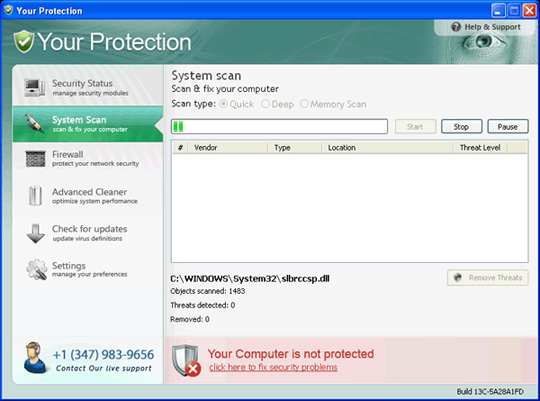
When Your Protection works, they will continuously generate false messages about the status and number of viruses, Trojans and worms detected on the system. And after Your Protection has been successfully installed on the victim's computer, they will automatically copy the following files to the hard drive:
C: Program FilesYour Protection % UserProfile% Start MenuProgramsYour Protection C: Program FilesYour Protectionurphook.dll C: Program FilesYour Protectionurpprot.exe % UserProfile% Local Settingstempmplay32xe.exe C: Program FilesYour Protectionabout.ico C: Program FilesYour Protectionactivate.ico C: Program FilesYour Protectionbuy.ico C: Program FilesYour Protectionhelp.ico C: Program FilesYour Protectionscan.ico C: Program FilesYour Protectionsettings.ico C: Program FilesYour Protectionsplash.mp3 C: Program FilesYour Protectionuninstall.exe C: Program FilesYour Protectionupdate.ico C: Program FilesYour Protectionurp.db C: Program FilesYour Protectionurpext.dll C: Program FilesUser Protectionvirus.mp3 % UserProfile% Start MenuProgramsYour ProtectionAbout.lnk % UserProfile% Start MenuProgramsYour ProtectionActivate.lnk % UserProfile% Start MenuProgramsYour ProtectionBuy.lnk % UserProfile% Start MenuProgramsYour ProtectionScan.lnk % UserProfile% Start MenuProgramsYour ProtectionSettings.lnk % UserProfile% Start MenuProgramsYour ProtectionUpdate.lnk % UserProfile% Start MenuProgramsYour ProtectionYour Protection Support.lnk % UserProfile% Start MenuProgramsYour ProtectionYour Protection.lnk % UserProfile% Application DataMicrosoftInternet ExplorerQuick LaunchYour Protection.lnk % UserProfile% DesktopYour Protection Support.lnk % UserProfile% DesktopYour Protection.lnk
Also continue to create the following registry keys:
HKEY_CURRENT_USERSOFTWAREMicrosoftWindowsCurrentVersionRunyour protection HKEY_CURRENT_USERSoftwareMicrosoftWindowsCurrentVersionRunmplay32xe.exe HKEY_CURRENT_USERSOFTWAREMicrosoftWindowsCurrentVersionPoliciesSystemDisableTaskMgr HKEY_LOCAL_MACHINESOFTWAREMicrosoftWindowsCurrentVersionPoliciesSystemDisableTaskMgr
Main interface of Antivirus phishing application:
FAQ
What is Engineering: Some Popular Fake Security Software -- Part 3 about?
It provides a structured overview of engineering, explains the main context, and highlights practical takeaways for readers.
Why does this topic matter?
Understanding the main concepts helps readers evaluate the issue, avoid common mistakes, and make better-informed decisions.
How should readers use this information?
Use the guidance as a practical starting point, confirm details that may have changed, and follow current product, safety, or security recommendations.
Related Articles
 Engineering: Some Popular Fake Security Software -- Part 118 minutes read
 Technical: Some Popular Fake Security Software -- Part 217 minutes read
 Instructions: Basic Operations to Remove Fake Security Software4 minutes read
 Tips to Avoid Fake Download Button7 minutes read
 How Fake IP: The Best Way to Fake IP Computer, Best8 minutes read
 Technical: How to Removing Fake Internet Security 2010 Software3 minutes read
Reader Comments 0
Sign in with email or Google to join the discussion.