Table of Contents
This guide provides a clear, practical overview of many users report that Windows 11 causes nvme ssds to slow, with useful context, important details, and straightforward takeaways for everyday readers.
On the Microsoft forum, user MJ_JasonM said that after upgrading to Windows 11 the random read and write performance of SSDs is reduced by half compared to Windows 10.
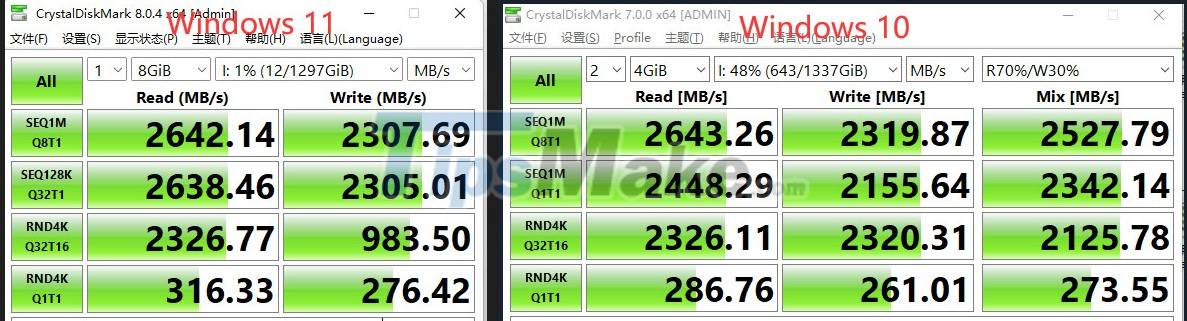
In a response to the Reddit forum, a Microsoft employee named Neal Christiansen (reddit account neochristi) seems to confirm that Microsoft is investigating the issue. "Hi, I'm from Microsoft's file system team and I'm investigating this issue," Christiansen wrote.
Windows 11 users also provide SSD performance-related feedback via Microsoft's Feedback Hub. According to a user with the nickname Jeff C, the problem may be related to the driver provided by Microsoft.
"After testing, I found that all NVMe SSDs using Microsoft drivers have problems. However, my Intel 905P SSDs using Intel-supplied drivers are working fine," Jeff C shared.
However, this is still just speculation and the problem may lie in another area.
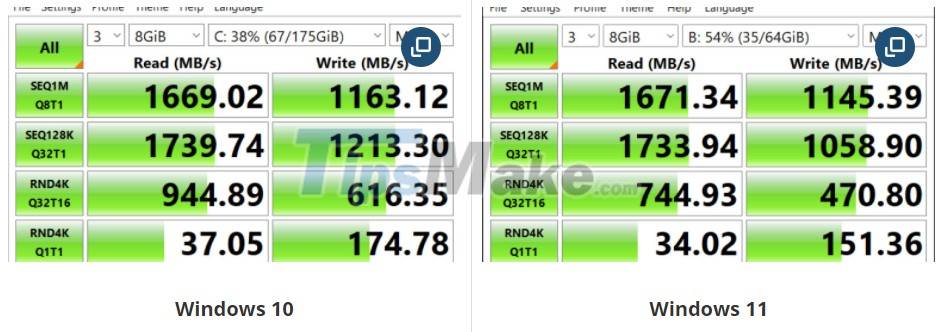
Neowin's test on a WD SN520 NVMe drive using the CrystalDiskMark tool shows a clear drop in performance. Both read and write performance as well as random writes are greatly reduced.
Let's wait and see how Microsoft responds to this issue.
Key Takeaways
Use the information above as a practical reference for many users report that Windows 11 causes nvme ssds to slow. Review each step carefully, confirm any requirements, and choose the option that best fits your situation.
FAQ
What does this guide explain about Many Users Report That Windows 11 Causes Nvme Ssds to Slow?
It explains the main concepts, practical considerations, and useful steps related to many users report that Windows 11 causes nvme ssds to slow without requiring advanced knowledge.
Who can benefit from learning about Many Users Report That Windows 11 Causes Nvme Ssds to Slow?
This information is useful for readers who want a clear overview, practical guidance, and reliable steps related to many users report that Windows 11 causes nvme ssds to slow.
What should I check before applying this information?
Review the requirements, confirm that your device, software, or situation matches the instructions, and back up important data before making major changes.
Related Articles
 Things You Need to Know About NVMe SSDs: Main Insights8 minutes read
 Common Types of Laptop SSDs: How to Choose the Right One13 minutes read
 Difference Between NVMe, SATA and M.2 SSDs: What You Need to Know8 minutes read
 Why Use Sata SSD: Reasons to Use Sata SSD Hard Drive8 minutes read
 7 Things You Should Check Before Buying Any Nvme SSD: Practical Guide9 minutes read
 How to Add or Remove 'Sec Nvme Idle Timeout' from Power Options4 minutes read
Reader Comments 0
Sign in with email or Google to join the discussion.