Table of Contents
This updated guide examines Learn About Web Testing Framework Samurai and organizes the essential facts, background, and practical takeaways in clear American English.
Samurai Web Testing Framework homepage:
http://www.samurai-wtf.org/What is the Samurai Web Testing Framework?
As live CDs became more popular, specialized distributions began to appear. And Samurai is such a distribution. Samurai is sponsored by IntelGuardians Network Intelligence Inc, an information security consulting firm based in Washington, DC.
The Samurai Web Testing Framework is a virtual machine, supported on VirtualBox and VMWare, pre-configured to act as a web pentest environment. When developing this environment, developers have chosen the most common tools used in security.
Tools like Fierce Domain Scanner (Fierce domain scanner) and Maltego are used for reconnaissance. Tools like WebScarab and ratproxy are used for mapping. Later, w3af and burp were used to explore. The final stage, exploit, BeEF, AJAXShell, etc. will be used. The VM also includes a pre-configured wiki, set up to store central information during the pentest process.
Samurai focuses on the tools needed for web application testers to look for common vulnerabilities, such as misconfiguration, cross site scripting (XSS), SQL injection, including remote files and other Other common vulnerabilities. The CD includes a number of tools to rearrange applications and web servers, list files, directories, and many test scripts.
First look at Samurai
Bootable Samurai CD provides a number of options when starting. It can be run as a Live CD or you can install this framework as a complete operating system:
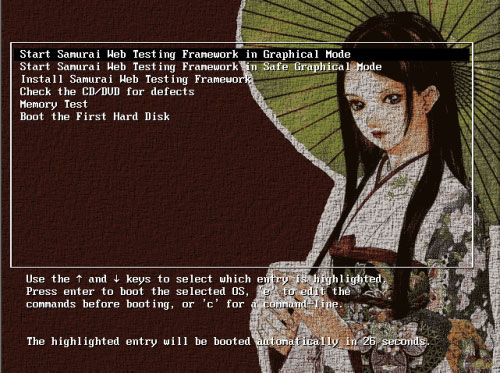
The status screen starts quite neatly:

When booting Samurai into the login screen, enter the username and password 'samurai' to login. This information is a bit confusing. It appears on the Github Samurai WTF page and in Readme.txt is only available when you log into the distribution:

After logging in, it was clear that Samurai was based on Ubuntu, which was a bit unusual for the Live CD distribution:

Applications
Samurai comes with a bunch of useful apps. These include many common Linux tools such as:
- Burp Suite , a web application attack tool
- DirBuster, a file and directory listing tool, Brute force tool from OWASP
- Fierce Domain Scanner , a target enumeration utility
- Gooscan, an automated Google query tool useful for finding CGI vulnerabilities, does not need to directly scan targets, but only queries Google's cache
- Grendel-Scan, an open source web application vulnerability testing tool
- HTTP_Print, a tool that retrieves the fingerprint of the internet server
- Maltego CE, an open source application that makes data mining to find information from the Internet, then links them together (useful for basic target research).
- Nikto, an open source web server scanner
- Paros, one of Java's favorite proxy and testing tools, is based on the Java platform
- Rat Proxy, a passive, semi-automated web application security control tool.
- Spike Proxy , a web application analysis and vulnerability scanning tool.
- SQLBrute, a Brute force tool and SQL injection.
- w3af (and GUI), framework that controls and attacks web applications.
- Wapiti, a web application security control and vulnerability scanner
- WebScarab, an HTTP application control tool from OWASP
- WebShag, a web server control tool
- ZenMap, NMAP graphical interface
In addition, Samurai includes several utilities not available in the GUI menu, including:
- dnswalk, a roaming and DNS query tool
- httping, a ping-like utility for HTTP requests
- httrack, a website cloning utility.
- john the ripper, a password cracking program
- netcat, a versatile TCIP / IP tool
- nmap, a port scanner and OS detection tool
- siege, an HTTP (pressure) load testing and benchmarking tool.
- snarf, a lightweight URL fetcher
- etc.
Of course, all these tools can easily be installed on Linux machines. But having a Live CD with these tools installed and configured is also quite good. Samurai also comes with Wine pre-installed very convenient.
Prerequisite for installing Web Testing Framework Samurai
- vagrant
- Virtualization software - Vagrant basic box used to support Virtualbox, VMware and many other similar options
- Vagrant-vbguest plugin for Vagrant (Virtualbox only) - This plugin will automatically install client extensions, support for higher display resolution, as well as many other utilities like clipboard sharing.
Initial installation
1. Make sure you have the prerequisites listed above.
2. Duplicate this archive.
3. From a command line terminal in the project directory, run thevagrant upcommand. Then wait for the process to finish. Immediately after the first boot, you should restart using thevagrant reloadcommand. Running thevagrant upcommand will build the main target, this is the only VM that has both the user environment and the target. You can runvagen up userenvandvagrant up targetto build separate virtual machines for that purpose.
NOTE : The Guest VM window will open with CLI while provisioning is ongoing. It is best to let thevagrant upcommand complete.
Provisioning script
The main Vagrant provisioning script for SamuraiWTF isinstall/userenv_bootstrap.sh. An independent target provisioning script is included ininstall/target_bootstrap.sh. Changes to the system, goals, tool settings, or initialization for SamuraiWTF are all handled in these scripts.
Some note
When you load the VM, the username and password are both: samurai .
The menus are available via a right click on the desktop.
When logged in, need to provide the target system. First, load Chrome bookmarks by starting Chrome. Then select the three-dot menu, then click Bookmarks. From the submenu, select Import bookmarks and settings . In the window that opens, select Bookmarks HTML File . A file selection window will open. Select the file chrome_bookmarks.html in Samurai's Home directory.
Some target environments need to be initialized before use. Use their setup links or reset their DB to do this.
Overall, Samurai looks like a great addition to many Live CDs aimed at information security professionals. Samurai succeeded in becoming an easy-to-use distro with lots of great tools. Samurai also helps highlight many other great open source tools for penetration testers and information security professionals.
One of the great things about a Live CD like this is that you can boot from a CD and test the tools without having to go through the installation process, and configure them first. This gives users the opportunity to test drive test tools, before deciding whether they are valuable enough to install on major systems.
FAQ
What is Learn About Web Testing Framework Samurai about?
It provides a structured overview of Web Testing Framework Samurai, explains the main context, and highlights practical takeaways for readers.
Why does this topic matter?
Understanding the main concepts helps readers evaluate the issue, avoid common mistakes, and make better-informed decisions.
How should readers use this information?
Use the guidance as a practical starting point, confirm details that may have changed, and follow current product, safety, or security recommendations.
Related Articles
 How to Get Epic Games' Samurai Shodown Game for Free3 minutes read
 Enable .Net Framework 3.5 on Windows 83 minutes read
 Effective Microsoft .NET Framework Repair and Removal Tool5 minutes read
 What Is the Microsoft .NET Framework, and Why Is It Installed on12 minutes read
 Fix the Error of Not Installing the .NET Framework 3.5 on Windows3 minutes read
 How to Install Microsoft NET Framework 4.5 Full for Windows 7, 83 minutes read
Reader Comments 0
Sign in with email or Google to join the discussion.