Table of Contents
Understanding Delete YouTube video viewing history requires more than a headline. The overview below breaks down the key facts, changes, and user impact.
Simply because even without purpose, accidentally searching, viewing or clicking actions can become a cause of misunderstanding.
Here are 3 ways to ensure privacy on YouTube:
Keep the 'Like' Action Private
If you don't notice, you will probably reveal to anyone who visits your YouTube profile that you just clicked on the video. To keep your privacy, you must:
Step 1: From the main interface of your YouTube account, click on the profile picture and select the custom icon.
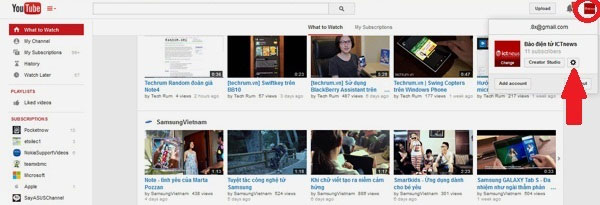 Delete YouTube search history and privacy: From the main interface of your YouTube account, click on the avatar image (circled in red) and then select the custom icon (arrow).
Step 2: In the ACCOUNT SETTINGS page, go to Privacy. Here you have 2 options, Keep all liked videos and saved playlists private to not update likes and save your playlist for visitors, and Keep all my private subcriptions to not update YouTube channel list you follow. Finally, click Save to save.
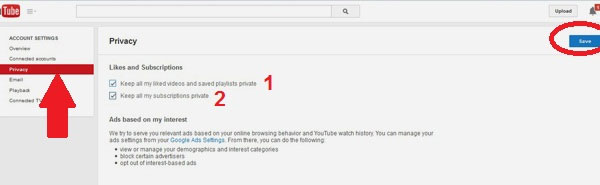 Delete YouTube search history and ensure privacy: In the ACCOUNT SETTINGS page, go to Privacy (arrow).Here, check both options, 'Keep all my liked videos and saved private playlists' (number 1) and 'Keep all my private profiles' (number 2).Finally, click Save to save.
Delete YouTube Search History
Your YouTube search history is actually just for you to see what you have been looking for, but this information can easily be leaked to people who often share computers or phones. To be careful, delete all and stop updating.
Step 1: From the main interface of your YouTube account, click on the avatar and select Creator Studio button.
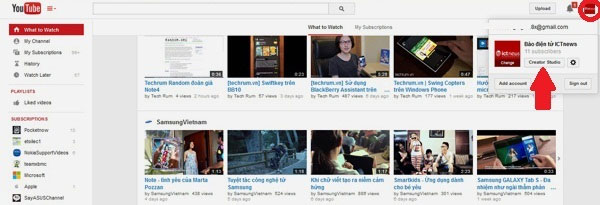 Delete YouTube search history and ensure privacy: From the main interface of your YouTube account, click on the avatar image (circled in red) and then select the Creator Studio button (arrow).
Step 2: Go to VIDEO MANAGER and then go to sub-section Search History. Here you can click Clear all search history to delete all keywords you ever searched on YouTube and click Pause search history to stop updating search history.
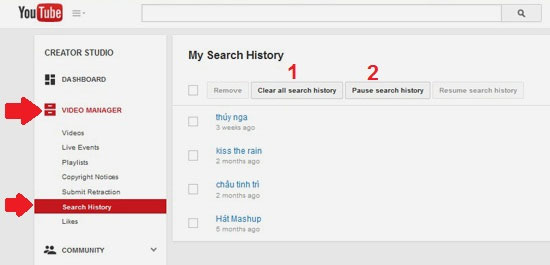 Delete YouTube search history and ensure privacy: Go to VIDEO MANAGER and go to sub-section Search History.Here you can press 'Clear all search history' (number 1) to delete all keywords you ever searched on YouTube and click 'Pause search history' (number 2) to stop updating the search history.
Delete YouTube Video Viewing History
Similar to deleting search history, deleting YouTube video viewing history can help you avoid many hassles and misunderstandings when sharing machines with others.
To do so, from the main interface of your YouTube account, go to the History section. Press Clear all watch history to delete all information about the videos you have opened and click Pause watch history to stop updating history.
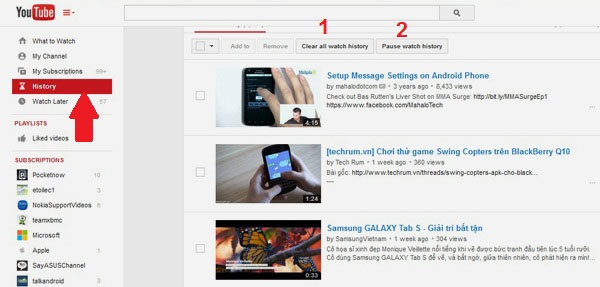 Delete YouTube search history and ensure privacy: From the main interface of your YouTube account, go to History.Press 'Clear all watch history' (number 1) to delete all information about the videos you have opened and press 'Pause watch history' (number 2) to stop updating history.
FAQ
What is the main topic of Instructions on How to Delete YouTube Search History and Ensure?
Understanding Delete YouTube video viewing history requires more than a headline.
Why is Delete YouTube video viewing history important?
The overview below breaks down the key facts, changes, and user impact.
What should readers remember about Delete YouTube video viewing history?
Simply because even without purpose, accidentally searching, viewing or clicking actions can become a cause of misunderstanding.
Related Articles
 How to Delete YouTube History and Ensure Privacy7 minutes read
 The Easiest Way to Delete YouTube Search History3 minutes read
 How to Delete YouTube Search History (Delete YouTube3 minutes read
 How to Clear Search History on Microsoft Edge3 minutes read
 How to Delete Youtube History Automatically6 minutes read
 Instructions to Delete Search History on Search Bar Windows 113 minutes read
Reader Comments 0
Sign in with email or Google to join the discussion.