Table of Contents
This practical guide explains how to create reminder to read WhatsApp messages. Follow the steps in order, review the requirements first, and use the troubleshooting notes when a setting or option does not work as expected.
How to create a reminder to read WhatsApp messages
You open the chat on the WhatsApp application, then select the messages that we want to create a reminder to read the message. Next, select the 3-dot icon and click Remind me to create a reminder.
You can then choose a notification reminder time of 2 hours, 8 hours, 24 hours or set a custom time of your choice.
After attaching a reminder, a bell icon appears next to the message, making the message stand out in the chat thread.
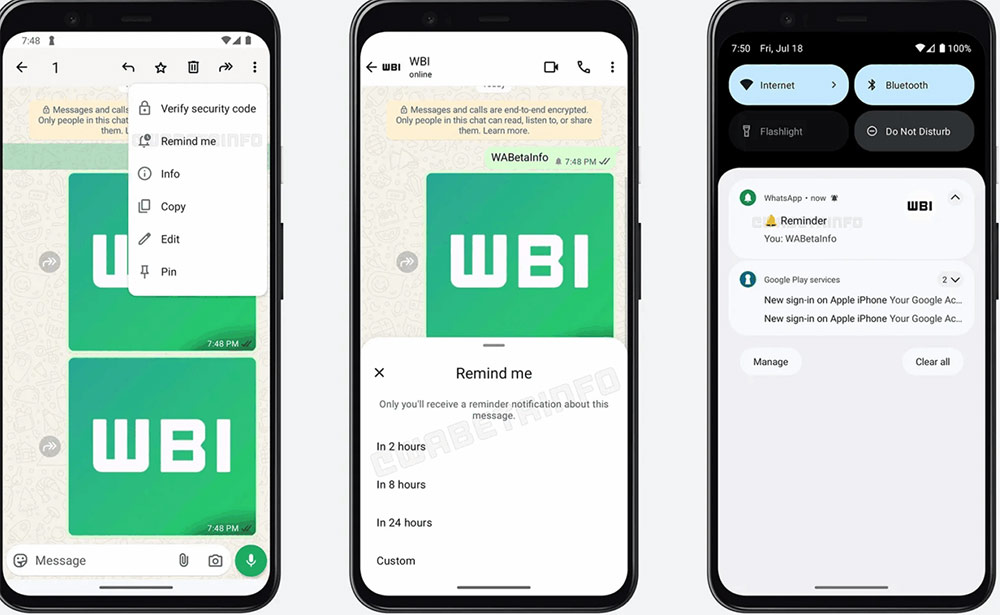
When the reminder timer ends, you'll receive a notification from WhatsApp, including the message content, chat name, or media preview.
This feature is currently being tested in the latest beta version of WhatsApp for Android and iOS will have to wait for some time.
FAQ
How to create a reminder to read WhatsApp messages?
You open the chat on the WhatsApp application, then select the messages that we want to create a reminder to read the message. Next, select the 3-dot icon and click Remind me to create a reminder.
What does this guide cover?
This guide explains create reminder to read WhatsApp messages, including the main steps, important details, and practical considerations.
Who is this guide for?
It is designed for readers who want a clear, practical overview and a reliable process they can follow without unnecessary complexity.
Related Articles
 How to See the Exact Time When Whatsapp Messages Are Read3 minutes read
 Instructions to Edit Sent Messages on Whatsapp3 minutes read
 How to Check If Whatsapp Messages Have Been Read?2 minutes read
 How to Send WhatsApp Messages Directly on Gemini3 minutes read
 Instructions for Pinning Messages in WhatsApp: Complete Overview4 minutes read
 How to Recover Messages on Whastapp: Restore Messages5 minutes read
Reader Comments 0
Sign in with email or Google to join the discussion.