Table of Contents
If TikTok will not open, load videos, record smoothly, or accept your login, start with the least disruptive fixes: test the connection, restart the app and phone, install updates, and then clear TikTok's cache. The right next step depends on the symptom, so avoid deleting app data or reinstalling until you have protected any drafts stored on the device.
Try these checks first
- Test the connection. Open another website or app. If it also fails, switch between Wi-Fi and mobile data, reconnect to the network, or restart the router.
- Close and reopen TikTok. Remove it from the recent-apps screen before opening it again.
- Restart the phone. This can release a stuck camera, microphone, or network process.
- Update TikTok. Check Google Play or the App Store rather than downloading an APK from an unfamiliar site.
- Check free storage. Very low device storage can interfere with downloads, recording, and app updates.
If TikTok fails on more than one connection or device, the service may be having a temporary problem. In that case, repeated reinstalls are unlikely to help; wait and try again later.
Clear TikTok's cache
TikTok's in-app cache control removes temporary files and is a sensible next step when feeds will not refresh, thumbnails fail to load, or the app feels unusually slow.
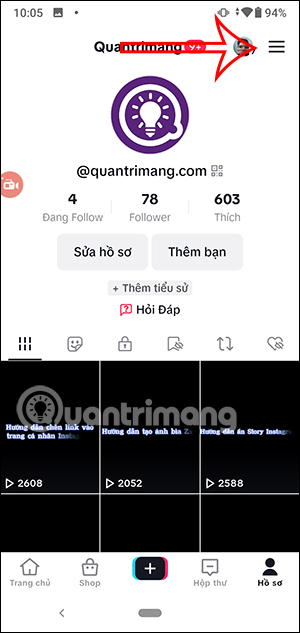
- Open TikTok and tap Profile.
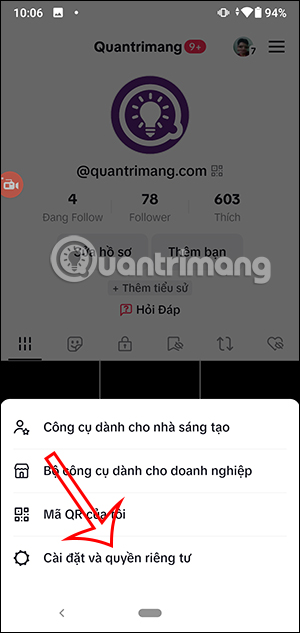
- Tap the Menu button, then choose Settings and privacy.
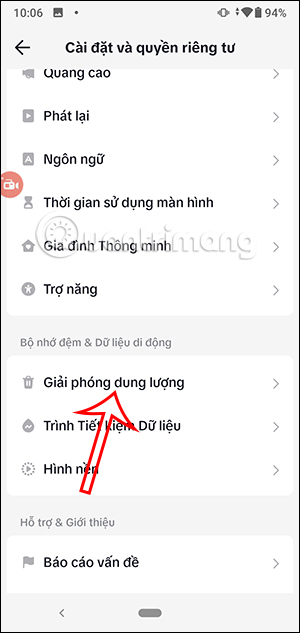
- Tap Free up space.
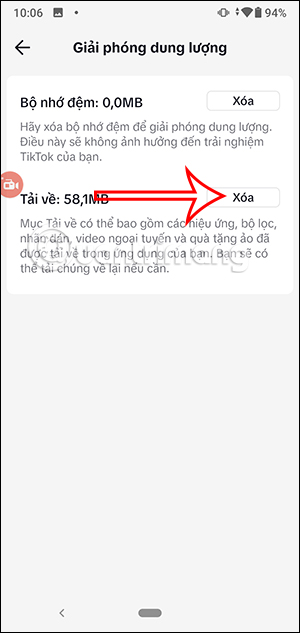
- Use Clear beside Cache. Review any separate Downloads option before confirming it.
Menu names may vary slightly by app version. TikTok's current instructions are available in its official first-steps guide.
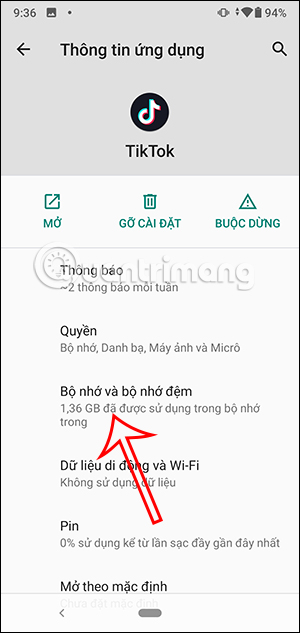
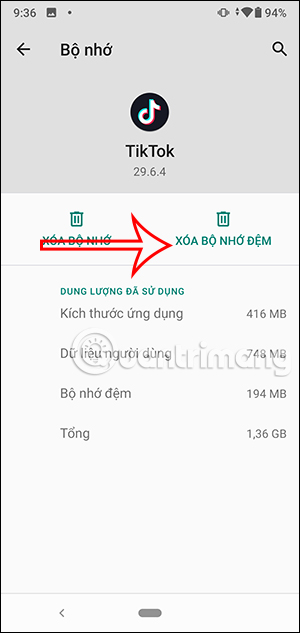
The screenshots below show where the menu and storage controls appeared in an earlier version of TikTok. The wording or position may differ on your phone.
If TikTok will not open or keeps closing
After completing the basic checks, open the phone's settings and confirm that TikTok has enough storage and the permissions needed for the feature you are using. On Android, you can usually clear the app's cache from Settings > Apps > TikTok > Storage; exact labels depend on the phone manufacturer.
Do not confuse Clear cache with Clear storage or Clear data. The latter resets local app data and may sign you out. On iPhone, offloading or reinstalling is a later resort rather than a first step.
Protect drafts before uninstalling. TikTok says drafts can be removed when the app is uninstalled and reinstalled or when an account is moved to another device. If a draft matters, finish or otherwise preserve it before deleting the app. See TikTok's notes on editing, posting, and deleting videos.
If TikTok freezes while recording
- Close other apps that may be using the camera or microphone.
- Confirm that TikTok has camera and microphone permission in the phone's privacy settings.
- Check available storage, especially if the freeze occurs while saving a recording.
- Try recording once without a demanding effect or filter. If that works, update TikTok and test the effect again.
- Restart the phone and install any available operating-system update.
If the camera works in the phone's Camera app but not in TikTok, the problem is more likely to involve TikTok's permissions, cache, version, or a particular effect. If the camera fails in every app, troubleshoot the phone rather than TikTok alone.
If videos or shared TikTok links will not load
First determine whether the problem affects every video or only one link. Copy the complete shared URL and open it in TikTok or a regular browser. A single post may be unavailable because it was deleted, made private, or restricted for the viewer's account or region. Clearing the cache will not restore a post that is no longer accessible.
If no videos load, change networks, disable a misbehaving VPN or content filter temporarily, restart TikTok, and clear the in-app cache. If videos play in a browser but not in the app, update the app and check whether the operating system is set to open supported TikTok links in TikTok.
If you cannot log in
Use the same sign-in method used when the account was created. An account created through another social platform may require recovery through that provider. For an email, username, or phone login, use Forgot password? on the login screen and follow TikTok's password-reset instructions. Do not give verification codes to anyone or pay a third party to recover the account.
Report a problem to TikTok
If the issue remains after the relevant checks, open Profile > Menu > Settings and privacy > Report a problem. Choose the closest topic, follow the prompts, and include the device model, operating-system version, TikTok version, the exact error message, and what you already tried. TikTok explains the available contact path in its Report a problem guide.
Related Articles
 VPN Errors: Summary of Common VPN Error Codes6 minutes read
 Common Errors on Computer Speakers and How to Fix Them7 minutes read
 How to Fix Common TikTok Errors4 minutes read
 How to Fix Font Errors in Images Using Canva AI4 minutes read
 Fix Some Common Computer Errors - Part 212 minutes read
 Top 10 'Disasters' and How to Deal with Them4 minutes read
Reader Comments 0
Sign in with email or Google to join the discussion.