Table of Contents
Instagram now has the option to reply to likes on Reels videos to increase engagement with your friends or viewers.
Instagram now has the option to reply to likes on Reels videos to increase interaction with friends or viewers of your videos. As soon as someone likes an Instagram Reels video, this guide will receive a notification and you can respond, reply to the like of that video. Below is a guide to reply to likes on Instagram Reels videos.
How to reply to likes on Instagram Reels videos
When someone likes your Reels video, this guide will receive a notification and you click on that notification.
Now displays the bar to reply to your friend's Reels video likes. Enter the content and press send to switch to the Instagram direct messaging interface.
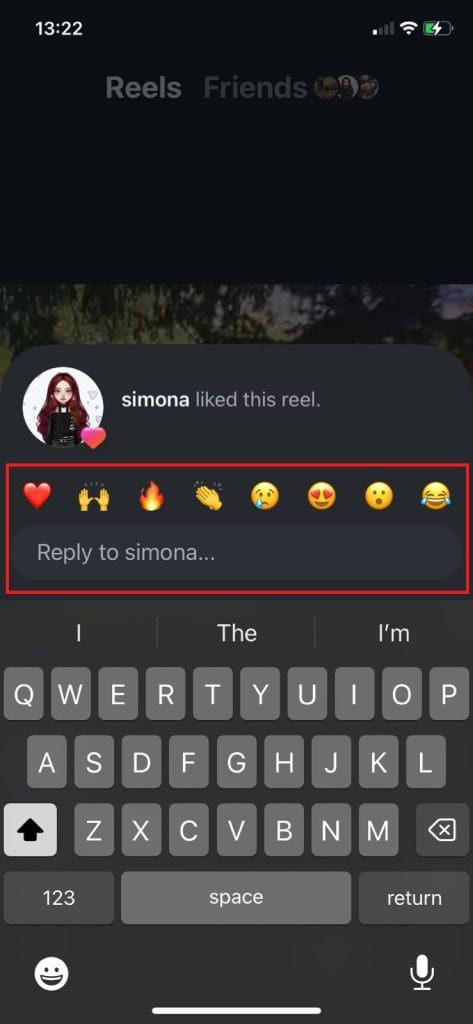
The Instagram Reels video reply feature is now gradually rolling out to different Instagram accounts. Please update the app to the latest version and wait for Meta to update the feature.
FAQ
How do you reply to likes on instagram reels videos: step-by-step guide?
In practical terms, instagram now has the option to reply to likes on Reels videos to increase engagement with your friends or viewers.
What should you check before getting started?
Review the requirements, compatible device or software version, and any warnings described in the guide before making changes.
What should you do if the steps do not work?
Repeat the steps in order, confirm that your app or system is up to date, and review the troubleshooting details provided above.
Related Articles
 Instructions for Pinning Reels Instagram Videos: Key Facts4 minutes read
 How to Delete Multiple Instagram Reels Videos at Once with a Few Simple Steps3 minutes read
 Instagram Will Allow Reels Up to 3 Minutes Long4 minutes read
 How to Hide Reels Instagram Suggested Videos3 minutes read
 How to Post Reels Instagram Video to Instagram Story3 minutes read
 How to Use the Instagram Reels Video Editing Tool: Step-by-Step Guide4 minutes read
Reader Comments 0
Sign in with email or Google to join the discussion.