Table of Contents
The new feature is called Personal Context. It allows Gemini to use your past conversations to create more nuanced and relevant responses, instead of starting each conversation...
Google is introducing a new capability for Gemini: Artificial intelligence (AI) can now remember your past conversations by default. At first glance, this sounds helpful because it makes responses smoother and more relevant. While this can be useful, it's also a concern if you value privacy. If you're uncomfortable with your conversations being archived, this guide will show you how to turn off Gemini's conversation remembering feature and manage your history.
For more context before choosing a tool, compare Claude and ChatGPT and review these practical AI tools for students.
Why do Geminis remember your conversations?
The new feature is called Personal Context. It allows Gemini to use your past conversations to create more nuanced and relevant responses, instead of starting each conversation from scratch.
For example, if you've discussed a workout plan before, it might incorporate that into questions related to your new health.
While that sounds convenient, not everyone wants an AI assistant remembering their past. Especially when Google's privacy policy, as mentioned here in preventing AI data training, warns that conversations can be stored for up to 3 years or used to train AI.
Furthermore, there's no clear way to know what Gemini is storing, which can lead to irrelevant and frustrating responses. This lack of control is concerning.
This feature is currently only available for version 2.5 Pro and will later be extended to 2.5 Flash. Notably, it is not available in places like the UK, where privacy laws are very strict, or for users under 18, which further adds to the inconsistency.
Turn off Gemini's memory.
Fortunately, Google gives you the option to stop Gemini's chat memory. Here are the steps to follow:
Open Gemini on the web or app and go to Settings. Select Personal Context and turn off the option "Your past chats with Gemini".
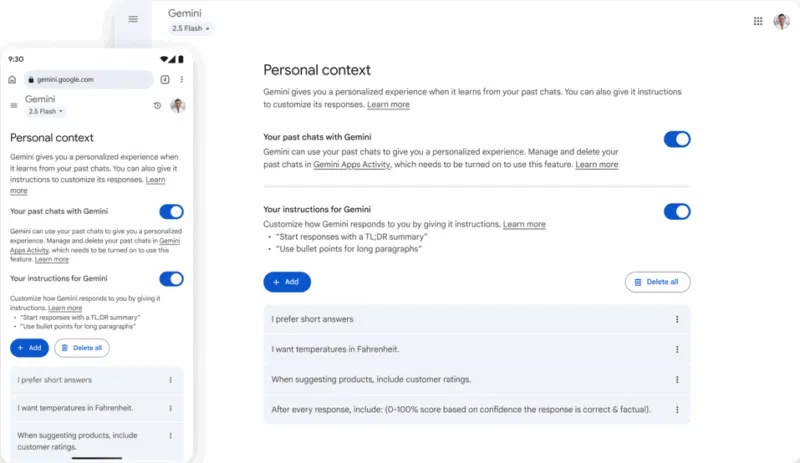
After disabling this setting, Gemini will no longer record or use your old conversations. Therefore, it remains useful in real time without creating long-term records. If you have already disabled Gemini in the Gmail or Google Workspace app, the process will be similar.
Note: Turning off this feature will not affect conversations already used to train the AI.
Use Temporary Chats for conversations where privacy is a priority.
For questions that only appear once and you don't want Gemini to store anything, use Temporary Chats. It's like Gemini's incognito mode.
When enabled, your conversations will not be stored or used to train the AI, and they will automatically delete after 72 hours. This is ideal for quick queries, such as asking for a quick tech tip without wanting it to be saved in your history.
To use this feature, open a new prompt and select the Temporary Chats icon next to New chat.
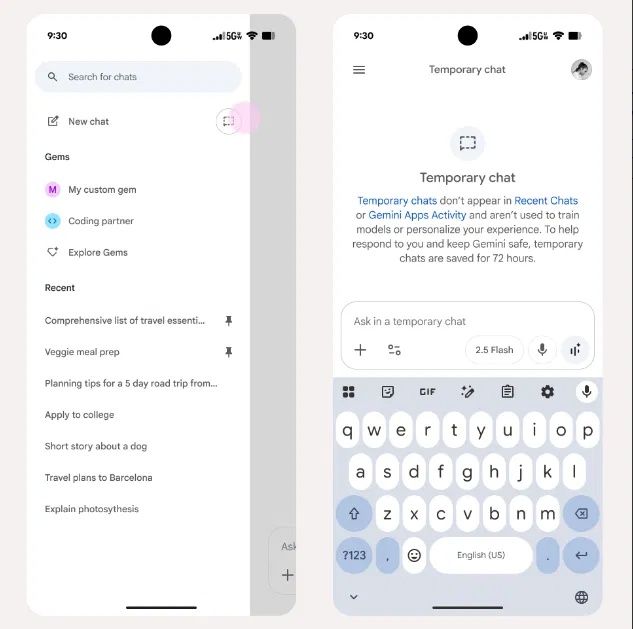
It's also ideal for sensitive topics or simply exploring how advanced Gemini's reasoning abilities have become.
Manage and delete Gemini chat history
Even when storage is turned off, you may still have old conversations stored. Therefore, you may need to review and delete specific past conversations from Gemini's activity page instead of completely clearing storage.
Go to Profile -> Gemini Apps Activity on the app or Settings -> Activity on the web.
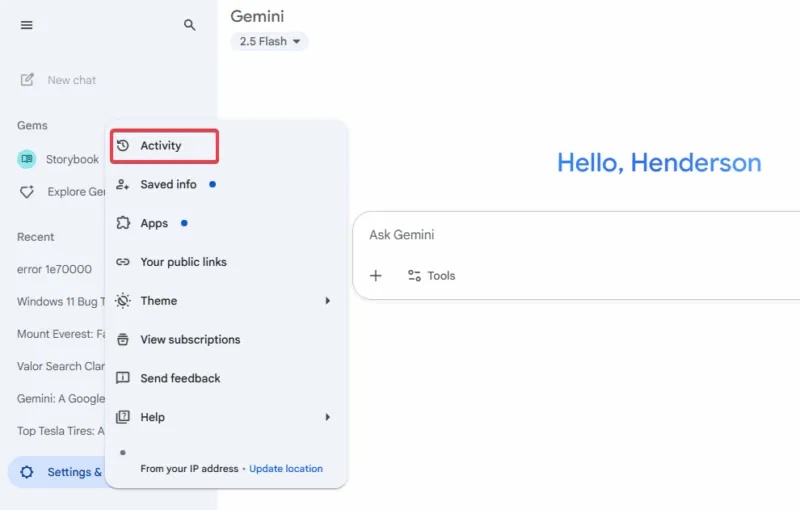
Find specific conversations and click the X to delete them.
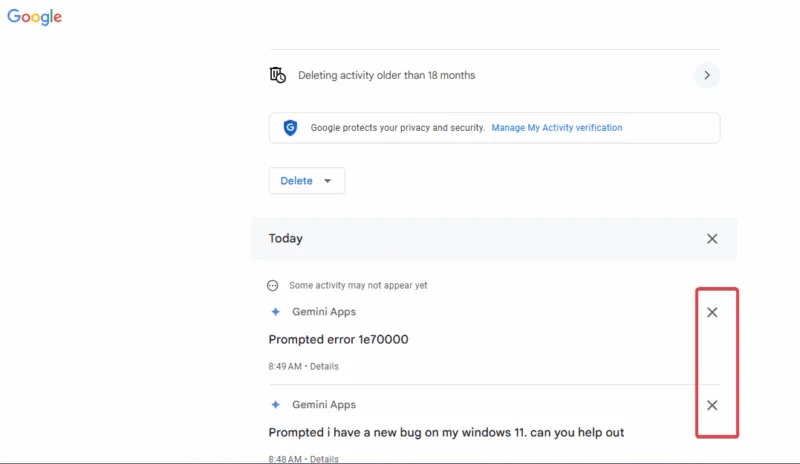
To start anew, Google is adding a Keep Activity feature to replace Gemini Apps Activity, which controls whether your data is stored to improve the service. You don't need to adjust this feature if you've already turned it off. It's just a name change.
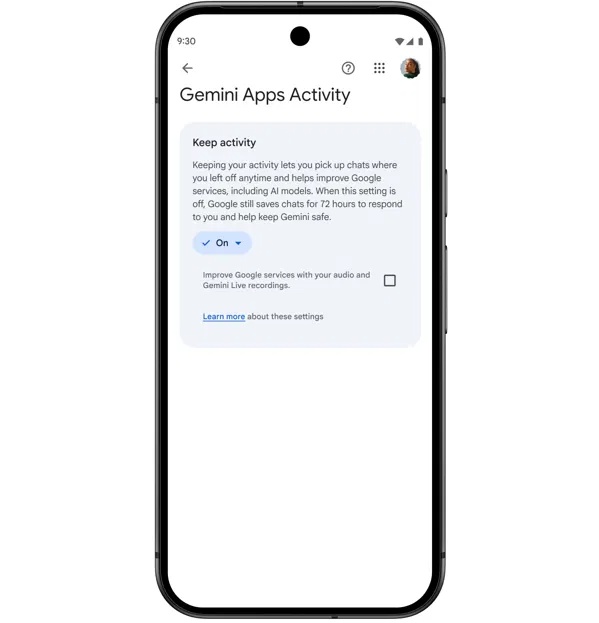
Additionally, you can keep the previous option of automatically deleting old data every 3, 18, or 36 months. You can set the time to 3 months to keep things tidy.
Related Articles
 Gemini 3.1 Pro or Gemini 3 Pro: Better?8 minutes read
 4 Google Apps That Work Better with Gemini: Explained5 minutes read
 How to Turn Off Gemini in Google Docs10 minutes read
 Create English Listening Practice Conversations Using Google AI Studio4 minutes read
 How to use Gemini API14 minutes read
 What Is Google Gemini? How Does Gemini Work?6 minutes read
Reader Comments 0
Sign in with email or Google to join the discussion.