Table of Contents
This guide organizes the entries in "4 Best Android Digital Assistants" and explains what each option, idea, or example offers. It also highlights practical details that matter when comparing the choices.
4. Bixby
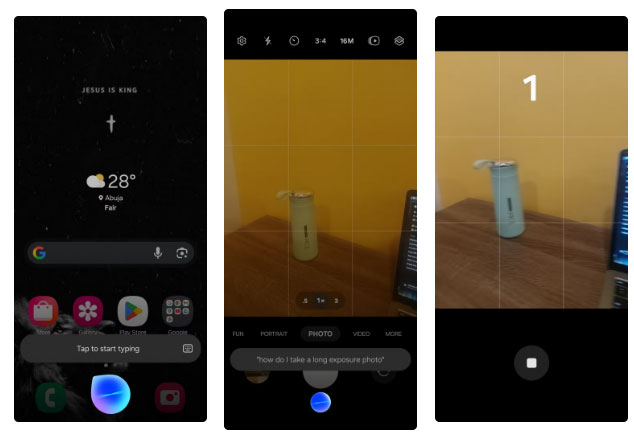
Bixby is built into most Samsung devices and is often overlooked. But once you try it, you'll find it more useful than you expect.
On the Galaxy A72, Bixby handles basic tasks well: Switching settings, opening apps, and answering simple questions. Voice commands can be used to adjust settings, open specific camera modes, and control SmartThings devices. It responds quickly and understands most requests without much adjustment.
It also has a wake word ('Hi Bixby') so you can launch the virtual assistant hands-free without touching your phone, which is something not every assistant on this list can do.
3. ChatGPT
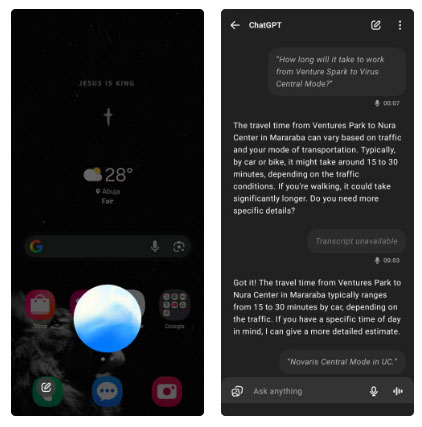
Using ChatGPT as a phone assistant feels different right from the start. It's designed around conversation and language, not device control. That means it's great at helping you think through queries or answering follow-up questions in context. It's especially useful if you're already using ChatGPT's voice mode and want that same flexibility from your home screen.
But when it comes to everyday phone tasks, the limitations quickly appear. There's no wake word, so you can't just say something out loud and expect the virtual assistant to respond. You have to activate it manually or assign it to a button on the phone.
And even when opened, ChatGPT only responds by voice. Any results in the form of images or text appear separately inside the ChatGPT app, which disrupts the flow if you expect on-screen feedback like other assistants provide.
2. Perplexity
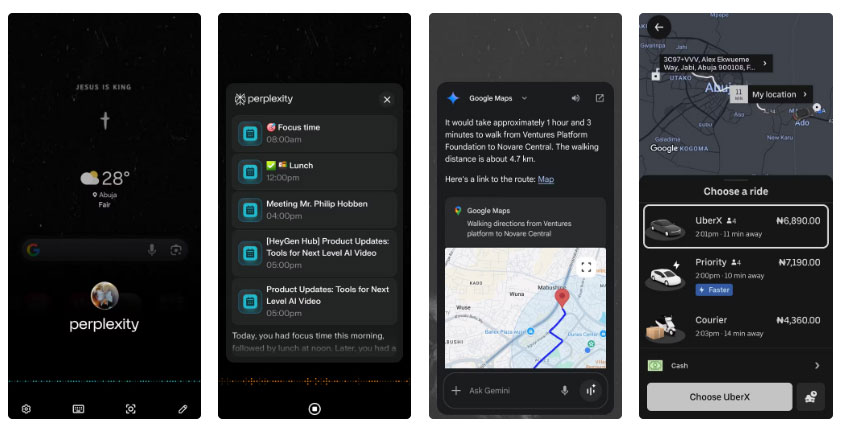
Perplexity Assistant isn't as well-known as Gemini or ChatGPT, but it's quickly becoming a strong contender in the space. It answers complex questions, supports follow-ups, and handles multi-layered tasks with ease.
Try asking it to suggest nearby restaurants, then refine the list by walking distance, then text someone. It handles the entire process without any setup or repetition.
But as a voice assistant, Perplexity suffers from the same problem as ChatGPT: there's no wake word. You have to launch it manually or assign it to a button. That extra step adds complexity, especially when your hands are full or your phone is in another room.
1. Gemini
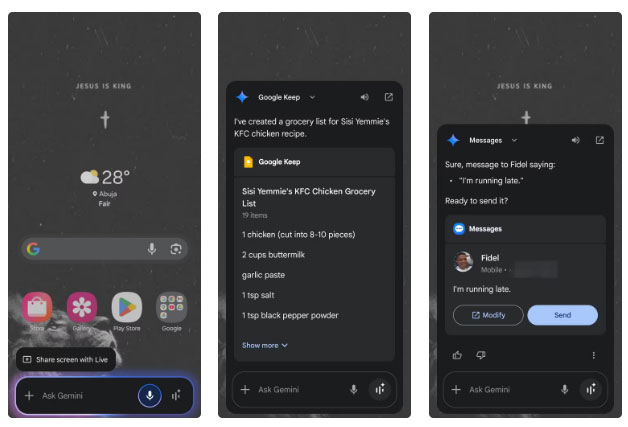
Gemini is the Google Assistant replacement, and the transition should be seamless. The app still supports 'Hey Google,' meaning you can launch apps hands-free and it's fully integrated with Google apps and services.
Tasks like setting reminders, checking your schedule, or playing music work as expected. The improvement is in natural language understanding. You can speak more comfortably, and the app handles follow-up questions more smoothly than the old assistant.
What makes Gemini stand out is the way it handles tasks that span multiple apps. You can say, 'Check Gmail for the message Nathan sent me about translation software,' and it will display a summary of the email right on your home screen.
Gemini isn't perfect, though. It sometimes takes a while to respond, and not every request is perfectly understood. But overall, it strikes a good balance between conversational intelligence and practical usefulness.
FAQ
What should you know about 4. Bixby?
Bixby is built into most Samsung devices and is often overlooked. But once you try it, you'll find it more useful than you expect.
What should you know about 3. ChatGPT?
Using ChatGPT as a phone assistant feels different right from the start. It's designed around conversation and language, not device control. That means it's great at helping you think through queries or answering follow-up questions in context. It's especially useful if you're already using ChatGPT's voice mode and want that.
What should you know about 2. Perplexity?
Perplexity Assistant isn't as well-known as Gemini or ChatGPT, but it's quickly becoming a strong contender in the space. It answers complex questions, supports follow-ups, and handles multi-layered tasks with ease.
What should you know about 1. Gemini?
Gemini is the Google Assistant replacement, and the transition should be seamless. The app still supports 'Hey Google,' meaning you can launch apps hands-free and it's fully integrated with Google apps and services.
Related Articles
 7 Useful Things AI Assistants Can Do—Safely13 minutes read
 7 Trends SEO Will Dominate the World from 20177 minutes read
 How to Change the Default Digital Assistant on Android6 minutes read
 Is Siri or Alexa the Most Suitable Assistant for a Smart Home Explained10 minutes read
 Looking Back at Palm Pre: Being Good and Ahead of Time Is7 minutes read
 From ESIM to AI: Technology Makes Long Journeys More Comfortable and Safer9 minutes read
Reader Comments 0
Sign in with email or Google to join the discussion.