Table of Contents
This guide provides a clear, practical overview of "Google Assistant Is Disappearing from Your Smartwatch". It organizes the most useful details, explains important considerations, and highlights the steps or choices that matter most.
Last week, Google began replacing Assistant with Gemini on the Pixel Watch. It was a move that was expected, as the Mountain View company had laid out a clear roadmap for phasing out Assistant on phones, tablets, watches, cars, and other smart devices. After a brief rollout on the Pixel Watch, Gemini is now appearing on a range of Wear OS devices from other manufacturers.
So, if you own a smartwatch running Wear OS 5 or older from Samsung, Xiaomi, OnePlus,. your virtual assistant is about to get a big change.
Multiple users on Reddit have confirmed the rollout: owners either automatically receive Gemini, or see the update in the Play Store for Wear OS. Once the update hits your watch, you'll get notifications about Google's new AI assistant on your wrist.
Users can now interact with Gemini by:
- Press the button on the side of the watch
- Use the "Hey Google" trigger phrase (if voice commands are enabled)
Alternatively, Gemini can also be opened by:
- Tap the app icon on the small screen
- Access via Tile
- Set as a complication on a custom watch face Note: When adding Gemini as an action, it may show the label "Google" or "Google Digital Assistant" instead of "Gemini," but you'll know it by the sparkling star icon.
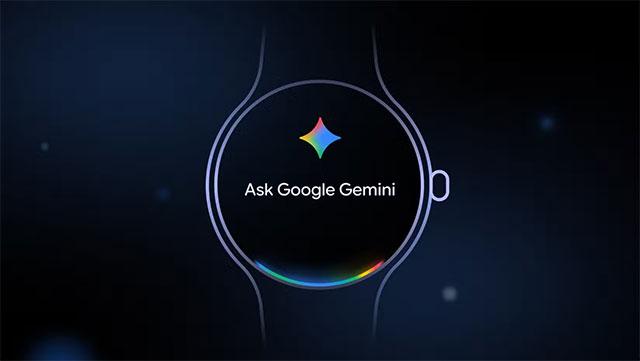
Notably, many Reddit users reported that they were still able to use the old Assistant after updating to Gemini. However, this is likely only temporary as Google is rolling out Gemini in stages. Once the process is complete or Google decides to do so, Assistant will be completely disabled.
The overall experience doesn't change much, but expect improvements. Gemini promises to improve the overall experience, especially with tasks like:
- Reminders & Tasks
- Play music
- Handle all complex commands
- Remember parking location instantly
- Create and launch playlists
- Song recognition
- Perform complex tasks without reaching for your phone Google is expected to continue refining Gemini over time.
Note: This is a slow and partial rollout. If you don't see the update yet, please be patient.
FAQ
What does this guide cover?
This guide explains Google assistant is disappearing from your smartwatch, including the main steps, important details, and practical considerations.
Who is this guide for?
It is designed for readers who want a clear, practical overview and a reliable process they can follow without unnecessary complexity.
What should you check before getting started?
Review the requirements, confirm that your software or device is up to date, and save any important data before changing settings.
Related Articles
 What Is Google Assistant? How to Use It?8 minutes read
 Google's Next - gen AI Assistant Could Control Your Entire Phone6 minutes read
 How to Translate a Conversation on Google Assistant3 minutes read
 Google Announces the New Google Assistant with Incredible Speed3 minutes read
 The Words of 'Hegemony' of Google Assistant4 minutes read
 How to Use Google Assistant in Iot Projects5 minutes read
Reader Comments 0
Sign in with email or Google to join the discussion.