Table of Contents
You can usually find a network printer’s IP address in one of three places: Windows printer properties, the printer’s own network menu, or your router’s connected-device list. The address normally looks like 192.168.1.45 or 10.0.0.25.
This guide applies to printers connected by Wi-Fi or Ethernet. A USB-only printer does not need its own network IP address, although a printer shared through another computer may appear under that computer’s name.
Method 1: Check Printer Properties in Windows
The classic Control Panel route works in Windows 10 and Windows 11 and is useful when the printer was installed with a standard TCP/IP port.
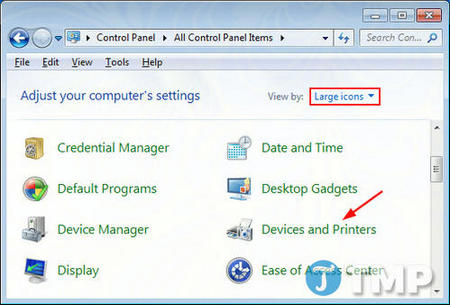
- Open Control Panel. Select View by: Large icons, then choose Devices and Printers. In some Windows 11 versions, the Settings app may open first; use the link for additional device or printer settings to reach the classic window.
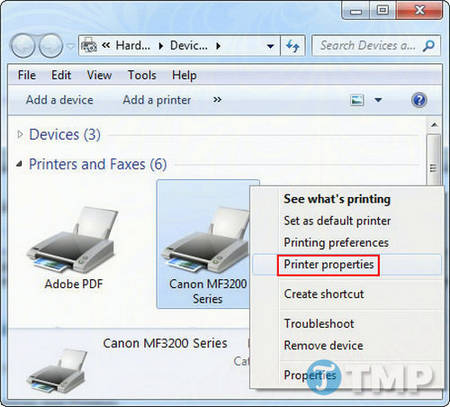
- Right-click the printer and select Printer properties. Do not choose the similarly named Properties entry for the device unless it leads to the printer settings you need.
- Open the Ports tab. Find the checked port used by the printer. If it is a Standard TCP/IP Port, select it and choose Configure Port.
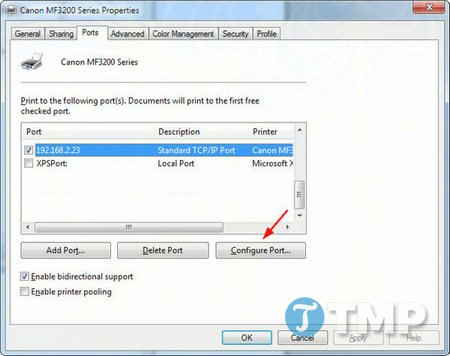
- Read the value in Printer Name or IP Address. Copy only the address; do not change the port configuration unless you intend to reconfigure the printer.
If the selected port begins with WSD, Windows may show a device name instead of a clear IP address. Use one of the next methods.
Method 2: Use Windows Settings
- Open Settings and go to Bluetooth & devices > Printers & scanners in Windows 11, or Devices > Printers & scanners in Windows 10.
- Select the printer, then open Printer properties, Hardware properties, or the printer’s management page. The available link depends on the driver.
- Look for Web page, Location, Network information, or a TCP/IP port. If Windows shows a web address containing four groups of numbers, those numbers are usually the printer’s IPv4 address.
Many manufacturer utilities also include a Network or Device information screen. Use the installed utility for the exact printer model rather than downloading an unverified scanner tool.
Method 3: Check the printer’s screen
On a printer with a display, open a menu such as Settings, Network, Wi-Fi, Ethernet, or Network status. Look for IPv4 address, TCP/IP, or Wireless details. Menu names differ by brand and model.
Do not confuse the IP address with the Wi-Fi Direct name, MAC address, serial number, subnet mask, or default gateway. A MAC address contains letters and pairs separated by colons or hyphens; a normal IPv4 address contains four decimal numbers separated by periods.
Method 4: Print a network configuration page
Printers without a screen can often print a network or configuration report. Use the printer’s Information, Wireless, Go, or Menu control, but check the model’s manual for the correct button sequence. Avoid holding the power button based on a generic instruction, because that action can differ between models.
On the printed report, look for IPv4 Address, IP Address, or TCP/IP. An address beginning with 169.254 usually means the printer did not receive a usable address from the router, so reconnect it to the local network before trying to add it.
Method 5: Check your router
Sign in to your router’s local administration page and open its connected devices, DHCP clients, or network map. Match the printer by its device name or MAC address, then note the assigned IP address. Only change the address reservation if you understand the router settings.
A reserved address can prevent a printer’s IP from changing after a restart. If you need that setup, see the principles in TipsMake’s static IP address guide; router-side DHCP reservation is often preferable for a printer.
Confirm that you found the correct address
- Enter the IP address in a browser while connected to the same trusted local network. Many printers display an embedded management page.
- Open Command Prompt and run
ping 192.168.1.45, replacing the example with the printer’s address. A reply confirms that a device responds, but some printers ignore ping requests. - Print a test page. If Windows cannot reach the printer, check that the PC and printer are on the same network and that guest-network isolation is not separating them.
If the address is correct but printing still fails, work through the fixes for Windows cannot connect to the printer. You can also review the basic connection checks in How to print documents.
Related Articles
 How to Find the Router IP Address on Any Platform7 minutes read
 6 Ways to View IP Addresses on Computers, Smartphones or Tablet10 minutes read
 What Is an IP Address?8 minutes read
 How to Find the Default Gateway IP Address11 minutes read
 Link This Website to Friends, You Will Know Their Address via the Computer's IP3 minutes read
 How to Change Mac Addresses on Windows, Linux and Mac Os X6 minutes read
Reader Comments 0
Sign in with email or Google to join the discussion.