Table of Contents
When a Canon LBP 2900 reports that no toner cartridge is installed, it may not be detecting the cartridge’s physical presence or correct seating. Remove and reinstall the cartridge first; if the message remains, check the exact cartridge type, protective packaging, accessible contact points, and the printer’s detection mechanism.
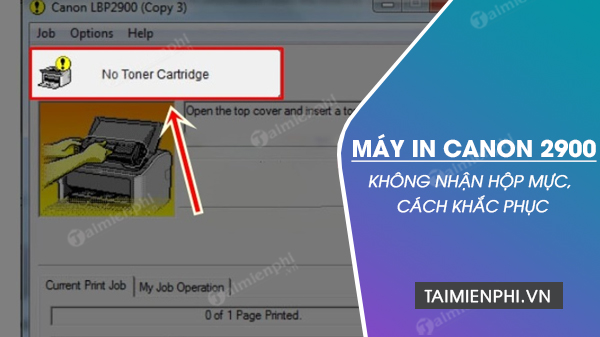
The LBP 2900 is a monochrome laser printer, so the replaceable supply is a toner cartridge, not a liquid-ink cartridge. Use the exact status text shown by Canon CAPT software or the printer indicator; a “no cartridge” message is different from low toner, paper jam, or a Windows communication error.
Before opening the printer
- Cancel the current print job and switch the printer off.
- Unplug the power cable and allow the printer to cool. The fuser area can remain hot after printing.
- Open only the covers described in the user guide. Prepare a clean, level surface for the cartridge.
Do not touch the photosensitive drum, expose it to bright light for an extended period, or use a household vacuum on spilled toner.
1. Remove and reseat the toner cartridge
- Open the cartridge cover and pull the cartridge out by its designated handle, keeping it level.
- Inspect it for shipping locks, protective tape, or a sealing strip that should have been removed during installation. Follow the cartridge’s own instructions; do not pull an unidentified tab by force.
- Check for cracked plastic, a displaced shutter, or loose parts. Do not dismantle the cartridge.
- Align the cartridge with the internal guides and slide it in evenly until it is fully seated.
- Close the cover firmly, reconnect power, and print a one-page test.
If reseating works, the cartridge may previously have been misaligned or the cover may not have closed completely. If the message returns after vibration or movement, the cartridge body or detection mechanism may be worn.
2. Verify cartridge compatibility
Cartridge labels can vary by sales region and printer variant. Confirm compatibility using the full printer model, region, and Canon documentation or the label from the known-working cartridge. A cartridge that fits the opening is not necessarily compatible.
- Compare the product code and physical molding with the previous working cartridge.
- Check whether the replacement was sold for the exact LBP 2900/2900B variant in your market.
- If the error began immediately after a refill or remanufactured cartridge was installed, test a known-good compatible cartridge before replacing printer parts.
A low toner condition normally affects density or triggers a supply warning; it does not always produce “no cartridge.” Adding toner will not fix a broken detection tab or an incompatible housing.
3. Inspect accessible contact and seating areas

With power disconnected, use a light to inspect the cartridge bay. Look for a torn label, packing material, loose paper scrap, or heavy toner deposit that prevents the cartridge from sitting flat.
- Remove only loose debris that is safely reachable.
- Use a clean, dry, lint-free cloth on accessible exterior contact surfaces if the manual permits.
- Do not spray cleaner into the printer, bend spring contacts, rotate gears by force, or insert metal tools.
- Do not “fully disassemble” the printer as a routine cleaning step. The cartridge sensor and fuser area should be serviced by a qualified technician when they are not user-accessible.
4. Distinguish cartridge trouble from a printer sensor fault
| Test | Interpretation |
|---|---|
| Old cartridge is detected; replacement is not | The replacement is likely incompatible, damaged, or incorrectly assembled. |
| Neither cartridge is detected | Check seating and the cover; a printer-side detection lever, switch, wiring, or controller fault becomes more likely. |
| Cartridge is detected only when held or moved | Stop forcing it. Guides, housing, or the detection mechanism may be damaged. |
| CAPT shows a general printer error, not “no cartridge” | Troubleshoot the exact driver, port, cover, or service-status message instead. |
A small plastic sensor lever can be broken or jammed, but its position and replacement procedure should be confirmed in service information for the exact printer. Do not replace an assumed “left-side sensor” based only on a generic description.
5. Restart the Canon CAPT connection
If the cartridge is physically detected but Windows still shows stale status, turn the printer off, clear the queue, restart Windows, and reconnect the USB cable directly. Then open the Canon status window and print a Windows test page.
For driver and queue problems, follow How to fix Canon LBP 2900 printer errors on Windows. If the device is being installed on a new PC, use the setup checks in Install Canon LBP 2900 on Windows.
When to arrange service
Request repair if two verified compatible cartridges produce the same “no cartridge” message, the cover or cartridge guides are damaged, an internal lever is broken, or the printer makes grinding noises. Tell the technician which cartridges were tested and the exact CAPT message. That evidence avoids unnecessary toner refills and helps isolate the printer-side sensor or controller.
If the actual problem is that the printer recognizes the cartridge but will not pick up paper, use the separate Canon LBP 2900 paper-feed guide.
Related Articles
 Popular Genuine Canon Inks2 minutes read
 The Printer Does Not Recognize the Ink Cartridge - Causes5 minutes read
 Answer About Ink9 minutes read
 Printer Error Install Black Cartridge - Causes and Solutions4 minutes read
 How to Refill Canon Printer Ink: Practical Guide11 minutes read
 Driver Canon 2900 - Driver Canon 2900 Download and3 minutes read
Reader Comments 0
Sign in with email or Google to join the discussion.