Table of Contents
Claude does not need a special PDF format for a single conversation. The most reliable method is to copy the messages you need into Google Docs or Microsoft Word, clean the document, and export it as a PDF.
This approach gives you control over what is included and avoids preserving unrelated navigation, account details, or unfinished prompts. It is also safer than installing an unknown browser extension with permission to read your conversations.
Before exporting
- Remove passwords, API keys, private customer data, and other sensitive information.
- Confirm that you are allowed to share any uploaded or quoted source material.
- Remember that Claude output can contain errors; a PDF does not make the content authoritative.
- Decide whether you need the entire conversation or only the useful answer.
Method 1: Copy selected messages to Google Docs
Step 1: Open the conversation
In Claude, open the chat you want to save. Scroll through the relevant section so that you know where the exported material begins and ends.
Step 2: Copy the needed content
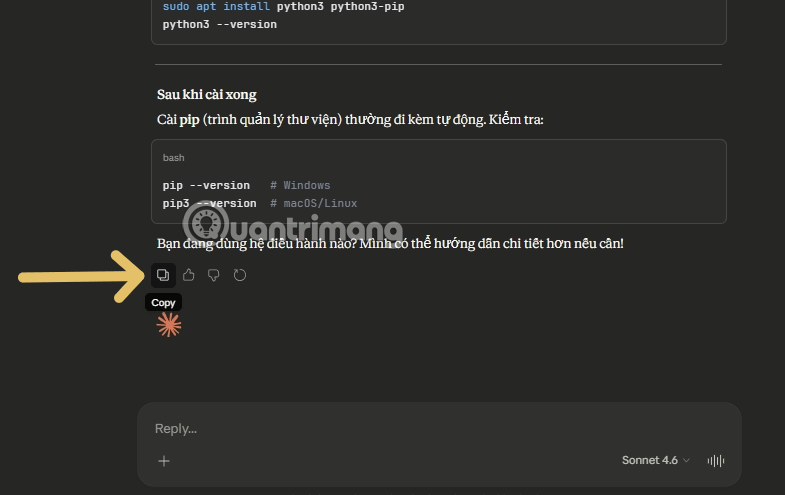
Use the Copy control on a response when available, or select the exact text you need. If the conversation includes several turns, copy them in order and label user prompts separately from Claude's responses.
Step 3: Paste into a new document
Create a blank Google Doc and paste the content. If the original formatting is messy, use paste-without-formatting and then apply your own heading and body styles.
Step 4: Edit the document
Add a descriptive title, export date, and a short note explaining the purpose of the conversation. Remove repeated interface text, citations you have not checked, and personal details that do not belong in the archive.
For code, use a monospaced font and keep line breaks intact. For tables, check that columns fit on the page. Large images may need to be resized or placed on a separate page.
Step 5: Download as PDF
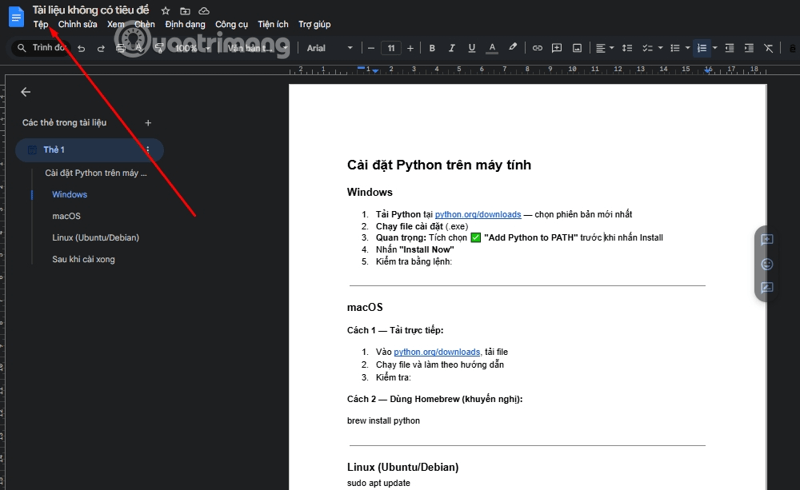
Open File in Google Docs.
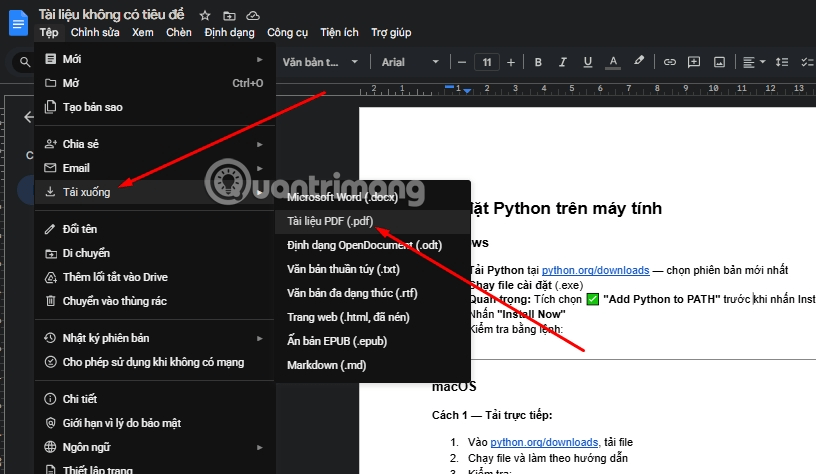
Choose Download, then PDF document (.pdf).
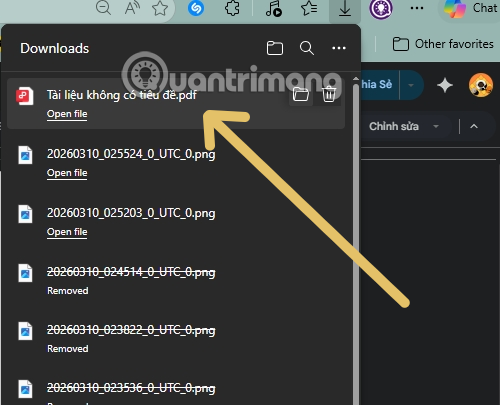
The browser saves the file to the configured download location.
Method 2: Export from Microsoft Word
- Paste the selected conversation into a new Word document.
- Use heading styles and a readable body font.
- Open File > Save As or Export, depending on the Word version.
- Choose PDF as the file type.
- Review the page range and accessibility options, then save.
Word is useful when you need more control over page breaks, headers, footers, or a company template.
Method 3: Print to PDF from the browser
You can try the browser's print command and choose Save as PDF. This is fast, but it may include navigation, omit content that has not loaded, or split code and tables badly across pages. Preview every page before saving.
If the print preview is cluttered, use the document method instead of trying to repair a poorly captured browser page.
Improve the PDF before sharing
- Verify facts and links: open citations and confirm that they support the claims.
- Identify speakers: label prompts and responses so readers understand the context.
- Add scope: note the date and whether the document is a draft, brainstorming record, or approved guidance.
- Fix page breaks: keep headings with the following paragraph and avoid splitting tables unnecessarily.
- Add alt text: describe meaningful images in the source document before export.
- Use a clear filename: for example,
project-research-claude-chat-2026-09-21.pdf.
Check the exported file
Open the PDF after downloading it. Search for a phrase near the end to confirm that the conversation is complete. Test links, inspect code indentation, and look for clipped text, blank pages, missing images, or unusual characters.
If the PDF contains confidential information, store it in an approved location and apply the same access controls you would use for the original data. A local PDF is a separate copy that will not be removed automatically if the Claude chat is later deleted.
What an exported conversation does not prove
A PDF records text, not truth or authorship. It does not verify that the model's answer is correct, that a source was used lawfully, or that the conversation has not been edited after copying. For audit or compliance purposes, follow your organization's approved recordkeeping process rather than relying on a manually assembled PDF alone.
For normal study, drafting, and reference, copying selected messages into a document gives the cleanest result and the most control over privacy and formatting.
Related Articles
 The Reg Export Command in Windows: Tips and Examples3 minutes read
 How to Create Dialogue for a Topic on Twitter3 minutes read
 How to Export Contacts from Gmail?3 minutes read
 How to Create an English Review Conversation on Educaplay3 minutes read
 How to Export a PDF File in Grok: Step-by-Step Guide5 minutes read
 How to Export Microsoft Onenote Notes to PDF File4 minutes read
Reader Comments 0
Sign in with email or Google to join the discussion.