Table of Contents
Cursor can use several OpenAI models, but the labels in its model picker change as models are added or retired. The old name “GPT-5.5 Codex” is therefore not a reliable menu label. Open the model picker in Cursor, choose the OpenAI model that is actually available to your account, and verify its usage terms before starting a long Agent session.
Check which OpenAI models Cursor currently offers
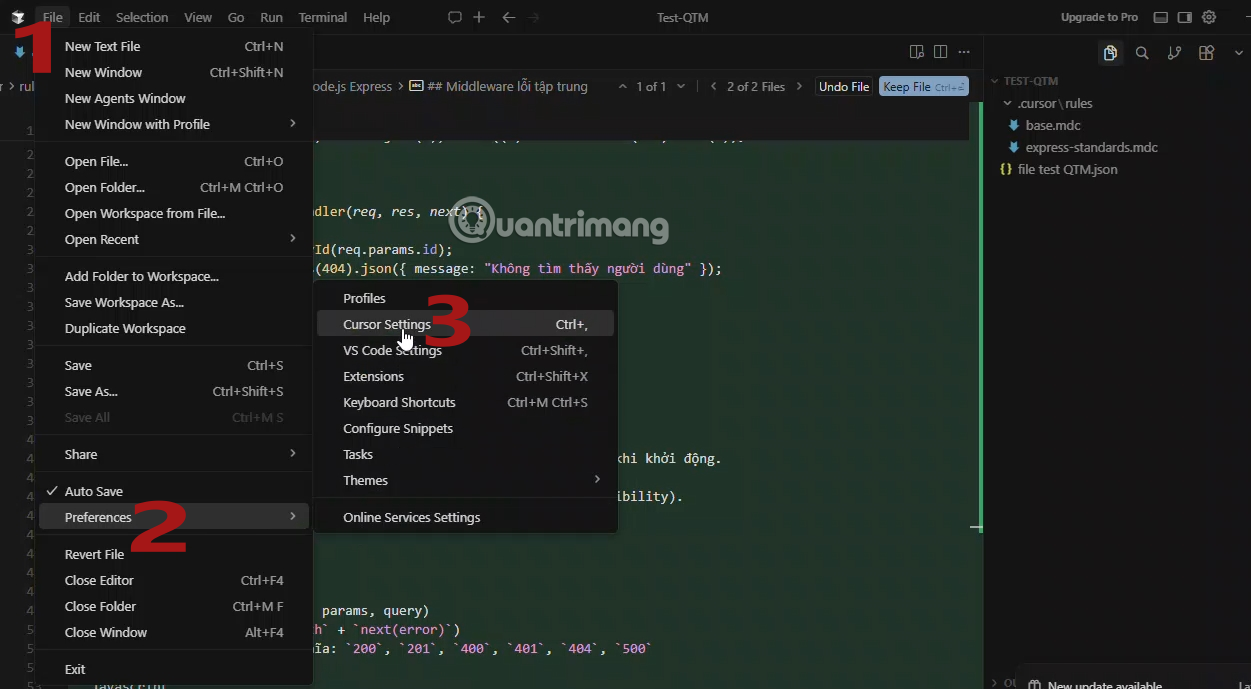
Before changing any setting, update Cursor and sign in to the correct account. Then open Cursor Settings from the gear menu or the application settings. Look for the Models or model-management section. The exact layout can vary by Cursor version and plan.
Cursor's current models and pricing documentation is the authoritative list for models billed through Cursor. At the time of review, the prominent OpenAI choices had moved beyond GPT-5.5 to the GPT-5.6 family. If GPT-5.5 does not appear in your picker, that is not necessarily an installation problem; it may have been replaced, restricted by your plan, or removed from the current catalog.
Enable or expose a model in Cursor
- Open Cursor Settings. Use the gear menu, Command Palette, or the settings shortcut for your operating system.
- Open the Models section. If Cursor provides per-model switches, enable the OpenAI model you want to make visible. Some versions show supported models directly in the picker without a separate switch.
- Check account and organization controls. A team administrator can limit model availability. Personal and business plans can also expose different options.
- Review usage before continuing. Third-party models may draw from a separate usage pool, and choosing a more expensive model can consume included usage faster. Check the usage dashboard rather than relying on an old quota figure in a tutorial.
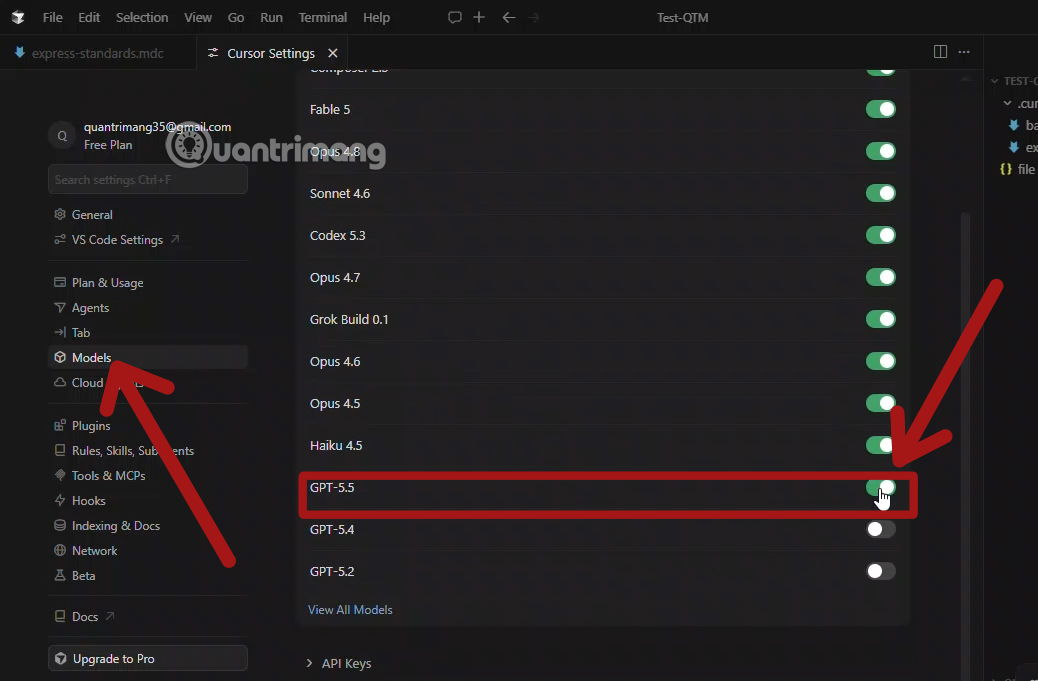
Do not add an API key simply because a model is missing. Cursor can bill supported third-party models through its own plans, while bring-your-own-key options have separate requirements and limitations. Use the authentication method documented for your version and organization.
Select the model in Agent or Chat
- Open Cursor's Agent or Chat panel.
- Start a new conversation when changing models for a substantial task. This avoids carrying an unnecessarily large or irrelevant context from an older session.
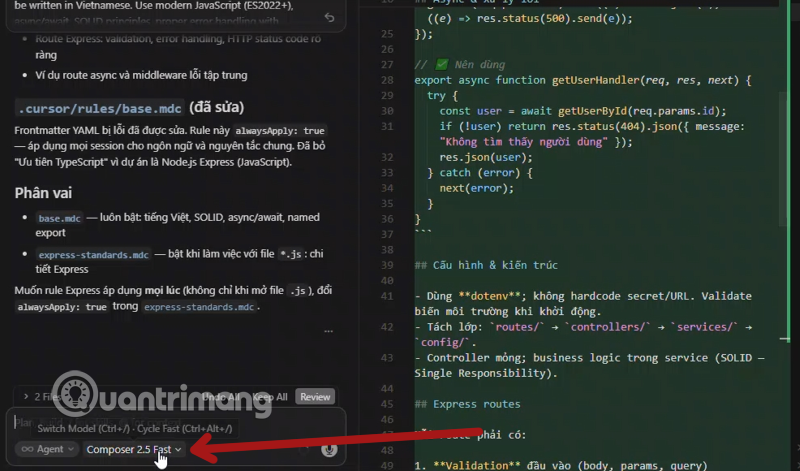
- Open the model menu in the panel and select the exact OpenAI model name shown there. If GPT-5.5 is absent, choose a current alternative that fits the task rather than trying to type an unsupported identifier.
- Choose a reasoning or speed option only if Cursor exposes it. Higher effort can help with difficult work, but it can also take longer and use more tokens.
- Describe the goal, constraints, relevant files, and validation command in the first prompt.
A safer workflow for coding tasks
Model choice matters less than giving the agent a bounded task and reviewing what it changes. For any change that touches several files:
- Start from a clean Git state. Commit or stash unrelated edits so the new diff is easy to inspect.
- Ask for a plan first. Have the agent identify the likely files, assumptions, and tests before editing.
- Provide local context. Mention the framework, supported runtime versions, style rules, and acceptance criteria. A project-specific Cursor Rules file can keep recurring instructions out of every prompt.
- Limit the initial scope. A request such as “fix this function and add focused tests” is safer than “improve the whole project.”
- Review the diff. Pay special attention to authentication, authorization, migrations, dependencies, generated files, and deleted error handling.
- Run the real checks. Use the project's tests, formatter, linter, type checker, and build. A confident explanation from the model is not evidence that the code works.
If you are comparing editor-based agents with a terminal workflow, see the practical differences in our guide to using Claude Code in VS Code. You can also extend Cursor with familiar tooling by following the Cursor extension installation guide.

Which model should you choose?
Use the current model descriptions in Cursor instead of treating one model as universally best. A fast or lower-cost model is often sufficient for search, small edits, test generation, and routine refactoring. A stronger reasoning model is more appropriate for ambiguous bugs, architecture work, unfamiliar repositories, or changes with many interacting constraints.
If Cursor offers an automatic routing option, it can be convenient for mixed workloads. Select a specific model when reproducibility, a known capability, or predictable cost matters more than automatic selection. For OpenAI's own current model descriptions, consult the official Codex model guide; availability inside Cursor is still determined by Cursor.
Troubleshoot a missing or unavailable model
| Symptom | Likely explanation | What to check |
|---|---|---|
| The old GPT-5.5 label is missing | The catalog has changed or the model was replaced | Compare the picker with Cursor's current models page and choose the supported successor |
| OpenAI models do not appear | Outdated app, account restriction, or organization policy | Update Cursor, sign out and back in, and ask the team administrator about model controls |
| The model is visible but cannot run | Plan, usage-pool, billing, or regional restriction | Open the usage dashboard and billing settings; read the error message before retrying |
| The selected model changes | Auto routing is enabled or a new session used a default | Select a fixed model for the task and confirm the label before sending the prompt |
| Responses stop during a large task | The request is too broad, context is excessive, or usage is constrained | Split the work into smaller stages, start a focused thread, and inspect current usage |
What GPT-5.5 means here
GPT-5.5 was an official OpenAI model for complex coding and professional work, and OpenAI made it available in Codex. That does not mean a permanent Cursor model named “GPT-5.5 Codex” exists. Product names, provider integrations, and model menus are separate things. Select the exact label Cursor shows today, and treat screenshots in older tutorials as orientation rather than proof of current availability.
This distinction also prevents two common mistakes: purchasing a plan based on an outdated quota claim and assuming that a missing legacy model indicates a broken installation. Check the live model picker, the Cursor usage dashboard, and the two providers' official documentation before committing a large repository task.
Related Articles
 How to Add a GitHub MCP Server to Cursor9 minutes read
 OpenAI Launches GPT-5-Codex: Upgrading Codex with Dynamic4 minutes read
 How to Use Claude in Cursor: What You Need to Know7 minutes read
 What Is Plan Mode in Cursor?8 minutes read
 OpenAI Codex User Guide with 3 Real-World Examples10 minutes read
 Is the Codex or Claude Code Better for AI in Programming: Explained10 minutes read
Reader Comments 0
Sign in with email or Google to join the discussion.