Table of Contents
Kuaishou (快手) is the China-focused short-video and livestreaming service from the company that also operates Kwai internationally. They are related products, but their content, account systems, language support, regional availability, and some features can differ. If you specifically want the Chinese service, install Kuaishou only from its official website or an official app-store listing—never from an unverified “APK download” button.

Kuaishou or Kwai: which app do you need?
| App | Best for | Where to get it |
|---|---|---|
| Kuaishou (快手) | China-focused content and services; interface may be primarily Chinese | Kuaishou's official website or its verified Apple App Store listing |
| Kwai | The international service, with availability and language support varying by country | Google Play or the Apple App Store in supported regions |
The two apps should not be treated as interchangeable. An account created in one service may not provide the same access in the other, and a feature shown in an old screenshot may have moved or disappeared. If you simply want an international short-video app, compare the options in TipsMake's guide to TikTok alternatives for creating and sharing videos.
Download Kuaishou from an official source
On iPhone or iPad
- Open the verified Kuaishou App Store listing.
- Check that the app name is 快手 and that the listed developer is Beijing Kwai Technology Co., Ltd.
- Tap Get and complete Apple's normal installation process.
The listing may not be available in every App Store region. Changing an Apple Account region can affect subscriptions, payment methods, and store credit, so do not change it solely to bypass an availability restriction without reviewing Apple's requirements.
On Android
- Visit the official Kuaishou website and use its download option. Confirm that the address remains on a kuaishou.com domain.
- If Android asks whether the browser may install unknown apps, grant that permission only to the browser used for this official download.
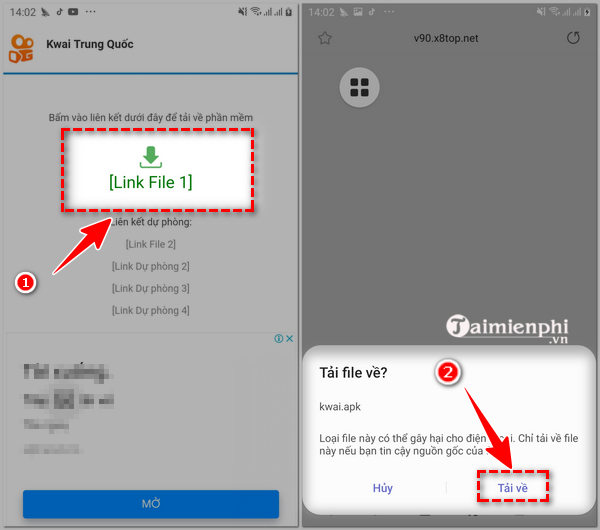
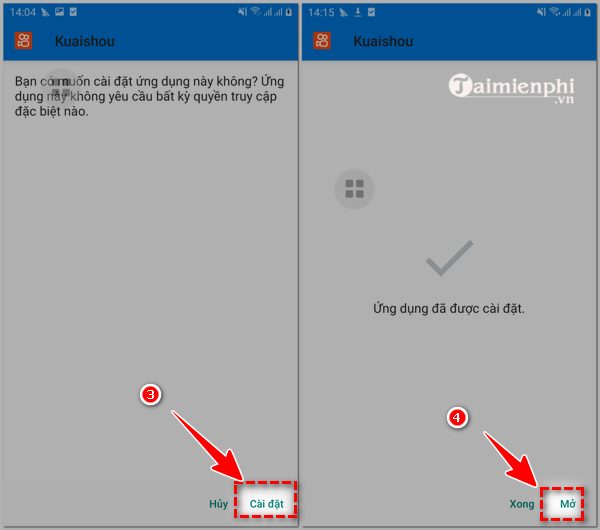
- Open the downloaded package, review the app name and requested permissions, and tap Install.
- After installation, return to Settings > Apps > Special app access > Install unknown apps and turn that browser's permission off again.
The exact Android menu names vary by phone maker. Avoid third-party APK mirrors when the developer provides an official download. If the official package is unavailable for your device or region, use global Kwai from its verified Google Play listing instead. TipsMake also explains the trade-offs among alternative Android app stores and APK sources.
What the older installation screens show
The following screenshots document an earlier Android installation flow. They remain useful as orientation, but button labels, permission prompts, and the app interface can change with each release.
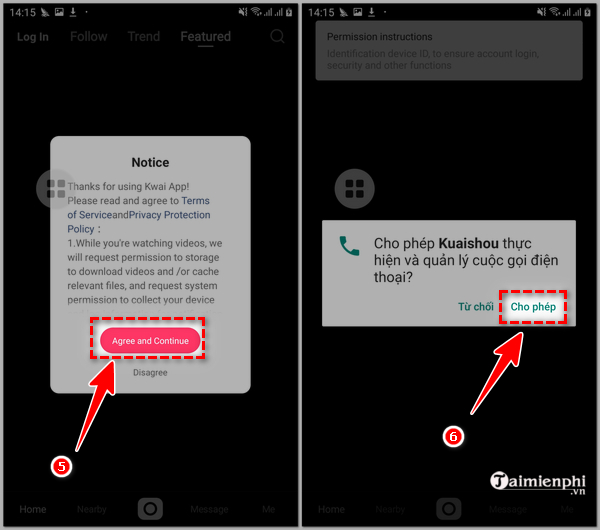
Do not approve every permission automatically. Camera access is needed to record video, microphone access is needed to record sound, and photo access is needed to import media. Phone, contacts, precise location, or other permissions are not required for basic offline editing; deny them unless you understand and want the associated feature. You can change a permission later under Settings > Apps > Kuaishou > Permissions.
Create a Kuaishou account
You can usually browse some public content without completing every account step, but posting, following, messaging, or livestreaming may require sign-in. The available methods depend on the app version and region.
- Open Kuaishou and tap the profile or Me tab.
- Select a supported sign-in method. If phone registration is offered, choose your country code and enter a number you control.
- Enter the verification code sent by the service. Never share that code with another person or enter it on an unrelated website.
- Choose a display name and review the privacy, discoverability, and message settings before publishing.
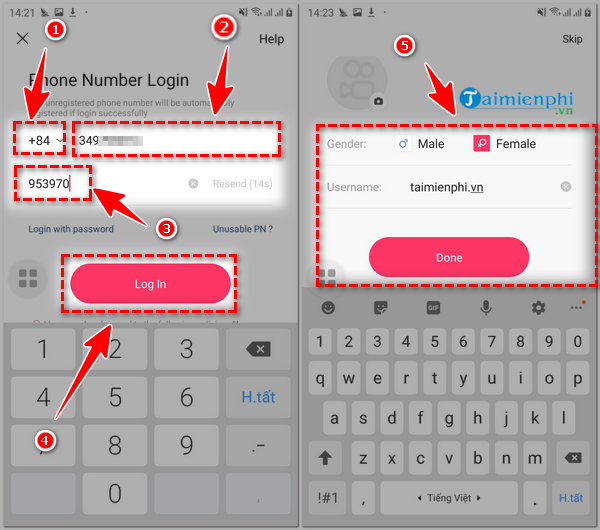
Do not assume that a +84 or other non-Chinese number will always be accepted; supported country codes and verification delivery can change. Some China-specific functions, including parts of livestreaming, payments, or commerce, may require additional identity or regional verification. Do not use someone else's identity or buy a pre-verified account.
Record, edit, and post a short video
- Tap the central create or camera button.
- Allow camera and microphone access only if you plan to record inside the app. To edit an existing clip, select the album option and grant access only to the photos or videos you want to use when Android or iOS offers limited access.
- Record a clip or import media. Depending on the version, the editor may offer speed, timer, music, text, stickers, filters, trimming, or effect controls.
- Preview the complete video. Check that speech is audible, text is readable, and copyrighted music is permitted for your intended use.
- Tap Next, add a concise caption, choose the audience and interaction settings, then post only when you are comfortable with who can view it.
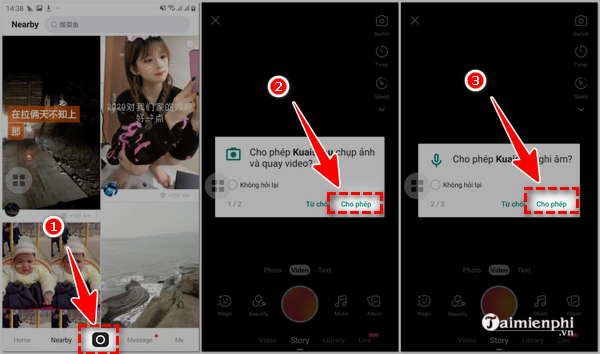
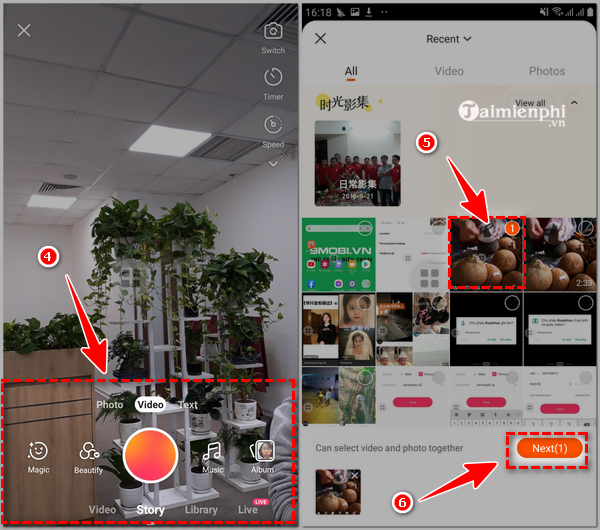
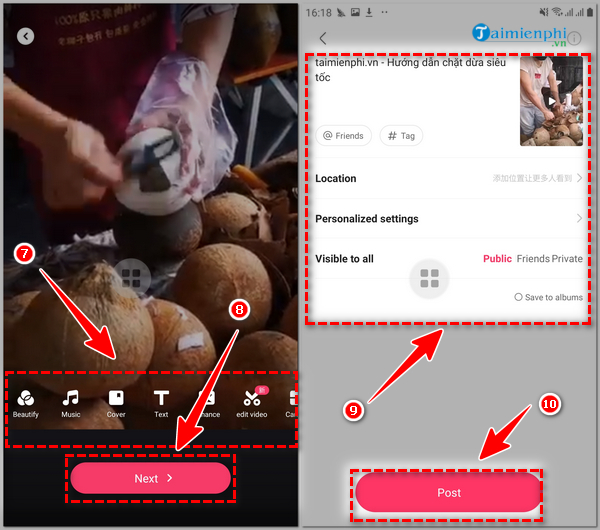
Menus such as Home, Nearby, Messages, Live, and Profile can vary. A Nearby feed or location tag can reveal more than expected, so keep precise location access off unless you deliberately need it. If autoplay is the main concern, use the settings described in TipsMake's guide to controlling autoplay on social apps where the app version provides a matching option.
Use Kuaishou on a computer
The safest desktop option is the official Kuaishou website in a current browser. It can be used to view public content and may offer account functions after sign-in. An Android APK is not a native Windows installer. Avoid websites that repackage it as an unofficial “Kuaishou for PC” executable, and use an emulator only if you understand its permissions and download it from the emulator developer's official site.
If installation or verification fails
- “App not installed”: delete the incomplete file, confirm sufficient storage, restart the phone, and download a fresh copy from the official source.
- Package blocked: verify the download domain. Do not disable Play Protect or other device security merely to force installation.
- No verification code: confirm the country code and number, wait before requesting another code, and check whether that region is supported.
- Interface is difficult to read: use the international Kwai app instead of relying on screen-translation overlays that can see sensitive content.
- Unexpected permission request: deny it first. The app can ask again when you use the related feature.
Because Kuaishou is an online platform, its registration rules, feature access, and regional availability can change. The official website and verified store listing are the reliable places to confirm the current download.
Related Articles
 How to Use Kwai on Your Phone, Add Effects, Parody a Hot Video Voice5 minutes read
 How to Make Money by Kwai: Set Money to Earn Money5 minutes read
 How to Find Friends on Kwai: Search for Friends on Kwai5 minutes read
 How to Download Video Kwai to Your Phone4 minutes read
 How to Download and Install Chinese Zing Speed on Your Computer5 minutes read
 How to Turn Back Time on Kwai6 minutes read
Reader Comments 0
Sign in with email or Google to join the discussion.