Table of Contents
CrystalDiskInfo reads health information reported by supported HDDs and SSDs. It can highlight warning signs, but a “Good” result is not a guarantee that a drive will keep working. Use it alongside a tested backup, not as a replacement for one.
If a drive is already disappearing, producing read errors, or making unusual mechanical noises, prioritize important data before running additional tests. Repeated scans cannot repair physical damage.
Install or open CrystalDiskInfo
- Get CrystalDiskInfo from Crystal Dew World, the developer’s website. Do not confuse it with CrystalDiskMark, which is a performance benchmark.
- Install the setup package, or extract the portable archive into its own folder.
- Launch the executable appropriate for your system.
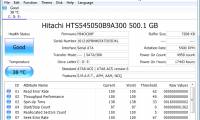
- If more than one drive is listed, select the drive you want to inspect. Check its model and capacity so you do not mistake one disk for another.
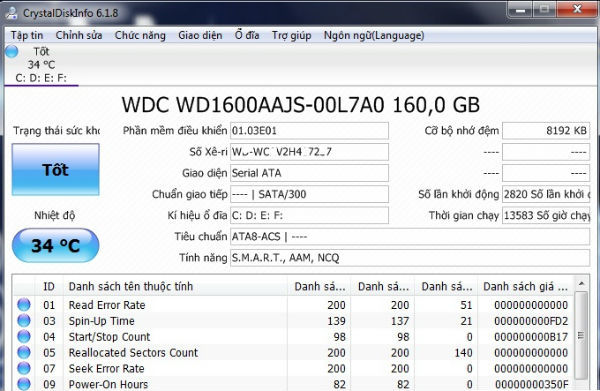
Read the main results
| Result | How to interpret it |
|---|---|
| Good | No warning has been triggered by the data and thresholds the program is using. Continue backing up. |
| Caution | Investigate the highlighted attributes and back up important files promptly. |
| Bad | Treat the drive as unreliable and prioritize data recovery or replacement. |
| Unknown or missing data | The device or connection may not expose usable health information. This is not a healthy result. |
Temperature is a current reading, not a diagnosis by itself. Compare it with the drive manufacturer’s specifications and consider whether it rises abnormally during ordinary work. Power-on hours and power-cycle counts describe usage; neither gives an exact manufacturing age or remaining lifespan.
SMART attributes differ among manufacturers and drive types. Do not apply an HDD sector-count interpretation to an unrelated SSD attribute or assume all raw values use the same units.
What C5 and C6 warnings mean
For the HDD attributes discussed in the original example, C5 is Current Pending Sector Count and C6 is Uncorrectable Sector Count. CrystalDiskInfo’s health-status documentation explains how these and other attributes can trigger a caution.
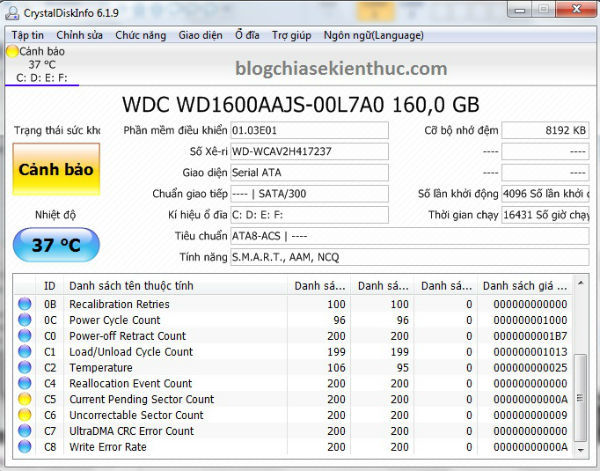
A warning does not predict the exact moment a drive will fail. It does mean that you should stop treating the drive as the only home for important data. Values that continue to rise or occur alongside read errors deserve particular attention.
- Copy irreplaceable files to a separate device or another verified backup destination.
- Open a sample of the copied files to confirm the backup is usable.
- Record the drive model, warning, and raw values so you can compare later readings.
- After protecting the data, consult the drive manufacturer’s diagnostics or replacement guidance.
If files are already unreadable and valuable, stop unnecessary activity and consider a recovery specialist before running write-based repairs. See the developer’s guidance for Caution and Bad results. The computer backup guide covers planning a separate copy.
Enable background monitoring if useful
The Function menu includes Resident mode in the interface shown below, allowing the application to remain in the notification area. Automatic refresh controls let you choose how often it updates the displayed readings. Menu names can vary with the version and language.
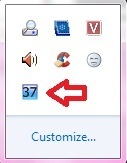
Choose a refresh interval that suits your use and check any alert settings. Background monitoring is useful only when you notice and act on warnings; it does not prevent sudden failure.
Why the old WMIC command is not enough
Older Windows guides used wmic diskdrive get status for a brief status response. The screenshot below is retained as a historical example. Microsoft has removed WMIC from newer Windows 11 releases, so it should not be presented as a current universal method.
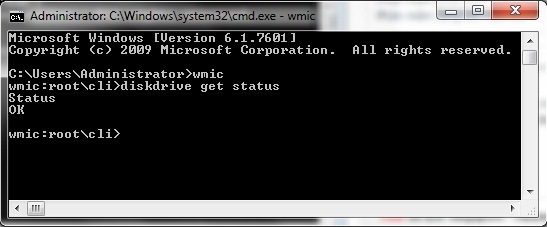
Read Microsoft’s WMIC documentation for its removal status. For this task, use the detailed drive information in CrystalDiskInfo or the manufacturer’s supported diagnostic utility.
If you need more examples of the displayed fields, see reading HDD and SSD health in CrystalDiskInfo. Keep backups current even when every displayed status is good.
Related Articles
 How to Check HDD and SSD Health with CrystalDiskInfo
 How to check hard drive health in 3 ways
 5 ways to check hard drive effectively to help periodically check the hard drive
 Instructions for installing and using CrystalDiskInfo to check hard drives
 CrystalDiskInfo - Software to check information on the health of your hard drive
 Check the health status of your hard drive
Reader Comments 0
Sign in with email or Google to join the discussion.