Table of Contents
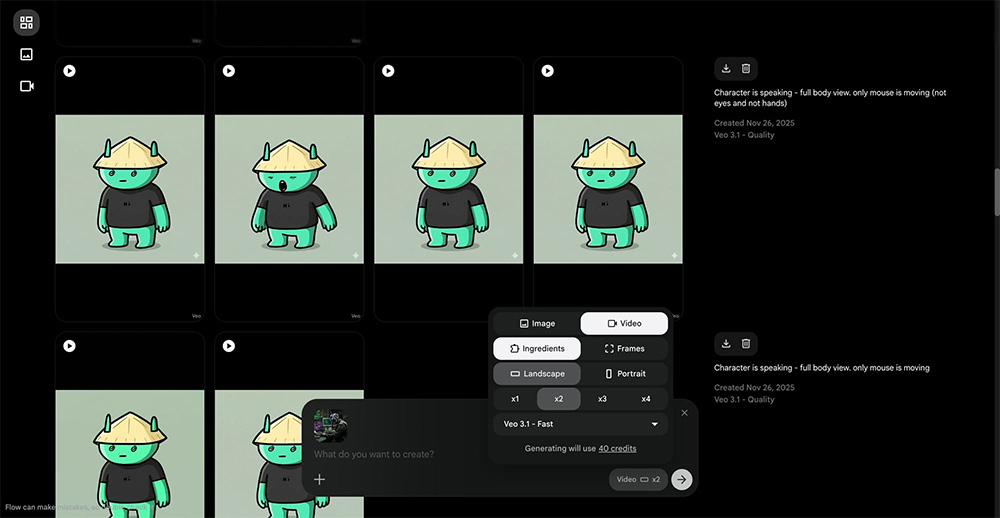
Google’s February 25, 2026 Flow update brought image creation and editing closer to its video-generation workflow. The company said capabilities from Whisk and ImageFX were moving into Flow, allowing creators to generate, refine, and animate assets in one workspace.
What changed in the workspace
The redesigned interface gives images a more prominent role. Google described an asset grid with search, filters, sorting, and collections, plus ways to reference specific assets while composing a prompt.
Images generated with Nano Banana can become ingredients or frames for Veo video generation. That shortens the handoff from making a reference image to animating it. For a practical example, see combining reference images in Flow.
More control over edits
The update introduced a lasso tool for selecting an image region and requesting a change in natural language. Drawing on an image can also indicate where an edit belongs. Google additionally described controls for extending clips, inserting or removing objects, and directing camera movement.
A precise selection helps communicate intent, but inspect the entire result. Faces, labels, lighting, and details outside the intended edit may still need correction.
What about older Whisk and ImageFX projects?
Google announced that an opt-in transfer of Whisk and ImageFX projects and assets would begin in March 2026. This was a rollout announcement, not a claim that every library had already moved automatically.
If you have older work, check the transfer options shown in your account and verify the assets after migration. Keep copies of important exports before reorganizing a project.
Use the update in a small project first
Create or upload one reference image, make a single edit, and then use the approved image for a short video test. Check continuity, framing, and text before spending more generation credits. TipsMake’s Flow storyboard guide covers planning a sequence of scenes.
Available controls, models, and usage allowances can vary with your account. The original demonstration below shows the announced workflow.
Related Articles
 How to Create Your Own Video Editing Tools Directly on Flow?4 minutes read
 How to Create a Video from a Single Image Using Google Flow3 minutes read
 How to Combine Photos Using Google Flow3 minutes read
 How to Create a Storyboard on Google Flow4 minutes read
 How to Create a Dialogue Video from Just Two Images Using Google Flow6 minutes read
 How to Create AI Videos Shot with Drones on Google Flow: Step-by-Step Guide5 minutes read
Reader Comments 0
Sign in with email or Google to join the discussion.