Table of Contents
If the Windows Taskbar disappears only while a browser is open, the browser is usually in full-screen mode, the Taskbar is set to auto-hide, or the window is extending onto another display. Try F11 first, then check the Windows settings below.
1. Exit browser full-screen mode
- Press F11 in Chrome, Edge, or Firefox. On some laptops, press Fn + F11.
- Move the pointer to the top of the screen and use the browser's full-screen exit control if one appears.
- Press Esc to close a full-screen video, presentation, or web app.
A maximized browser window should still leave the Taskbar visible. Full-screen mode deliberately covers it. If F11 restores the bar, Windows itself is working normally.
2. Turn off Taskbar auto-hide
On Windows 10, press Windows + I and open Personalization > Taskbar. Turn off Automatically hide the taskbar in desktop mode. Windows 11 places the equivalent option under Personalization > Taskbar > Taskbar behaviors.
On Windows 7, right-click the Taskbar and open Properties:
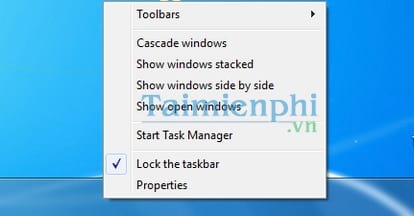
Clear Auto-hide the taskbar and select Apply.
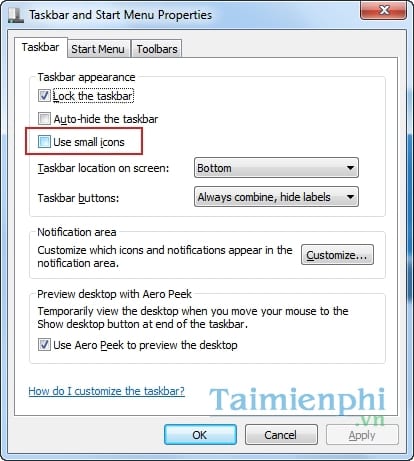
If you want to keep auto-hide enabled but the bar will not return when you move the pointer to the screen edge, follow the guide to fix a Taskbar that will not auto-hide correctly.
3. Check the display mode and main monitor
Press Windows + P. Select PC screen only for one display or Extend for a multi-monitor workspace. An incorrect projection mode can place the Taskbar on a screen you are not looking at.
Next, open Settings > System > Display, select the monitor you want to use, and enable Make this my main display. On older Windows versions, the Display control may look like this:
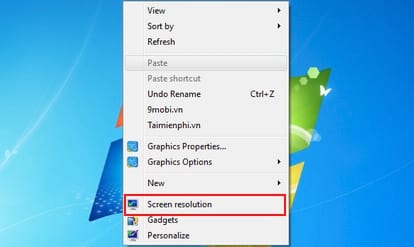
Use the display's Recommended resolution rather than choosing an arbitrary lower setting.
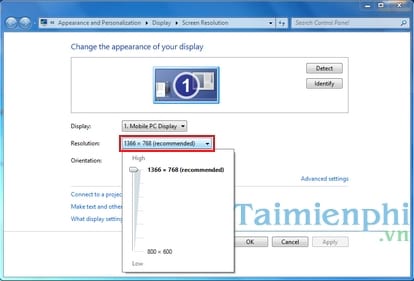
For more detail, review Windows projection modes or learn how to keep the Taskbar on one monitor.
4. Restart the browser and Windows Explorer
- Save open tabs and close every browser window.
- Press Ctrl + Shift + Esc to open Task Manager.
- Select Windows Explorer and choose Restart.
- Reopen the browser and test a normal window before restoring previous tabs.
If the browser immediately returns to full-screen mode, press F11 again and review its startup options or extensions. Disable recently installed display, full-screen, kiosk, video, or window-management extensions one at a time.
5. Check whether the Taskbar is frozen
Press the Windows key. If Start does not open and the Taskbar ignores clicks in every application, the issue is not browser-specific. Use the broader guide to fix an unresponsive Windows 10 Taskbar.
6. Restart the PC
A restart clears temporary browser, graphics, and Explorer state. If the problem returns, install browser, Windows, and graphics-driver updates from their official sources. Avoid changing the registry or resetting Windows until you have isolated whether the trigger is full-screen mode, auto-hide, a second display, or a browser extension.
Related Articles
 5 Extremely Effective Ways to Fix the Frozen Taskbar Error4 minutes read
 How to Fixing SSL Errors When Browsing the Web3 minutes read
 Fixing the Auto-Hide Correctly Feature on the Windows 10 Taskbar5 minutes read
 VPN Errors: Summary of Common VPN Error Codes6 minutes read
 Taskbar on Windows 10 Does Not Work, This Is a Fix5 minutes read
 How to Fix the White Taskbar Error on Windows 104 minutes read
Reader Comments 0
Sign in with email or Google to join the discussion.