Table of Contents
To create a DouYu account, use the platform's official registration page, select your phone's country or region code, create a password, request an SMS code, and accept the current agreements before submitting the form. You can browse many DouYu streams without an account, but signing in is generally required for chat, follows, purchases, and creator features.

Before you register
- Use only a
douyu.comorpassport.douyu.compage. Avoid third-party account sellers and unofficial registration services. - Use a phone number that you control and can keep. DouYu may use it for login and account recovery.
- Prepare a unique password that you do not use on another site.
- Registration availability, international SMS delivery, and identity requirements can vary by country and account feature.
DouYu's current privacy policy says phone registration uses a mobile number, password, and verification code. It also notes that livestreaming and certain interactive features can require real-name verification, potentially using an identity document or passport and facial verification.
Create a DouYu account on the official website
- Open the official DouYu registration page. If the site sends you to the main page, select the profile icon and choose the registration option.
- Choose your country or region code. Do not automatically select +84 unless you are using a Vietnamese phone number; mainland China uses +86, and other regions have their own codes.
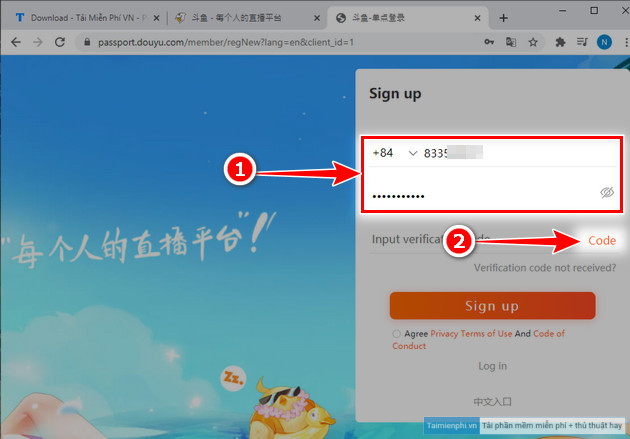
- Enter the mobile number in the format requested by the form.
- Create and confirm a strong password.
- Select the button to request an SMS verification code, then complete any visual challenge.
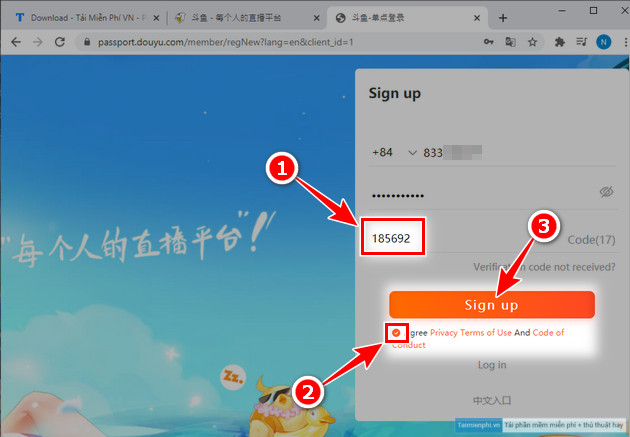
- Enter the code promptly. Do not share it with anyone.
- Read the linked privacy policy, registration agreement, and community rules. Check the consent box only if you agree.
- Select the registration button. DouYu may sign you in automatically or ask you to log in.
The current registration form is primarily Chinese but includes a For English switch in some versions. Browser translation can help explain navigation labels, but do not rely on automatic translation alone when accepting legal agreements.
Older interface: find the English registration form
The following screenshots show an earlier mobile-to-desktop route. DouYu changes its navigation periodically, so use these as visual reference rather than exact current labels.
1. Select the profile icon.
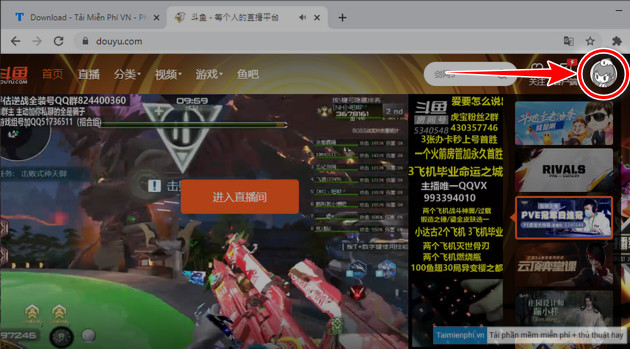
2. Switch to the PC version if the mobile page does not expose registration.
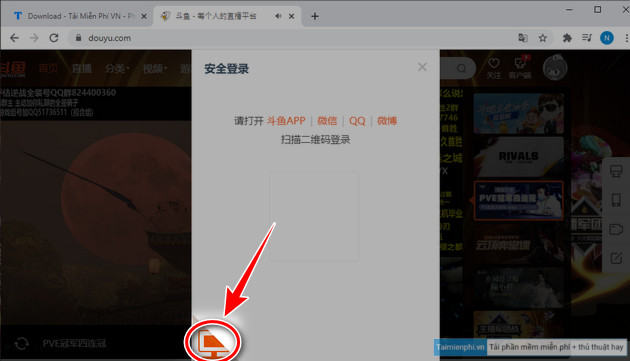
3. Select For English.
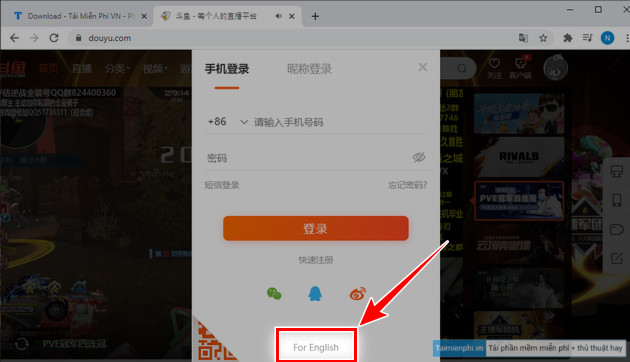
4. Open the desktop registration page.
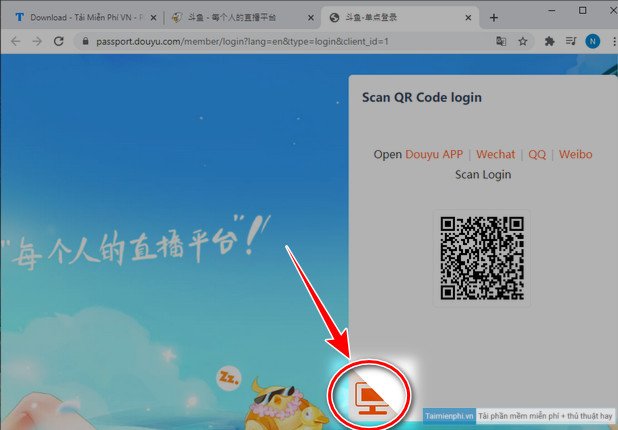
5. Select Sign Up.
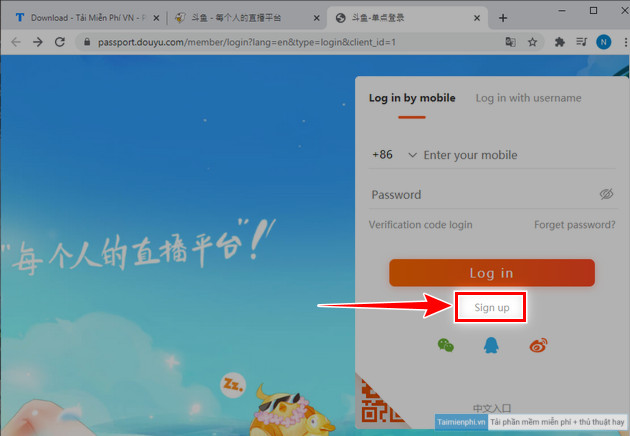
Enter your number and verification code
Choose the calling code that matches the SIM receiving the message. The screenshot below uses +84 only as an example for Vietnam.
After requesting a code, enter the SMS value in the verification field, read the current terms, and submit the form. Never send the code to a person claiming to be support. DouYu's own account-security notice warns users not to reveal passwords or SMS and login codes through unofficial channels.
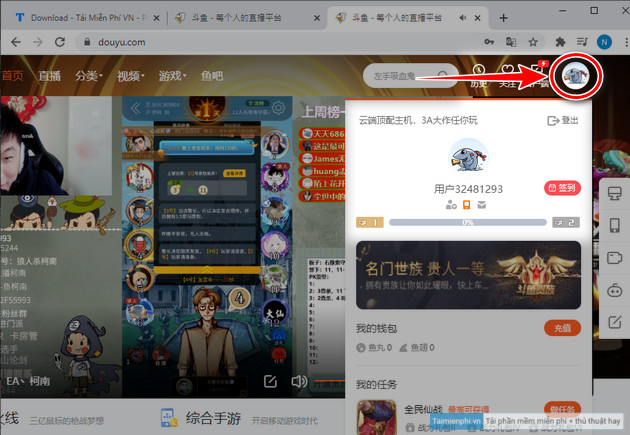
Change your nickname
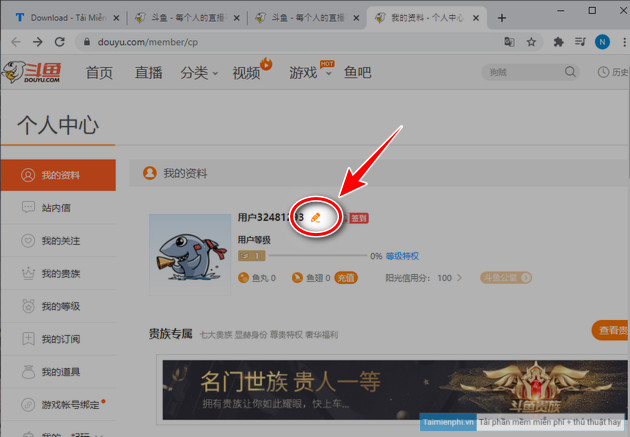
After signing in, select your avatar to open the account area. Look for the personal profile or editing option, then change the nickname if DouYu permits it. Names must follow platform rules, and the site may limit how often a name can be changed.
If the SMS code does not arrive
- Check the country code and remove a leading zero if the form's example indicates international formatting.
- Wait for the request timer before trying again; repeated requests can trigger a temporary limit.
- Confirm that the phone can receive international or short-code SMS messages.
- Disable browser translation temporarily if it prevents the verification widget from loading.
- Try the official DouYu app or registration page on another supported browser.
- If the region is unavailable or the code repeatedly fails, use DouYu's official customer-service link rather than a paid workaround.
Real-name verification and livestreaming
A viewer account and an approved broadcaster account are not the same. Starting a livestream, joining certain live interactions, or using monetization features may require additional identity, age, payment, or creator checks. Provide only your own accurate details through DouYu's official verification flow. Do not borrow, buy, rent, or share a verified account.
Registration alone does not guarantee income. Creator eligibility, revenue sharing, taxes, content rules, and regional access must be checked in the current DouYu creator terms before streaming commercially.
Keep the account secure
- Do not reuse the DouYu password elsewhere.
- Keep the bound phone number and recovery details current.
- Sign out on shared computers and review unfamiliar login activity.
- Do not scan a login QR code sent by a stranger.
- Use DouYu's official recovery process if you lose access; accurate registration history can matter during verification.
For broader context on the service, see our overview of major Chinese social platforms. If your goal is to produce streams rather than only watch them, compare the workflows in our OBS Studio and Wirecast guide before choosing capture software.
Related Articles
 How to Register ChatGPT, Register Chat GPT Easiest, Most Detailed3 minutes read
 How to Register for Fbang, Create an Fbang Account4 minutes read
 Create an Apple ID, Register an Apple ID Account for Less Than 36 minutes read
 How to Create a VTC Account: Complete Guide6 minutes read
 Register Zalo, How to Create a Zalo Account on Your Computer4 minutes read
 How to Register a Shopee Account on a Computer6 minutes read
Reader Comments 0
Sign in with email or Google to join the discussion.