
Artificial intelligence
How to Create and Review Lesson Slides with Brisk
Create a Brisk presentation from a defined lesson objective, adjust grade, language, length, and style, then verify the exported Google Slides deck before teaching.
Browse more Explore artificial intelligence guides, AI tools, model comparisons and practical tutorials for using AI at work and in everyday tasks.
Create a Brisk presentation from a defined lesson objective, adjust grade, language, length, and style, then verify the exported Google Slides deck before teaching.

Turn an approved lesson source into a Brisk podcast draft, set its audience and length, verify the script and audio, then download it with an accessible transcript.

Compare Gemma 4's open-weight, self-hosted control with Gemini's managed API, tools, media models, and operational convenience across privacy, hardware, cost, and deployment needs.

Compare individual AI plans by monthly price, core strengths, ecosystem fit, and usage limits, with a practical way to choose without overpaying.

Create global User Rules or project-specific .mdc files in Cursor, choose the correct activation type, and test concise instructions without breaking your workflow.

Review Claude Opus 4.7's high-resolution vision, task budgets, adaptive thinking, effort controls, and the API changes developers must handle when migrating.

Learn how leaders can assign accountability, redesign human-agent workflows, and scale AI adoption with clear controls, useful metrics, and employee feedback.

Understand prompt injection, excessive permissions, poisoned memory, unsafe tools, and cascading failures—and apply concrete controls before deploying AI agents.

Connect Cursor to GitHub through the official MCP server using GitHub's hosted endpoint or local Docker image, with secure token handling and verification steps.

Connect Supabase to Cursor through MCP, verify the available tools, and reduce risk with project scoping, read-only access, and manual approvals.

Animate a still image or use reference images to generate a short clip in Google Vids, then review, insert and edit it in your video project.
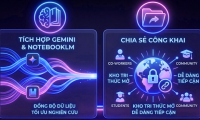
Enable public-link access, share notebook or Studio content, and check source visibility, sign-in requirements and how to restrict access again.

Find who bills your Claude Pro subscription, cancel through Anthropic, Apple or Google Play, and confirm the renewal has stopped.
Give Claude a clear spreadsheet layout, generate formulas for bonuses and lookups, and test the results for missing values, duplicates and version compatibility.

A reported solar-system simulator test shows why finding a real bug is not enough: an AI fix must address the failure, use consistent units and pass checks.
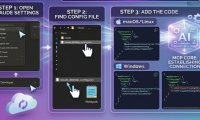
Configure Claude Desktop to access a dedicated local folder, validate the JSON setup, test read-only access first, and understand filesystem permissions.

Grok is the AI assistant developed by xAI. Understand its search, coding, voice and media tools, along with the limits of live information and AI-generated answers.

Plan short scenes, reuse a smartphone character reference, generate clips in Grok Imagine, and check visual continuity before editing them into a story.

Grok can help summarize public discussion on X. Use specific searches, inspect original posts and avoid treating a social-media sample as public opinion.

Choose suitable AI tasks, assign human review, protect business data and measure whether a pilot improves quality as well as speed.