Table of Contents
Cursor Rules give the AI persistent instructions about how you want it to work. Use User Rules for personal preferences that should follow you across repositories, and use Project Rules for conventions that belong to one codebase. Project rules are stored as .mdc files under .cursor/rules/, so they can be reviewed and committed with the rest of the project.
A useful rule is short, testable, and scoped to the work it governs. It should describe real repository conventions—not try to replace documentation, tests, or code review.
User Rules or Project Rules?
| Rule type | Use it for | Where it lives |
|---|---|---|
| User Rules | Your personal response style, preferred tools, or habits that apply across repositories | Cursor Settings; not stored in the project |
| Project Rules | Architecture, commands, file conventions, testing requirements, and repository-specific workflows | .cursor/rules/*.mdc |
| Team Rules | Organization-wide guidance managed centrally | Available through supported team administration features |
Do not put a private preference in a shared project rule unless the team agrees with it. Conversely, a repository's build and test commands belong in version-controlled project guidance rather than in one developer's global settings.
How to add a global User Rule in Cursor
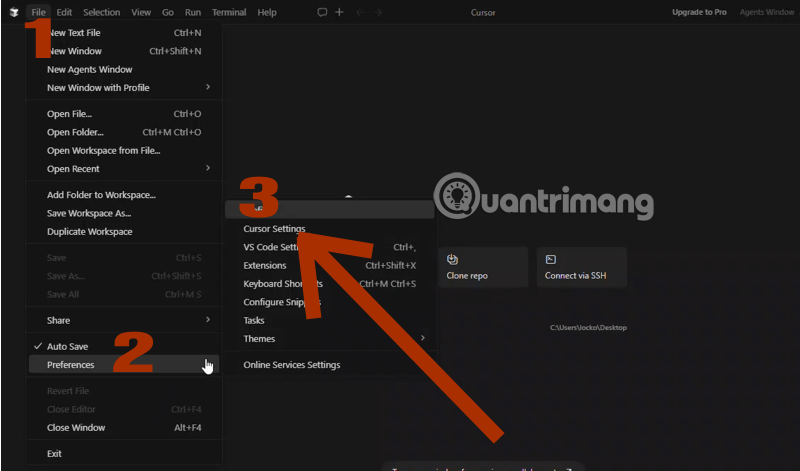
Step 1: Open Cursor Settings.
Launch Cursor, open Settings, and find the Rules area. Menu wording can change between releases, so use the Settings search box for “Rules” if the section is not immediately visible.
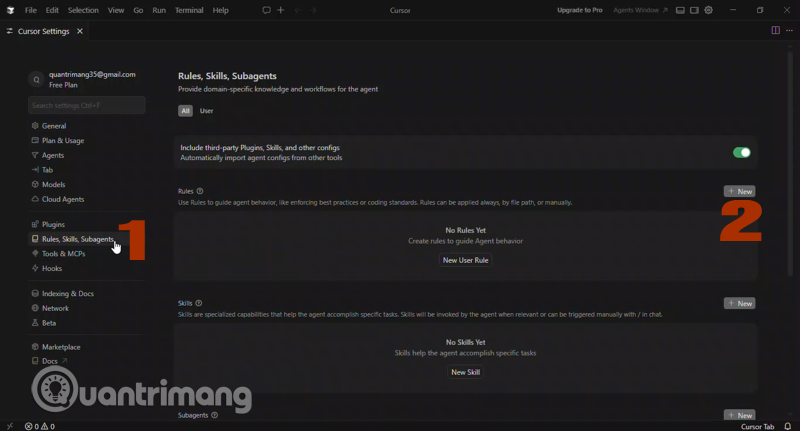
Step 2: Find User Rules.
User Rules apply to your Cursor sessions across repositories. Add only instructions that should remain true regardless of the codebase—for example, “Explain potentially destructive terminal commands before running them” or “When requirements are ambiguous, ask one focused question before editing files.”
Step 3: Write a focused instruction.
Prefer direct, observable requirements. “Write good code” is too vague. “Run the repository's formatter and relevant tests after modifying TypeScript files, then report failures” tells the agent what action and evidence are expected.
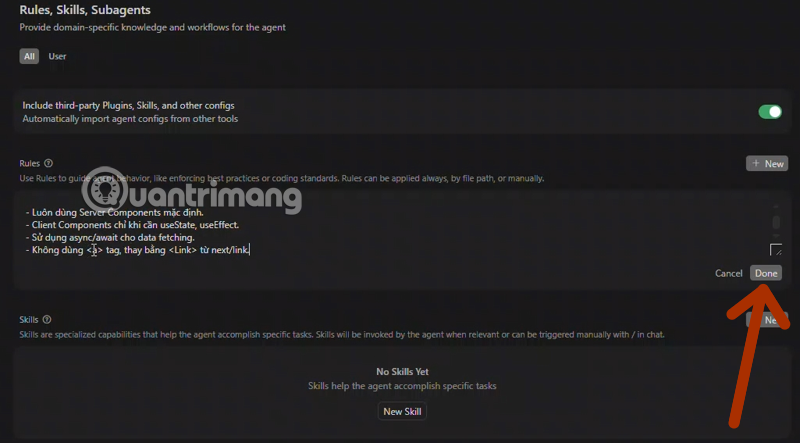
Step 4: Save and test it.
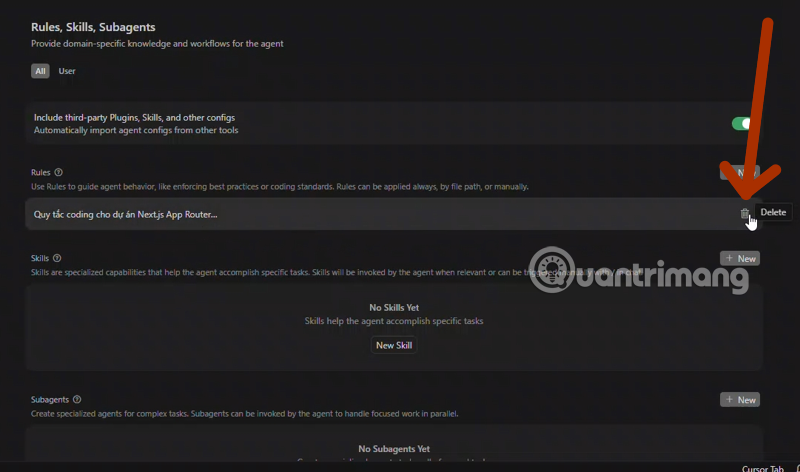
Open a new Agent conversation and give it a small, reversible task. Inspect the proposed changes and verify that the instruction was followed. If a rule is frequently ignored or produces unwanted behavior, make it narrower rather than adding more forceful wording.
How to create a Project Rule
Project Rules are the better choice for shared coding standards. Cursor provides an interface for creating them, but you can also create an .mdc file directly in the repository:
.cursor/
└── rules/
    ├── typescript-style.mdc
    ├── testing.mdc
    └── api-conventions.mdc
Cursor's rules system recognizes project rule files with the .mdc extension. A plain .md file in this directory is not treated as a Project Rule. If you want plain Markdown guidance, Cursor also supports an AGENTS.md-style approach; choose one convention and document it for the team.
Understand the four activation modes
The rule type controls when Cursor includes a rule in context:
- Always Apply: included in every chat session. Use sparingly for short, universal repository requirements.
- Apply Intelligently: Cursor selects the rule when its description matches the task.
- Apply to Specific Files: included when a file in context matches the configured glob pattern.
- Apply Manually: included only when you mention the rule, such as
@my-rule.
The frontmatter fields behind those modes are description, globs, and alwaysApply. Cursor documents the exact behavior in its official Rules reference.
Correct .mdc structure
An .mdc file contains YAML frontmatter followed by Markdown instructions. Keep the delimiters and line breaks intact:
---
description: TypeScript conventions for application source files
globs:
  - "src/**/*.ts"
  - "src/**/*.tsx"
alwaysApply: false
---

# TypeScript conventions

- Keep strict type checking enabled.
- Do not introduce any without explaining why.
- Reuse existing validation utilities before adding a dependency.
- After editing, run the relevant formatter and tests.
This rule attaches when matching TypeScript files are in context. If alwaysApply is true, Cursor treats the rule as always active and the description or globs do not provide conditional scoping.
Practical Cursor Rule examples
React component conventions
---
description: Conventions for React components
globs: "src/components/**/*.tsx"
alwaysApply: false
---

- Use PascalCase for component names and filenames.
- Follow patterns in neighboring components before adding a new abstraction.
- Preserve accessibility labels and keyboard behavior.
- Add or update tests for changed user-visible behavior.
API error handling
---
description: Error handling for server API routes
globs:
  - "src/api/**/*.ts"
  - "app/api/**/*.ts"
alwaysApply: false
---

- Validate untrusted input at the boundary.
- Do not expose stack traces or secrets in client responses.
- Use the repository's existing error type and logger.
- Include a test for each new error path.
Manual release checklist
---
description: Checklist for preparing a release
alwaysApply: false
---

When the release-checklist rule is requested:

1. Run the documented test and build commands.
2. Summarize user-visible changes.
3. Identify configuration or migration requirements.
4. Do not publish or deploy without explicit approval.
How to write rules that work reliably
- Describe repository facts. Include actual commands, paths, frameworks, and constraints the agent can verify.
- Keep one subject per file. Separate testing, API, UI, and database guidance so each rule can be scoped properly.
- Use examples selectively. A short correct example clarifies a pattern; a large copied file consumes context and becomes stale.
- Avoid contradictions. Review User Rules and Project Rules together when the agent behaves inconsistently.
- State validation steps. Name the formatter, type checker, or test command instead of saying only “make sure it works.”
- Do not embed secrets. Rules are instructions, not a place for tokens, passwords, or private keys.
- Update rules with the codebase. Remove references to retired folders, commands, and libraries.
Common problems and fixes
The rule never activates
Confirm that the file ends in .mdc, is under .cursor/rules/, and contains valid frontmatter. For an intelligent rule, make the description specific enough for Cursor to recognize the relevant task. For a file-scoped rule, test the glob against the real repository path.
The rule appears in every task
Check whether alwaysApply is set to true. Change the rule to an intelligent, file-specific, or manual mode if its instructions are not universally relevant.
The rule is followed inconsistently
Remove vague language and conflicts first. Split a long rule into focused files, place essential constraints near the top, and verify that requested tools or commands actually exist. Rules guide an AI agent; automated tests and linters should still enforce critical behavior.
The rule consumes too much context
Move long tutorials and design documents into dedicated files. Keep the rule as a concise instruction that points the agent to the relevant repository documentation when needed.
A maintainable setup
For a small project, start with two or three Project Rules: repository workflow, code conventions, and testing. Add another only when repeated mistakes show a genuine need. Commit the files, review changes like code, and explain their purpose in the project documentation.
If you are deciding whether Cursor fits your workflow, compare Replit and Cursor and review our list of AI tools for programming. The best rule set is not the largest one; it is the smallest set that makes expected behavior clear and verifiable.
Related Articles
 How to Use Cursor Rules File (. Mdc)11 minutes read
 Instructions on Setting up Rules in Cursor8 minutes read
 Why Have People Stopped Using Cursors to Write Code?7 minutes read
 How to Use Rules in Outlook to Manage Your Inbox7 minutes read
 Cursor AI: User Guide with 10 Practical Examples13 minutes read
 Is Cursor Worth It? AI Coding Editor Review for 202614 minutes read
Reader Comments 0
Sign in with email or Google to join the discussion.