Table of Contents
Typing faster is mostly a matter of accurate finger placement, repeatable practice, and removing the habits that make you look down or correct the same errors repeatedly. Start with a reliable baseline, then improve accuracy before trying to raise your words-per-minute score.

What counts as a fast typing speed?
Typing tests usually report words per minute (WPM) and accuracy. There is no single score that defines “fast” for every person: the required pace depends on the language, keyboard layout, text complexity, and job. A short list of common words is also easier than a paragraph with punctuation, numbers, and unfamiliar names.
Use your current result as the baseline. The most useful goal is a speed you can sustain while keeping errors low enough that corrections do not erase the time saved.

Eight ways to type faster and more accurately
1. Measure a consistent baseline
Use the same typing test, language, duration, and keyboard for two or three attempts. Record WPM and accuracy, then use the middle result. Retest weekly rather than after every practice session.
2. Put accuracy before speed
Slow down enough to press the correct key with the correct finger. Repeatedly typing an error at full speed can reinforce the wrong movement. Once your keystrokes become reliable, increase the pace gradually.
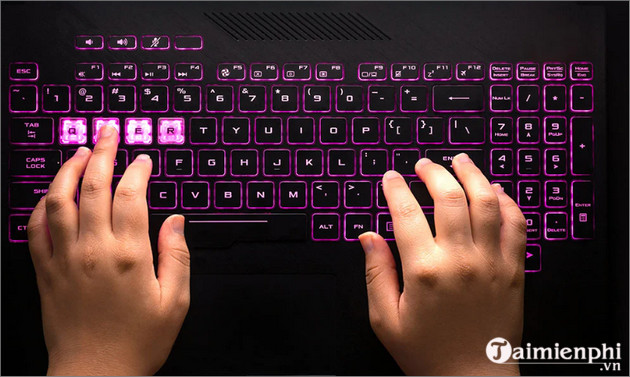
3. Use all fingers
Touch typing assigns each finger a section of the keyboard. This reduces the distance your hands travel and makes movements predictable. Avoid typing most letters with only one or two fingers, and do not use whichever hand happens to be closer.
4. Return to the home row
Rest the left fingers on A, S, D, F and the right fingers on J, K, L, ;. The raised marks on F and J help your index fingers find their starting positions without looking at the keyboard. Return to this row after reaching for other keys.
5. Set up a comfortable workstation
Keep the keyboard directly in front of you at a height that allows relaxed shoulders and forearms. Sit with your back supported and feet stable. Position the screen so you can read it without repeatedly bending your neck. There is no need to force every joint into an exact angle; comfort and a neutral, relaxed posture are more important.
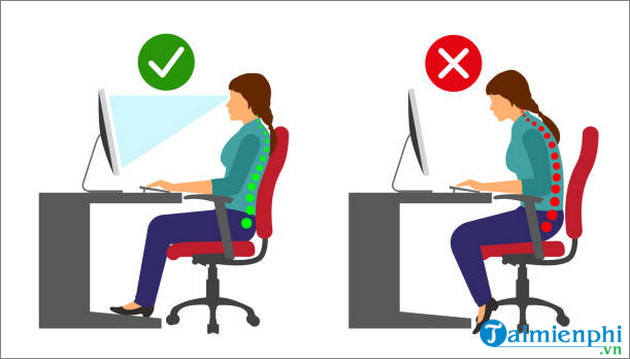
Keep your wrists mostly straight and avoid resting their full weight on a hard edge while typing. If you feel pain, numbness, or persistent tingling, stop and adjust your setup; seek qualified medical advice if symptoms continue.
6. Stop watching your hands
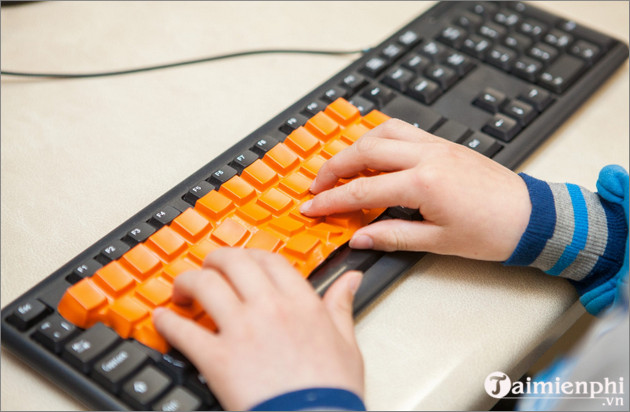
Look at the text on screen so you can detect mistakes immediately. If looking down is a strong habit, practice with a simple keyboard cover or a sheet of paper that blocks the key labels without interfering with your hands.
7. Practice small problem areas
Ten focused minutes are usually more useful than a long, unfocused session. Review your test results, identify two or three weak keys or letter combinations, and repeat exercises that target them. A pangram such as “The quick brown fox jumps over the lazy dog” touches every letter, but real words and sentences provide better varied practice.
8. Take breaks before technique deteriorates
Pause when your shoulders tense, your wrists bend awkwardly, or errors begin to increase. Stand, change position, and let your hands relax. A break is part of effective practice, especially when you type for work as well as training.
A simple 15-minute routine
- 2 minutes: type slowly from the home row to warm up.
- 8 minutes: practice one weak group of keys or a structured lesson.
- 3 minutes: type a realistic paragraph with punctuation.
- 2 minutes: review errors and record the lesson result.
For a step-by-step foundation, follow TipsMake's guide to touch-typing finger placement. You can measure a baseline with these online typing tests, or install RapidTyping for guided lessons. If the keyboard itself responds slowly, address that first with these Windows keyboard-delay fixes.
Track progress without chasing a record
Keep a small log with the date, test settings, WPM, accuracy, and the keys you missed. Look for a trend across several weeks. The best improvement is a pace you can maintain on ordinary emails, documents, or code—not an isolated peak score on an unusually easy test.
Related Articles
 How to Improve Typing Speed: Step-by-Step Guide17 minutes read
 To Improve Typing Speed, Visit These 5 Websites5 minutes read
 2 Tools to Improve Typing Speed for Programmers5 minutes read
 How to Check Your Typing Speed Online, Online Typing Test4 minutes read
 Software for Practicing 10-Finger Typing and Increasing Typing Speed11 minutes read
 How to Increase Typing Speed with Powertoys on Windows8 minutes read
Reader Comments 0
Sign in with email or Google to join the discussion.