Table of Contents
Headphone burn-in is the practice of playing music or noise through new headphones for many hours in the belief that the drivers will loosen and sound better. Small physical changes can occur in mechanical systems, but there is no reliable basis for treating a 40-, 100-, or 200-hour routine as necessary for every headphone—or as a guaranteed way to improve bass, treble, soundstage, or distortion.
Why the idea sounds plausible
A dynamic driver includes a diaphragm, voice coil, and suspension. Pads and ear tips also compress and settle with use. These are mechanical parts, so it is plausible that some parameters may change slightly early in their life.
Plausibility is not proof of an audible, beneficial, or repeatable change. A driver could change too little to hear, stabilize within normal production tolerance, or shift in a direction that is not an improvement. Planar, dynamic, balanced-armature, and other drivers should not be assigned arbitrary break-in requirements based on price or size. Learn how these mechanisms differ in the headphone driver guide.
Listener adaptation is a major factor
The auditory system quickly adapts to a new frequency balance. A headphone that initially sounds bright, dark, bass-heavy, or narrow can feel more natural after several listening sessions even if its physical output is unchanged. Memory for exact tonal balance is also short, making a comparison separated by days unreliable.
Other uncontrolled changes can affect the impression:
- ear-pad position and seal;
- headband adjustment and clamp;
- different volume, source, recording, or EQ;
- firmware or app settings on wireless headphones;
- mood, expectation, fatigue, and background noise.
Burn-in is not an audiophile-versus-gaming distinction
| Claim | More useful conclusion |
|---|---|
| Expensive dynamic or planar headphones require 40–200 hours | No universal duration is established; follow a documented manufacturer instruction only when it has a clear purpose |
| Gaming or Bluetooth headphones do not change because they use DSP | DSP does not prevent physical changes, but it also does not prove that other drivers need deliberate burn-in |
| Burn-in expands soundstage and deepens bass | Those are listening claims that need level-matched, controlled evidence for the exact model |
| Pink noise conditions the entire frequency range safely | Noise is unnecessary for normal use and can damage a driver if played too loudly |
| A premium headphone must sound poor until broken in | Evaluate defects, fit, and tuning immediately while the return period is active |
The safest approach: use the headphones normally
Listen at a comfortable, moderate level with familiar material. This lets the pads settle naturally and gives you time to understand the tuning without unattended stress tests. There is no need to rotate genres to “exercise” different parts of the frequency spectrum; a linear driver responds to the signal continuously.
If a manufacturer explicitly recommends a conditioning period, follow its volume and duration instructions, but do not let that delay a defect report or exceed the seller's return window.
Why pink noise and burn-in apps are unnecessary
Pink noise has equal energy per octave; white noise has equal power per unit bandwidth. Both are useful test signals in appropriate measurement work. Neither has been shown to be a required “treatment” for consumer headphones.
Continuous noise can be dangerous to the driver or anyone who accidentally puts the headphones on if the level is high. A percentage such as “40–60% volume” is not a safety standard because source voltage, gain, headphone sensitivity, and software volume curves differ.
Music-player loops, signal generators, and websites can generate valid test tones, but they do not make burn-in more effective. Never play a sine sweep or noise file at an unknown level, and do not leave a powered setup unattended for days.
How to test a claimed change more fairly
A meaningful test needs more than listening before and after a week:
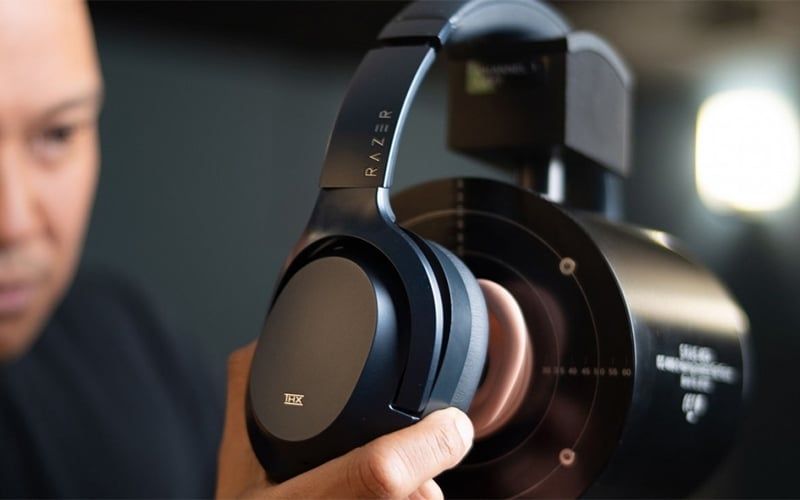
- Record baseline frequency-response, impedance, and distortion measurements on a repeatable fixture if one is available.
- Remove and reseat the headphone several times to estimate ordinary fit and placement variation.
- Condition one unit only while keeping an otherwise matched unit as a control.
- Measure both again under the same temperature, seal, position, level, and equipment.
- For listening, compare quickly, level-match closely, conceal which sample is which, and repeat enough trials to distinguish a result from guessing.
Even then, two retail units may differ slightly from the factory. A measured difference between them is not automatically caused by burn-in.
Check for defects immediately
Burn-in will not fix:
- a dead or intermittent channel;
- large left/right imbalance;
- buzzing, rattling, or scraping at ordinary levels;
- a loose connector or broken cable;
- wireless dropouts, battery faults, or corrupted firmware;
- painful fit or a shell that does not seal.
Test several recordings and another source, inspect removable cables and tips, and use a low-level channel test. Contact the seller or manufacturer while warranty and return options remain available.
What can legitimately change over time?
Ear pads can soften, flatten, or lose their seal, changing the distance and cavity around the ear. Tips can wear, filters can clog, headband clamp can relax, and batteries can age. These changes may be more audible than any early driver conditioning and are usually maintenance issues, not improvements.
Wireless firmware or automatic EQ can also change sound. Compare app settings, ANC mode, codec, and firmware before attributing a difference to mechanical burn-in.
Bottom line
You do not need a special burn-in playlist, fixed hour count, lossless file, rest schedule, or dedicated app. Use new headphones normally, evaluate them within the return period, and let familiarity develop without assuming every change is physical.
For sound-quality evaluation, the Hi-Fi headphone guide covers frequency response, distortion, fit, source, DAC, and amplifier factors. When level matching different headphones, also account for sensitivity and impedance rather than using the same volume-control position.
Related Articles
 The Most Standard Way to Burn in Headphones for Smooth Sound!9 minutes read
 5 Tips to Choose the Right Cheap Headphones6 minutes read
 8 Brands You Can Trust When Buying Headphones8 minutes read
 Top 10 Best Wired Headphone Headsets10 minutes read
 What Is Headphone Impedance?8 minutes read
 Top 5 Cheap, Cheap Headphone Headphones9 minutes read
Reader Comments 0
Sign in with email or Google to join the discussion.