Table of Contents
A desktop PC can connect to Wi-Fi as long as it has a wireless adapter. The easiest upgrade is a USB Wi-Fi adapter; a PCIe card usually provides better antennas and a more permanent connection. If you are building or replacing the PC, a motherboard with integrated Wi-Fi is the cleanest option.
First check whether Wi-Fi is already installed
In Windows 11, open Settings > Network & internet. If a Wi-Fi section appears, turn it on and select Show available networks. You can also open Device Manager > Network adapters and look for an adapter whose name includes Wireless, Wi-Fi, 802.11, WLAN, Intel AX, Realtek Wireless, or a similar label.
If no wireless adapter appears, choose one of the hardware options below. A missing Wi-Fi button can also be caused by a disabled adapter or driver problem, so check TipsMake's guide to fixing a missing Wi-Fi icon in Windows 11 before buying hardware for a PC that previously connected wirelessly.
Option 1: USB Wi-Fi adapter
A USB adapter is the quickest and least invasive way to add Wi-Fi. Plug it into an available port, let Windows install a driver, and then connect from the network menu. If Windows does not recognize it, download the correct driver from the adapter manufacturer's official support page.
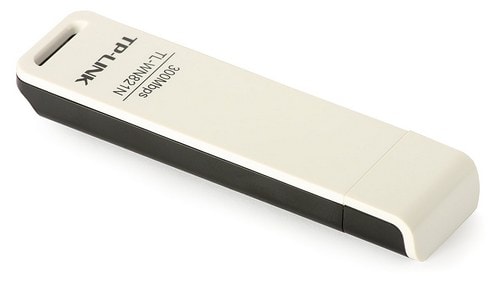
When a USB adapter is a good choice
- You do not want to open the computer case.
- You need a portable adapter that can move between PCs.
- The computer has no free PCIe slot.
- Your connection needs are moderate and the router is not far away.
Tiny “nano” adapters are convenient, but their small antennas can struggle behind a metal case or through several walls. For better reception, choose a model with an external antenna or place the adapter on a short USB extension cable above the desk. Prefer a USB 3.x port for adapters capable of high throughput.
Option 2: PCIe Wi-Fi card
A PCIe Wi-Fi card installs in a free expansion slot on the motherboard. Its external antennas and direct internal connection usually make it a better choice for gaming, large downloads, or a desktop located farther from the router.
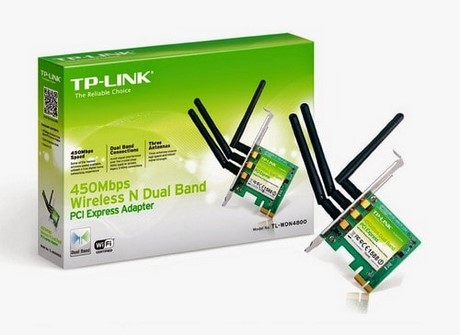
Installation outline
- Shut down the PC, unplug it, and move it to a stable work surface.
- Open the case and identify a compatible free PCIe slot.
- Remove the matching rear slot cover, seat the card evenly, and secure its bracket.
- If the card includes Bluetooth, connect its internal USB header cable as instructed by the manufacturer.
- Close the case, attach the external antennas, start Windows, and install the official driver if needed.
Check the motherboard manual before installation. Avoid touching contacts, do not force the card, and confirm that a large graphics card does not block the selected slot.
Option 3: Motherboard with built-in Wi-Fi
Many current motherboards include Wi-Fi and Bluetooth. This is convenient in a new build because the radio, antenna connectors, and drivers are designed as part of the board.
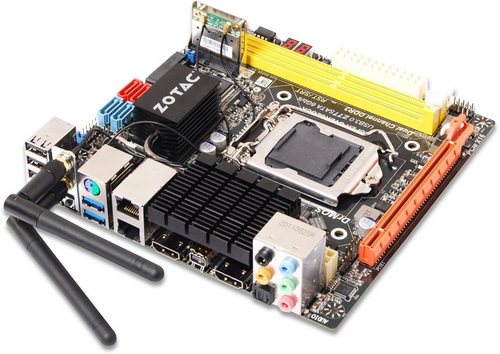
Replacing a working motherboard only to gain Wi-Fi is rarely cost-effective. A USB or PCIe adapter is normally the better upgrade. If you already own a Wi-Fi motherboard, remember to attach the supplied antennas; reception can be extremely weak without them.
How to choose the right adapter
- Router compatibility: an adapter cannot use a newer Wi-Fi generation unless the router supports it too. Wi-Fi 6 or 6E is a practical target for many current networks, while Wi-Fi 7 may make sense with matching equipment.
- Frequency bands: dual-band adapters support 2.4GHz and 5GHz. A 6GHz-capable adapter also requires a compatible router, operating system, and regional availability.
- Antennas: adjustable external antennas are helpful when the PC is under a desk or far from the router.
- Drivers: verify support for your exact Windows or Linux version before buying.
- Bluetooth: many PCIe cards combine Wi-Fi and Bluetooth, but Bluetooth may require a separate internal USB connection.
Connect after installation
- Select the network icon on the Windows taskbar.
- Turn on Wi-Fi and choose your network name.
- Select Connect, enter the password, and choose whether to connect automatically.
- Open a few sites or run a speed test to verify the connection.
If the adapter appears in Device Manager but cannot connect, update its driver, forget and rejoin the network, and restart both PC and router. The Windows 11 Wi-Fi troubleshooting guide covers these checks in order.
When Ethernet is still better
Wi-Fi is useful when running a cable is impractical, but Ethernet generally offers more consistent latency and avoids radio interference. For a stationary gaming PC, workstation, or computer that transfers large files to local storage, use a wired connection when possible. TipsMake's wired Ethernet setup guide explains the alternative.
Related Articles
 Additional Wi-Fi: How to Connect Wi-Fi to Desktop, PC7 minutes read
 Are There Ways to Connect Your Phone to a TV to Watch Videos?14 minutes read
 How to Connect Laptop to TV? 5 Ways to Connect the TV to Laptop6 minutes read
 How to Quickly Connect to Wi-Fi on a Desktop or Laptop Computer12 minutes read
 Top Most Popular Ways to Connect Laptop to TV8 minutes read
 How to Connect Wi-Fi to a Desktop Computer: Step-by-Step Guide6 minutes read
Reader Comments 0
Sign in with email or Google to join the discussion.