Table of Contents
Want More 2GB of Free Lifetime Storage on Google Drive? Spend 5, No covers the essential facts behind the topic, including what changed, why it mattered, and how it affected users.
Google Drive Overview
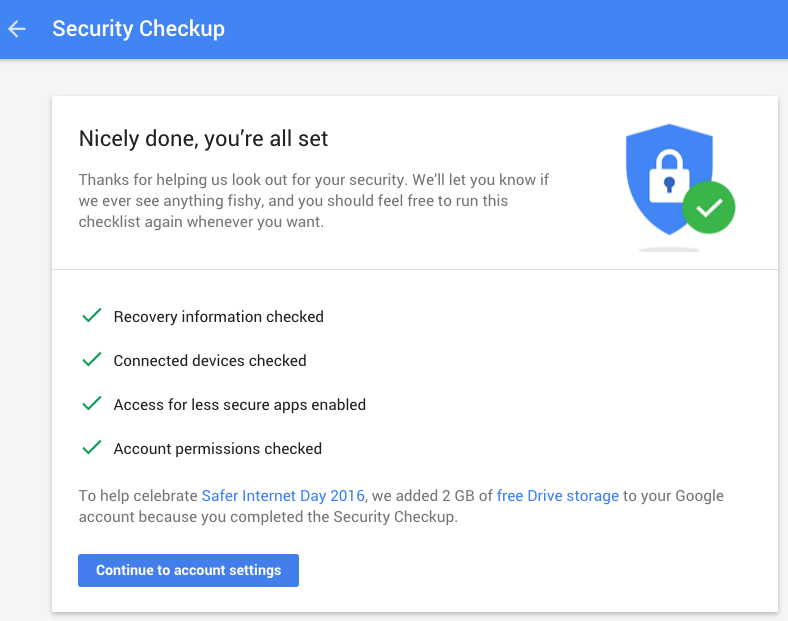
In practice, this is not the first time, remember that last year on this occasion Google also organized a similar program, Safer Internet Day 2015, this time the same way. All you need to do is:
1. Go to the Google login page at: https://security. Google. Com/settings/security/secureaccount? Pli=1
2. Check the information you have entered correctly (backup email address, phone number,.)
That's all, this process takes almost no more than two minutes. When completed, Google will notice as shown above, notice the last LINE, above the button Continue to account settings is visible, or you can check in Total storage.
And the good point: if you have done this in 2015, please do it again, Google will generously send you 2GB of free storage too.

Good luck!
FAQ
What does Want More 2GB of Free Lifetime Storage on Google Drive? Spend 5, No explain?
Want More 2GB of Free Lifetime Storage on Google Drive?.
Who is most affected by Google drive?
Spend 5, No covers the essential facts behind the topic, including what changed, why it mattered, and how it affected users.
What are the key takeaways from this topic?
Google Drive Overview In practice, this is not the first time, remember that last year on this occasion Google also organized a similar program, Safer Internet Day 2015, this time the same way.
Related Articles
 Free 100GB Offer from Zoolz, a Super Fast, Lifetime Storage Service5 minutes read
 6 Tips to Free up Storage Space on Google Photos7 minutes read
 How to Free up Space in Google Drive6 minutes read
 5 Little-Known Free Cloud Storage Apps6 minutes read
 Why Think Twice Before Buying a Lifetime VPN Plan?6 minutes read
 7 Tips to Free Up Space in Google Drive: Complete Guide9 minutes read
Reader Comments 0
Sign in with email or Google to join the discussion.