Table of Contents
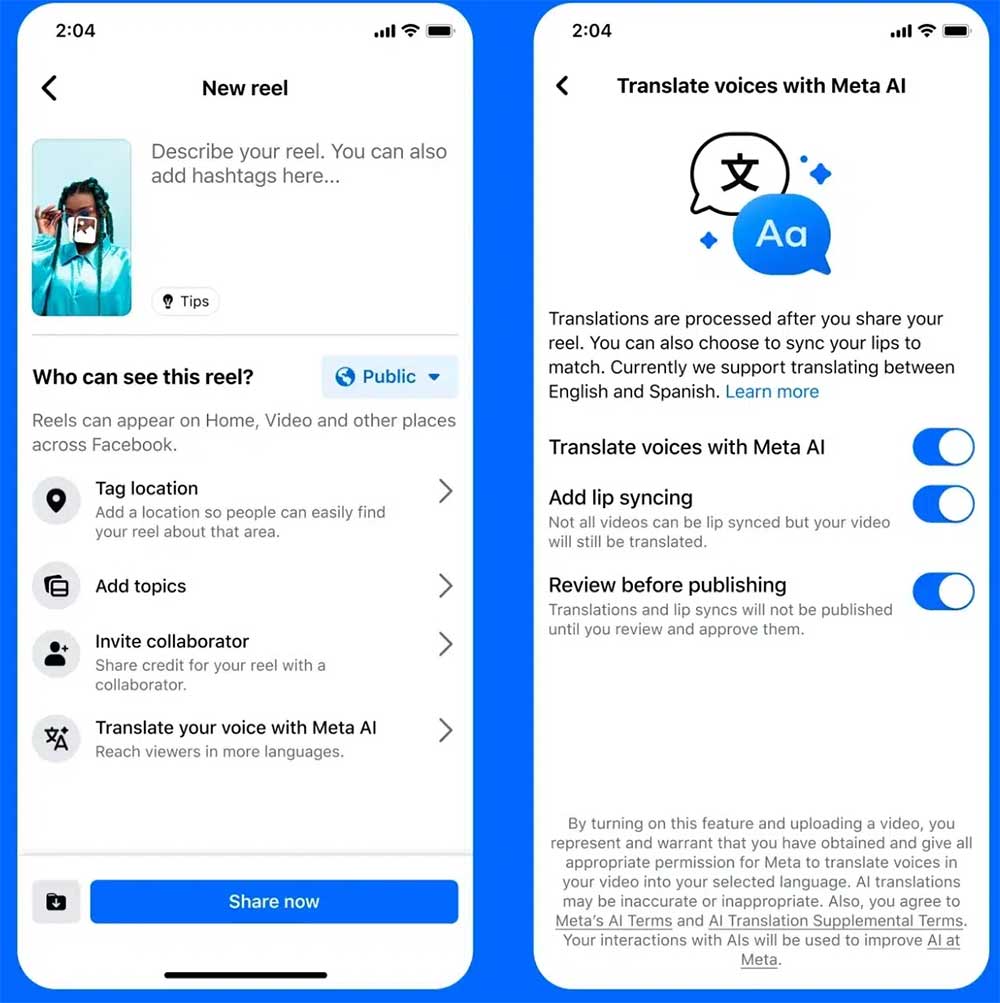
Meta now lets creators voice over Reels using AI, combining their voice and lip movements to translate content between English and Spanish. The AI will listen to your original recording, translate the audio, and recreate your voice in another language, matching your lip movements for a natural look. Here's a guide to voice over Reels videos.
How to Dub Reels Videos on Facebook and Instagram
If you're a creator with a public Instagram account or at least 1,000 Facebook followers, you can start using it today in regions where Meta AI is available (excluding places like the EU, UK, Brazil, and some others).
Before exporting Reels videos on Facebook and Instagram, click Translate your voice with Meta AI . Then turn on Add lip syncing.
Finally, everyone clicks Share now to proceed to post the video as usual.
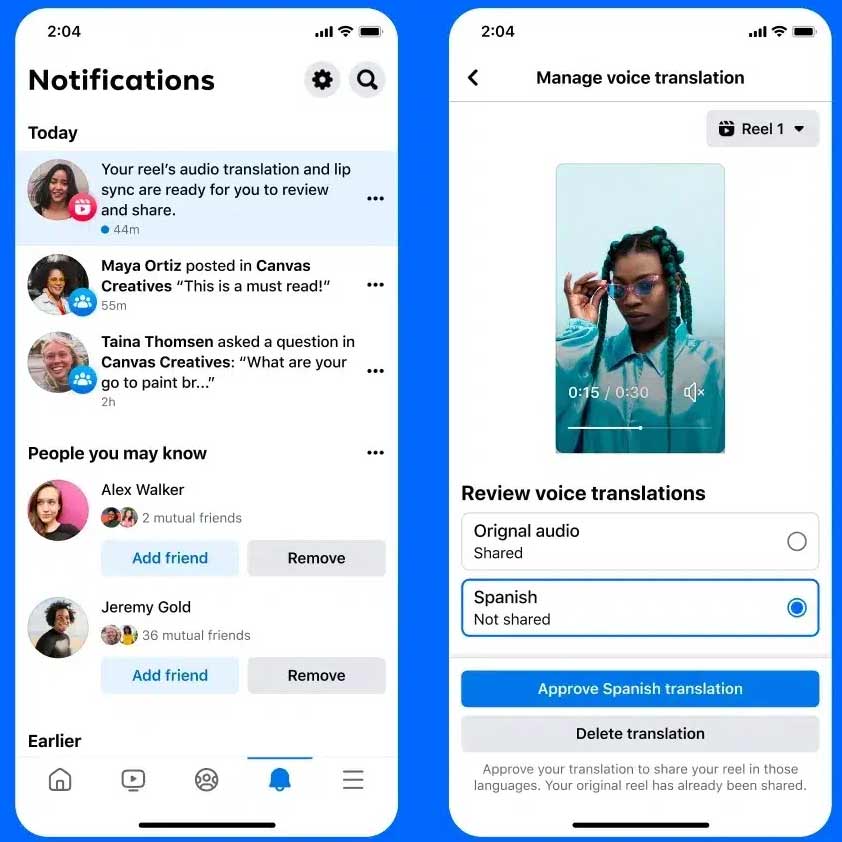
Once the video is complete, you'll get a notification when the AI is done. You can then approve it, delete the lip-sync, or delete the transcript entirely.
Meta also gives you new insights into Reel viewership in multiple languages, so you can track how your voiceover content is performing with viewers.
You can upload up to 20 different translated audio tracks to Facebook Reels through Meta Business Suite. Just go to the Reels editor, select Upload your own translated audio tracks under Closed captions & translations, and select the languages you want to upload.
You can add or change audio tracks even after the Reel has been published.
Final Thoughts
Overall, Facebook Reels Video Voiceover Tutorial is best understood by considering the main facts, practical context, and limitations together. Use the details above as a clear starting point and confirm time-sensitive information when necessary.
FAQ
What does this article explain about Facebook Reels Video Voiceover Tutorial?
Meta now lets creators voice over Reels using AI, combining their voice and lip movements to translate content between English and Spanish.
What should you know about How to Dub Reels Videos on Facebook and Instagram?
If you're a creator with a public Instagram account or at least 1,000 Facebook followers, you can start using it today in regions where Meta AI is available (excluding places like the EU, UK, Brazil, and some others).
Should time-sensitive details be verified?
Yes. Software features, game codes, product specifications, prices, and research findings can change. Confirm important details with an official or primary source when accuracy affects your decision.
Related Articles
 Facebook Reels Will Increase Video Length to 90 Minutes: What to Know4 minutes read
 How to Clean up Facebook Reels Video Viewing Interface: Step-by-Step Guide3 minutes read
 Meta Launched Facebook Reels Simultaneously in 150 Countries4 minutes read
 Guide to Finding Previously Watched Facebook Reels Videos5 minutes read
 How to Use the Instagram Reels Video Editing Tool: Step-by-Step Guide4 minutes read
 Instructions for Using Voiceover on iPhone4 minutes read
Reader Comments 0
Sign in with email or Google to join the discussion.