Table of Contents
LibreOffice, the popular open source office suite, has just released version 25.8 with many important changes in performance, security and compatibility with Microsoft Office.
The most notable point in this update is the official discontinuation of support for 32-bit Windows . That means LibreOffice 25.8 will no longer run on Windows 7, Windows 8 or other 32-bit operating systems. This is also the last version to support macOS 10.15.
In terms of features, Writer – the word processing application – has been significantly improved in the way it handles line breaks and hyphenation, making documents more consistent with Microsoft's Word format. Meanwhile, Calc – the spreadsheet application – has been added with a series of new functions such as TEXTSPLIT, CHOOSEROWS or WRAPCOLS, and has also accelerated the opening of complex XLSX files by up to 30%. With Impress – the presentation software – LibreOffice has added the ability to embed fonts in PPTX files and optimized the algorithm to determine the actual font used, thereby improving the quality when exporting to Microsoft formats.
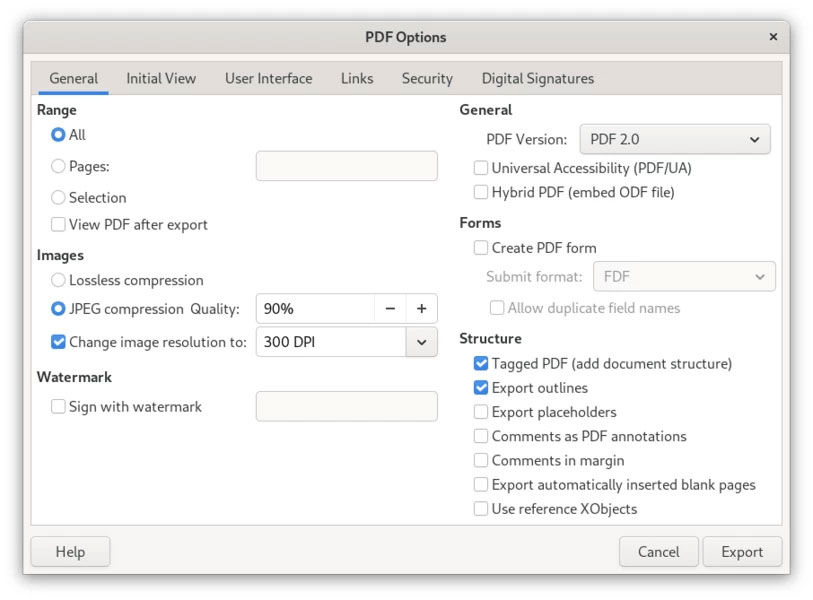
Another important upgrade is in PDF handling . LibreOffice 25.8 now supports the PDF 2.0 standard with modern AES-256 encryption, and improves compatibility with Adobe Reader when using digital signatures. This is an advantage over Microsoft Office, which is still stuck with the old PDF standard.
Additionally, the new version also brings a redesigned welcome interface, adds a 'Viewer mode' to open files as read-only, supports more accurate display of DOCX documents in Chinese, Japanese, and Korean, and improves the Draw drawing tool with default page margin display and the ability to import encrypted PDF files.
With the above changes, LibreOffice 25.8 not only affirms its position as a free alternative to Microsoft Office, but also shows its pioneering role in some features that even Office does not have yet.
Final Thoughts
The development covered in this article is worth following, but specifications, dates, and feature details may change until the relevant company or organization publishes an official confirmation.
FAQ
What is the main development covered in this article?
LibreOffice, the popular open source office suite, has just released version 25.8 with many important changes in performance, security and compatibility with Microsoft Office.
What should you know about the key details?
The most notable point in this update is the official discontinuation of support for 32-bit Windows. That means LibreOffice 25.8 will no longer run on Windows 7, Windows 8 or other 32-bit operating systems. This is also the last version to support macOS 10.15.
Is every reported detail officially confirmed?
Not necessarily. Product leaks, preview builds, research reports, and early announcements can change. Confirm important specifications, dates, and availability through an official source before making a decision.
Related Articles
 LibreOffice Improves Compatibility with Microsoft Office Files3 minutes read
 Libreoffice 7.2.2/7.1.6 , Libreoffice 7.2.2/7.1.6 Download6 minutes read
 LibreOffice Criticizes Microsoft for Using 'complicated' File Format4 minutes read
 Why Use Libreoffice Instead of Microsoft 365?5 minutes read
 What's New in Libreoffice Version 4.4?2 minutes read
 Microsoft Will Stop Providing Compatibility Support for Word, Excel and PowerPoint from April3 minutes read
Reader Comments 0
Sign in with email or Google to join the discussion.