Table of Contents
The most useful Windows keyboard shortcuts are the ones that replace repeated mouse actions: copy and paste, switch apps, search, open File Explorer, snap windows, capture part of the screen, lock the PC, and reopen a closed browser tab. Start with a small set and add shortcuts for tasks you perform every day.

Essential shortcuts that work in many apps
| Shortcut | Action |
|---|---|
Ctrl+C | Copy the selected item or text |
Ctrl+X | Cut the selected item or text |
Ctrl+V | Paste clipboard contents |
Ctrl+Z | Undo the last supported action |
Ctrl+Y | Redo in apps that support it |
Ctrl+A | Select all in the active context |
Ctrl+F | Find text or items in the active app |
Ctrl+S | Save the current document |
Ctrl+P | Open the print command |
Alt+Tab | Switch among open apps |
Alt+F4 | Close the active app or window |
Shortcuts are interpreted by the active application. For example, Ctrl+Y can redo an edit in one program and perform a different command in another. Check the app's menu or help when the result is unclear.
Windows key shortcuts
| Shortcut | Action in current Windows |
|---|---|
Windows | Open or close Start |
Windows+E | Open File Explorer |
Windows+I | Open Settings |
Windows+R | Open the Run dialog |
Windows+S | Open Search |
Windows+L | Lock the PC or show account switching |
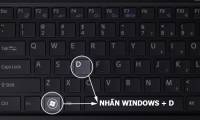
Windows+D | Show or hide the desktop |
Windows+Tab | Open Task View |
Windows+V | Open clipboard history after it is enabled |
Windows+Shift+S | Capture a selected screen region to the clipboard |
Windows+X | Open the Quick Link menu |
Windows+U | Open Accessibility settings |
Windows+. | Open the emoji and symbols panel |
Windows+Space | Switch input language or keyboard layout |
Windows+number | Open or switch to the taskbar app in that numbered position |
Several older lists are now wrong: Windows+Tab opens Task View rather than a “3D workspace,” Windows+Space switches input layouts rather than making windows transparent, and Windows+F opens Feedback Hub rather than a file search. Use Windows+S to search.
Arrange windows and virtual desktops
| Shortcut | Action |
|---|---|
Windows+Left/Right | Snap the active window to a side |
Windows+Up | Maximize the active window |
Windows+Down | Restore or minimize the active window, depending on its state |
Windows+Z | Open Snap layouts on supported Windows 11 configurations |
Windows+M | Minimize all windows |
Windows+Shift+M | Restore windows minimized with the desktop command |
Windows+Ctrl+D | Create a virtual desktop |
Windows+Ctrl+Left/Right | Switch virtual desktops |
Windows+Ctrl+F4 | Close the current virtual desktop |
File Explorer shortcuts
| Shortcut | Action |
|---|---|
Ctrl+Shift+N | Create a new folder |
F2 | Rename the selected item |
F5 | Refresh the window |
Alt+Up | Move to the parent folder |
Alt+Left/Right | Move backward or forward in folder history |
Ctrl+L | Select the address bar |
Delete | Move selected items to Recycle Bin when supported |
Shift+Delete | Delete selected items without sending them to Recycle Bin |
Use Shift+Delete carefully. Windows asks for confirmation in many configurations, but the normal Recycle Bin recovery path is bypassed.
Task and security shortcuts
Ctrl+Shift+Escopens Task Manager directly.Ctrl+Alt+Deleteopens the Windows security screen, where you can lock, switch user, sign out, change a password, or open Task Manager.Windows+Lis the faster choice when you only need to lock the computer.Windows+Ctrl+Shift+Bresets the graphics driver and can help when the display is unresponsive while Windows is still running; the screen may blink and a sound may play.
Ctrl+Shift+Delete is not a global “computer management” shortcut. In major browsers it usually opens the clear-browsing-data dialog, while other apps may ignore it or assign another action.
Browser tab and navigation shortcuts
| Shortcut | Common browser action |
|---|---|
Ctrl+T | Open a new tab |
Ctrl+W | Close the current tab |
Ctrl+Shift+T | Reopen the most recently closed tab |
Ctrl+Tab | Move to the next tab |
Ctrl+Shift+Tab | Move to the previous tab |
Ctrl+L | Select the address bar |
Ctrl+R or F5 | Reload the page |
Ctrl+D | Bookmark the current page |
Web applications can add their own commands. For example, TipsMake lists Shift-key shortcuts in Gmail; some Gmail shortcuts must be enabled in Gmail settings before they work.
Function keys depend on context
F1usually opens help, when the app provides it.F2renames a selected file in File Explorer but performs different actions elsewhere.F5refreshes File Explorer and browsers; in development tools it may start debugging.F6commonly cycles through interface regions, such as browser address and page areas.F11often toggles full-screen mode in browsers.
On laptops, media and brightness functions may share the F-row. You may need the Fn key or a keyboard setting to send a standard F-key command.
Windows and Mac shortcuts are not identical
macOS commonly uses the Command key where Windows applications use Ctrl, such as Command+C and Command+V. Window management, screenshots, app switching, and function-key behavior also differ. Do not mechanically replace every Ctrl with Command; use TipsMake's broader guide on keyboard shortcuts in Windows and macOS for platform-specific actions.
How to learn shortcuts without memorizing a giant list
- Choose five actions you repeat daily.
- Write their shortcuts next to the monitor for a week.
- Use menu labels and tooltips to discover app-specific commands.
- Add one or two new shortcuts only after the first set feels automatic.
- Review TipsMake's common Windows shortcuts when you need a wider reference.
Microsoft maintains the authoritative Windows keyboard shortcut reference. Hardware vendors and applications can add or override commands, so test a shortcut in the exact app and device you use.
Related Articles
 Pubg Keyboard Shortcuts - All the Pubg Keyboard Shortcuts You Need to Know3 minutes read
 All the Keyboard Shortcuts on Obscure Computers11 minutes read
 Keyboard Shortcuts in Illustrator Are Often Used, Keyboard Shortcuts Are7 minutes read
 The Most Important Keyboard Shortcuts You Need to Know8 minutes read
 Useful Keyboard Shortcuts in Microsoft Word (Part 2)8 minutes read
 Summary of All the Computer Shortcuts You Need to Know16 minutes read
Reader Comments 0
Sign in with email or Google to join the discussion.