Table of Contents
Windows Command Prompt uses Win32 console commands; calling every command a “DOS command” is imprecise on modern Windows. The most useful CMD commands let you navigate folders, inspect files, copy or move data, check network settings, list processes, and connect commands in a batch file. Start with read-only commands, quote paths containing spaces, and verify a target before using del, rmdir, or forced process termination.
Open Command Prompt and get help
Press Windows+S, type cmd, and open Command Prompt. You can also press Windows+R, enter cmd, and press Enter. Windows Terminal may open PowerShell by default; select a Command Prompt profile or run cmd when you specifically need CMD syntax.
help
dir /?
copy /?
help lists built-in commands. Appending /? shows syntax and options for a command. TipsMake also explains how to find CMD commands and ways to open Command Prompt.
Navigate folders
| Command | Purpose | Example |
|---|---|---|
cd | Show or change the current directory | cd /d "D:\Projects" |
dir | List files and folders | dir /a |
mkdir or md | Create a directory | mkdir "D:\Projects\Demo" |
rmdir or rd | Remove an empty directory | rmdir "D:\Projects\Demo" |
pushd | Save the current location and change directory | pushd "D:\Projects" |
popd | Return to the location saved by pushd | popd |
cd /d changes both drive and directory. Without /d, a path on another drive can produce confusing results.
Copy a file
Use quotes around complete Windows paths. This copies one file into an existing destination folder:
copy "D:\Examples\tipsmake.zip" "D:\Books\"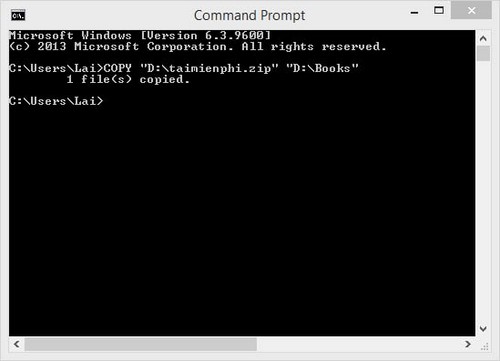
If the destination file already exists, copy may ask whether to overwrite it. For directory trees and resumable copies, use robocopy after reading robocopy /?; its options have different overwrite and deletion behavior from copy.
Delete a file carefully
First verify the exact match:
dir "D:\Examples\tipsmake.zip"Then delete only that file:
del "D:\Examples\tipsmake.zip"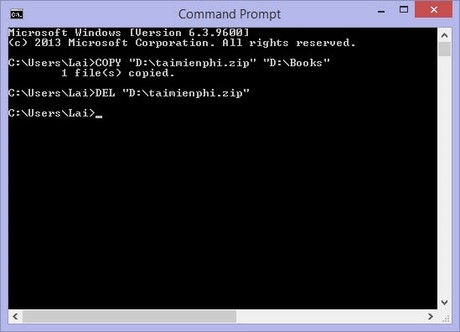
del normally bypasses Recycle Bin. Avoid broad wildcards such as del *.* until you have confirmed the current directory and previewed the matching files with dir.
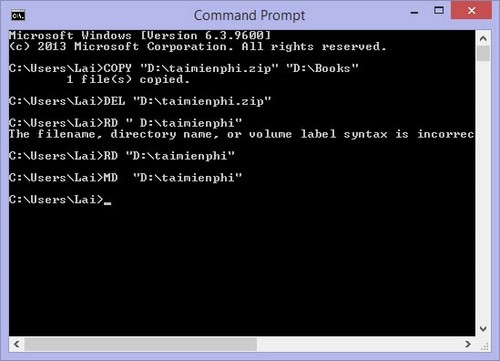
Create and remove directories
mkdir "D:\Examples\NewFolder"
rmdir "D:\Examples\NewFolder"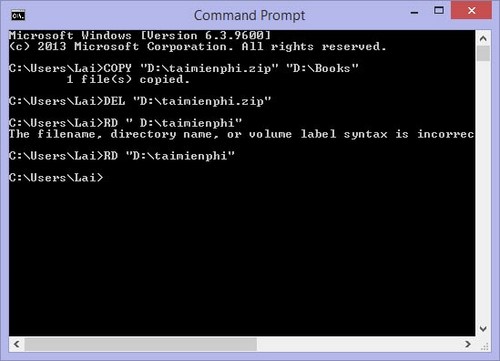
A plain rmdir removes only an empty directory. The /s option deletes a directory tree and its contents, so do not add it casually.
Other useful file commands
| Command | Example | Result |
|---|---|---|
move | move "D:\Drafts\note.txt" "D:\Archive\" | Moves a file |
ren | ren "D:\Archive\note.txt" "notes-2026.txt" | Renames a file |
type | type "D:\Archive\notes-2026.txt" | Displays a text file |
where | where python | Shows matching executable locations in the search path |
findstr | findstr /i "error" "*.log" | Finds text in matching files |
tree | tree "D:\Projects" /f | Displays a directory tree including files |
View network information
ipconfig
ipconfig /all
ipconfig shows basic adapter addresses. ipconfig /all adds details such as adapter descriptions, DHCP status, DNS servers, and physical addresses.
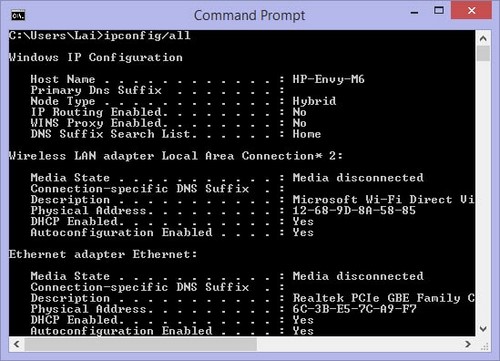
Do not read the first IPv4 address blindly when several adapters are present. Match the adapter to the active Ethernet, Wi-Fi, VPN, or virtual network. TipsMake's ipconfig guide explains release and renewal commands; releasing a DHCP lease can interrupt connectivity, so use those operations only when troubleshooting calls for them.
Test name resolution and connectivity
| Command | Purpose |
|---|---|
ping example.com | Tests whether replies return and measures round-trip time; blocked replies do not always mean the service is down |
tracert example.com | Shows the route hops that respond |
nslookup example.com | Queries DNS resolution |
netstat -ano | Lists connections, listening ports, and process IDs |
getmac | Displays MAC addresses for local adapters |
These commands reveal diagnostic information, not a complete security verdict. Firewalls, VPNs, proxies, IPv6, and server policy can change the output.
List and stop processes
tasklist
tasklist /fi "imagename eq notepad.exe"
After confirming the intended process, close it normally if possible. If it is unresponsive:
taskkill /im notepad.exeUse /f only as a last resort because forced termination can lose unsaved work:
taskkill /f /pid 1234Replace 1234 with a PID verified in tasklist or Task Manager. Internet Explorer examples are obsolete, and the correct historical process name was not iexplorer.exe.
System information and identity
whoamishows the current security identity.hostnameshows the computer name.systeminfodisplays operating-system, update, memory, and hardware summary data.setdisplays CMD environment variables;echo %PATH%prints the executable search path.verprints the Windows command processor's reported version.
Redirect and combine commands
ipconfig /all > "D:\Diagnostics\network.txt"
systeminfo >> "D:\Diagnostics\network.txt"
tasklist | findstr /i "notepad"
mkdir "D:\Work" && cd /d "D:\Work"
dir "D:\Missing" || echo The directory could not be listed.>replaces the destination file with command output.>>appends output.|sends one command's output to another command.&&runs the next command only after success.||runs the next command only after failure.
CMD and PowerShell syntax differ
Many executable programs work in both shells, but aliases, variables, quoting, pipelines, and script syntax differ. A command copied from a PowerShell tutorial may not work in CMD, and destructive operations can have different confirmation behavior. The Microsoft Windows command reference documents current Win32 commands for Windows 10, Windows 11, and supported Windows Server releases.
Related Articles
 Commonly Used CMD Commands on Windows6 minutes read
 15 Tar Commands Should Try in Linux9 minutes read
 Kali Linux Commands from AZ and Commonly Used Commands20 minutes read
 CMD Commands, Command Prompt Commands in Windows 7 And 87 minutes read
 Command Prompt: Summary of the Common Run CMD Commands8 minutes read
 999+ AI Commands for Learning21 minutes read
Reader Comments 0
Sign in with email or Google to join the discussion.