Table of Contents
Most Android voice changer apps record your voice, apply an effect, and save or share the edited clip. They generally do not replace your microphone during a normal phone call or every mobile game. Before installing one, decide whether you need edited recordings, live monitoring inside the app, video lenses, or a simple pitch effect.
The apps below have current Google Play listings, but availability, ads, subscriptions, permissions, and data-safety declarations can change. Read the listing shown in your region before installing.
Quick comparison
| App | Best for | Important limitation |
|---|---|---|
| Voice Changer by AndroidRock | Recording or importing audio and applying effects | Edits clips rather than changing every call or game microphone |
| Voice Changer with Effects by Baviux | Many preset effects, sharing, and ringtones | Some sharing and ringtone actions require extra device access |
| VoiceFX | Hearing effects while recording inside the app | Live monitoring is not the same as system-wide microphone routing |
| Snapchat | Voice and visual effects in Snaps | It is a social camera app, not a general audio editor |
| Kid Voice Changer | A simple high-pitched effect on an audio file | Single-purpose; not a full effects editor |
1. Voice Changer by AndroidRock
Voice Changer by AndroidRock records audio or opens an existing audio file, applies a preset effect, and saves the result. Its current listing describes tools for viewing, editing, and sharing saved clips and says effects can be applied more than once.
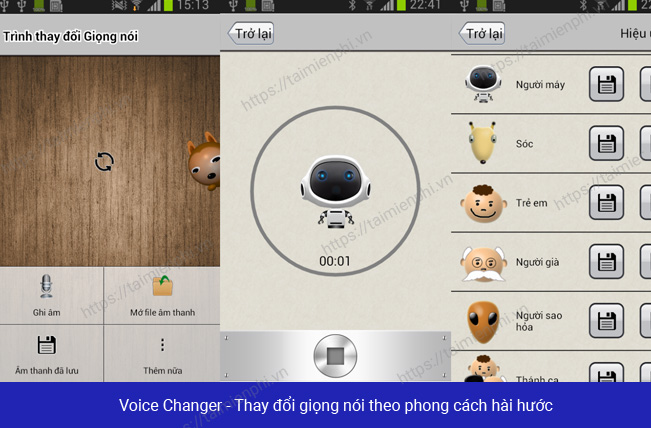
This is a practical choice for a voice note, short character line, or sound used in a video. Applying effects repeatedly can make speech harder to understand, so save a copy after each useful stage rather than overwriting the only result.
2. Voice Changer with Effects by Baviux
Voice Changer with Effects by Baviux offers a large set of familiar presets such as helium, robot, giant, backwards, monster, and alien. The listing also describes importing recorded audio, generating voice from text, sharing clips, and setting a result as a ringtone or notification sound.
Choose it when effect variety and ringtone creation matter. Review Android's permission prompt carefully: recording needs microphone access, opening media needs access to selected files, and setting a ringtone may require permission to modify system settings. An effect app should not need unrelated access to contacts, calls, or precise location for basic recording.
3. VoiceFX
VoiceFX applies effects while you speak inside the app, so you can hear the altered sound during recording. Its listing includes common character-style effects and a control for changing effect intensity.
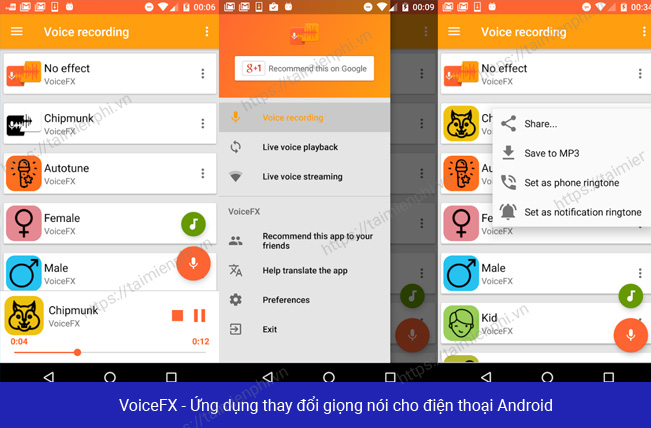
Live feedback is useful for practicing a character voice or adjusting an effect before saving. Use headphones to prevent the microphone from picking up the processed sound from the phone's speaker and creating feedback. Do not assume the effect will feed directly into Discord, a game, or a cellular call; Android app isolation usually keeps this monitoring inside VoiceFX.
4. Snapchat
Snapchat is primarily a social camera and messaging app. Some Lenses and filters alter voice as well as appearance, making it convenient for a short Snap with synchronized visual and audio effects.
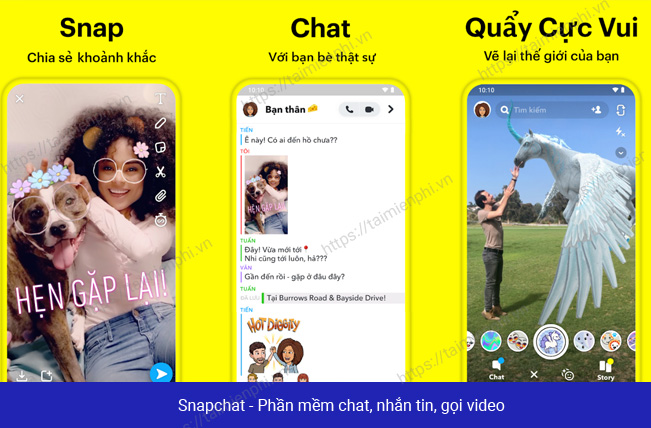
Use Snapchat when the result belongs in a Snap or Story. It is not ideal for managing standalone audio files, choosing precise export settings, or processing a long recording. Lenses rotate and change frequently, so a specific voice effect shown in an older tutorial may no longer be available.
5. Kid Voice Changer
Kid Voice Changer is a focused tool that applies a high-pitched, child-like effect to a selected audio file and saves the processed result. It is simpler than a multi-effect editor and may suit someone who needs only that single transformation.
The app's name describes an effect; it does not by itself establish that the app is designed or approved for children. A parent should still review the Play Store's content rating, ads, in-app purchases, data-safety section, and parental controls before allowing a child to use it.
How to evaluate a voice changer safely
- Install from Google Play: match the developer name and package listing, not just the app icon or a generic title.
- Check the update date: an abandoned audio app may work poorly on a newer Android release.
- Review data safety and privacy: voice recordings can contain identifying or private information. Do not upload or share them without consent.
- Grant only necessary permissions: microphone access is reasonable for recording; unrelated permissions deserve scrutiny.
- Make a short test: confirm export format, clarity, ads, watermarking, and sharing behavior before recording something long.
- Use effects ethically: do not impersonate another person, mislead callers, bypass verification, or publish someone's voice without permission.
Recorded clips versus real-time voice changing
If the goal is to edit narration for a video, any app that exports a clean audio file may work. If the goal is a system-wide live voice for a PC game or chat app, an Android recording app is usually the wrong tool. Compare our guide to voice-changing software for computers and the list of real-time voice changers for chat and games.
For cleaner source audio before applying effects, see these Android recording apps with noise reduction. Starting with a clear, unclipped recording generally produces a more understandable result than trying to fix heavy background noise after the voice has been transformed.
Related Articles
 Entertainment with 6 Voice Changer Apps on Android8 minutes read
 Top 15 Applications to 'Transform' Your Voice on iPhone6 minutes read
 Top Voice Changer Apps for MacBook5 minutes read
 Top 6 Voice Conversion Software on Windows 105 minutes read
 How to Use Fake Voice to Change Voice: Step-by-Step Guide3 minutes read
 5 Real-Time Voice Changing Software for Discord, Skype, Steam6 minutes read
Reader Comments 0
Sign in with email or Google to join the discussion.