Table of Contents
TikTok Filter Halloween Crop Video Tutorial is easier to approach with a clear overview and reliable steps. This guide organizes the essential information, highlights practical details, and explains what to check along the way.
Key Takeaways
- Review TikTok filter halloween crop video tutorial.
- Follow the recommended steps in order to avoid common mistakes with TikTok filter halloween crop video tutorial.
- Review compatibility, settings, or requirements before making changes.
TikTok Filter Halloween Crop Video Tutorial
Step 1: Open the TikTok app on your phone and log in to your account.
You can download TikTok right from the link below if you haven't installed it yet.
- Download TikTok for iPhone - Download TikTok for Android.
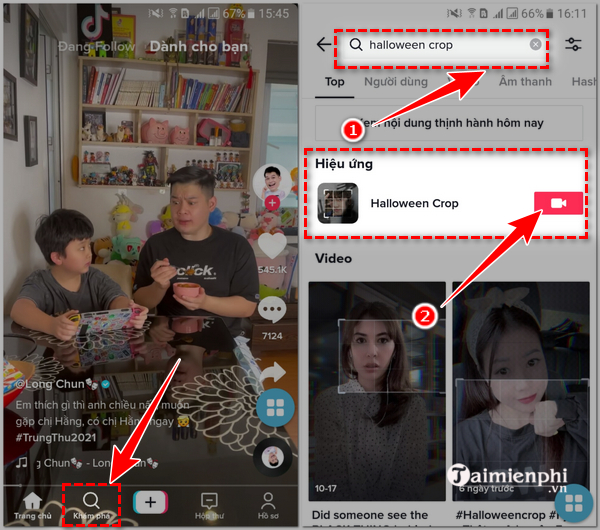
Step 2: Select " discover " => Enter the keyword " Halloween Crop " in the search box.
Step 3: Immediately, you will see Halloween effects and featured videos from TikTok users.
Tap the video icon to use this effect. This helps you continue.
Step 4: Set recording time, filters and beauty effects => Select the red circle icon in the middle to start recording.
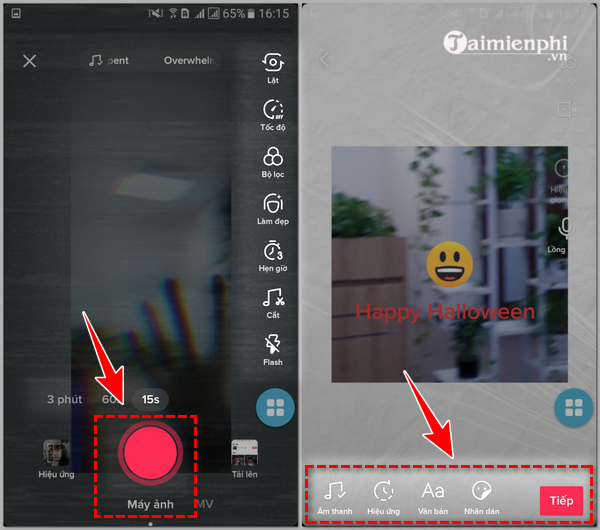
Step 5: After recording the video, the screen will display the video just recorded.
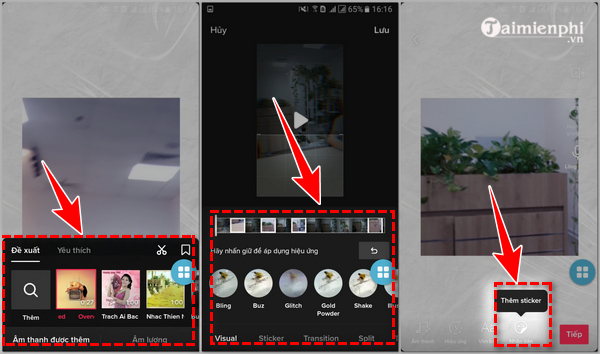
You can add audio, effects, text, or stickers to the video if you want to edit.
Click " Next " to move to the next step when finished editing.
Step 6: Enter a description, add hashtags, add location and viewer settings, comment on the video.
Finally, click " post " to complete the process.
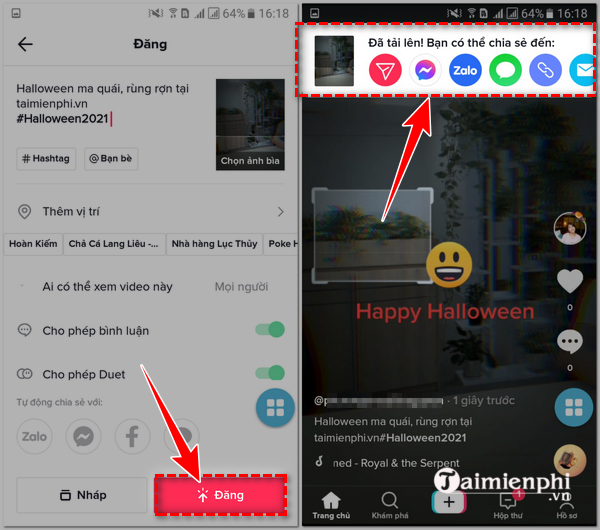
If you want to download the video without the TikTok watermark to share with friends and relatives on social networks like Facebook, Zalo, you can refer to our article on how to download TikTok videos without watermark after recording a Halloween effect video on TikTok.
Above, this guide has shared with you a complete and detailed guide on how to shoot TikTok filter Halloween Crop videos. Please refer to the instructions in this article to create impressive and unique videos for yourself this Halloween season.
Final Thoughts
The most reliable way to handle TikTok filter halloween crop video tutorial is to follow the process in order, verify each important setting, and test the result before moving on. Use the guidance above as a practical reference, then adjust the details for your device, software version, or specific goal.
FAQ
What should I know first about TikTok Filter Halloween Crop Video Tutorial?
The Crop effect is creating new trends on TikTok as thousands of videos are posted every day with lots of likes and comments from TikTokers.
How do I get the best results with TikTok Filter Halloween Crop Video Tutorial?
Use current software or equipment, follow the steps in order, review the recommended settings, and test one change at a time so you can identify what improves the result.
What should I do if TikTok Filter Halloween Crop Video Tutorial doesn't work as expected?
Check compatibility, permissions, connectivity, and version-specific settings. Restart the relevant device or app, then repeat the process carefully before trying a more advanced fix.
Related Articles
 Instructions for Recording AI Anime Filter Videos on Tiktok3 minutes read
 Instructions for Recording Aging Filter Videos on Tiktok3 minutes read
 How to Film Mermaid Transformation Videos on TikTok3 minutes read
 TikTok Outro Video: How to Create a Check Mark Outro Video on TikTok3 minutes read
 How to Recording Cartoon Character Filter Videos on TikTok4 minutes read
 Instructions for Scrolling Tiktok Videos Automatically3 minutes read
Reader Comments 0
Sign in with email or Google to join the discussion.