Clear, practical technology insights BSOD Code Lookup · Windows Error Code Lookup · Wi-Fi Troubleshooting · PC Troubleshooting Checklist

This Tool Will Help Bring iOS-specific Applications to Android: What You Need to Know

Explore skip with clear explanations, practical examples, common limitations, and useful tips for better-informed decisions.

Table of Contents

This Tool Will Help Bring iOS-specific Applications to Android is easier to understand when the main concepts, benefits, limitations, and real-world uses are considered together.

This guide organizes the essential information into clear sections and adds practical context so you can make a more informed decision.

One of the big challenges for app developers is that they often have to build separate apps for both iOS and Android. While there are cross-platform frameworks like React Native for app development, this often results in a suboptimal experience on both platforms.

Skip has been in beta for over a year, but now the framework has been released to the public for use by application developers. In fact, if you are an independent developer, you can use this tool completely free of charge.
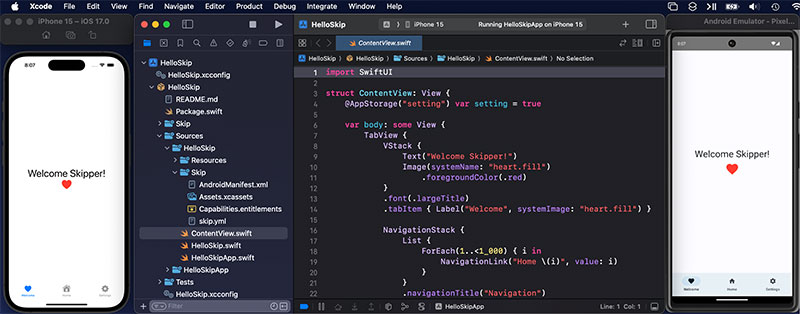
This Tool Will Help Bring iOS-specific Applications to Android: What You Need to Know screenshot

If you're an iOS app developer, Skip takes your existing Swift and SwiftUI code and compiles it to Kotlin and Compose, as if the app were natively written for Android. Your iOS code stays the same, and you also continue to use Xcode to keep both platforms in a unified code base.

You can also choose which code to share between the two platforms, and which code you want to keep separate for each platform. This tool also allows you to use any Swift/Objective-C library for iOS and any Kotlin/Java library on Android.

If you are an iOS developer and want to bring your app to Android, try Skip! This tool will definitely help significantly reduce the barrier to entry when creating native Android apps for small developers.

FAQ

What should beginners know about This Tool Will Help Bring iOS-specific Applications to Android?

Start with the basic requirements, learn the most common terms, and test changes gradually before using advanced features.

How can I get better results with This Tool Will Help Bring iOS-specific Applications to Android?

Use trusted tools, follow current instructions, compare results, and review settings or limitations that may affect performance.

What mistakes should I avoid with This Tool Will Help Bring iOS-specific Applications to Android?

Avoid skipping requirements, relying on outdated instructions, changing multiple settings at once, or using untrusted downloads and unsupported tools.

Discussion

Reader Comments 0

Sign in with email or Google to join the discussion.