Table of Contents
This guide provides a clear, practical overview of steps to remove m.nearbyme.io from the browser, with useful context, important details, and straightforward takeaways for everyday readers.
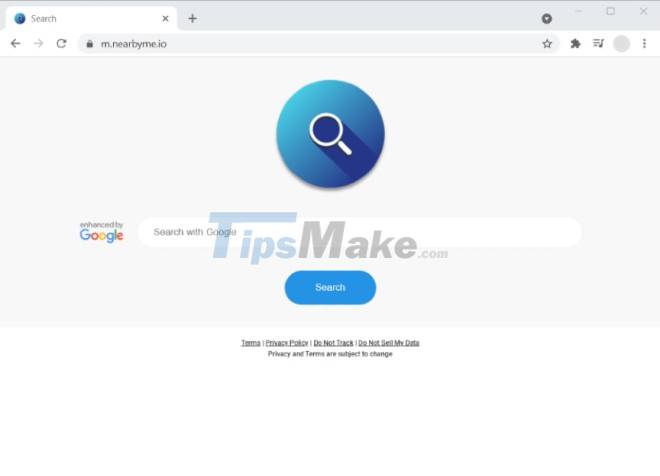
m.nearbyme.io is used to redirect user traffic thereby generating income for those behind it. On the surface it looks like users are using Google, but in reality m.nearbyme.io directs them to the pages it wants to generate income for the owner.
How to remove m.nearbyme.io
To remove m.nearbyme.io you can use SpyHunter or Malwarebytes tool. You can also use the manual removal of m.nearbyme.io according to the instructions below. You need to do the following steps before starting the m.nearbyme.io removal process to be able to remove it successfully:
Step 1 : Launch Command Prompt by clicking the Start menu button and typing command prompt . Right-click Command Prompt in the search results and select Run as Administrator
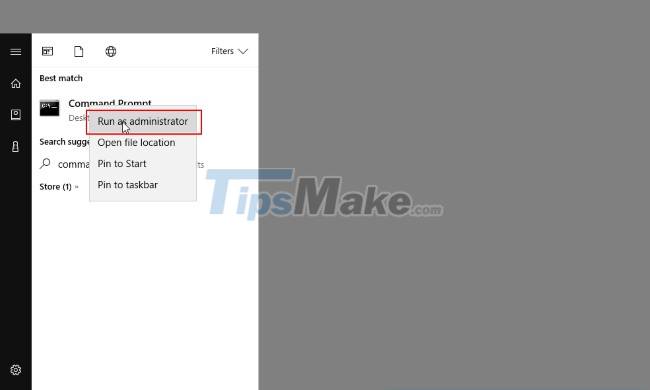
Step 2 : Enter and execute the following commands:
rd /S /Q "%WinDir%|System32|GroupPolicyUsers"rd /S /Q "%WinDir%|System32|GroupPolicy"gpupdate /force
Uninstall m.nearbyme.io from Control Panel
Normally, m.nearbyme.io will appear in the application section of the Control Panel under the name SwiftSelect or Swift-S. The steps to remove m.nearbyme.io are as follows:
Step 1 : Press the Start button
Step 2 : Select Settings
Step 3 : Click System
Step 4 : Click App & features and find SwiftSelect, Swift-S or any suspicious software in the list
Step 5 : Click on it and press Uninstall button
Note : To be able to completely uninstall m.nearbyme.io you need to have admin rights of the computer. If your computer is under the management of a business or organization, you need to contact the IT department for support.
Remove the m.nearbyme.io extension from the browser
Sometimes removing m.nearbyme.io from Control Panel doesn't give you the desired results. The reason is because m.nearbyme.io is still activated by the extension that plugs into the browsers. Therefore, you need to proceed further with removing the m.nearbyme.io extension from the browser.
Safari:
- Open Safari then click on the drop-down menu then select Preferences
- Click on the Extensions tab
- Find the SwiftSelect . extension
- Click the Uninstall button to remove it
Google Chrome:
- Open Google Chrome then type chrome://extensions in the address bar then press Enter
- Find SwiftSelect or suspicious extensions
- Click trash can icon to remove
Mozilla Firefox:
- Start Firefox then type about:addons in the address bar and press Enter
- Choose SwiftSelect or suspicious extensions
- Click Disable or Remove to remove
Microsoft Edge:
- Start Microsoft Edge then type edge://extensions in the address bar and press Enter
- Find SwiftSelect or suspicious extensions
- Click the Remove button to remove
After removing m.nearbyme.io from Control Panel and browser you should reset browser settings and restart your computer. Good luck!
Key Takeaways
Use the information above as a practical reference for steps to remove m.nearbyme.io from the browser. Review each step carefully, confirm any requirements, and choose the option that best fits your situation.
FAQ
What does this guide explain about Steps to Remove M.nearbyme.io from the Browser?
It explains the main concepts, practical considerations, and useful steps related to steps to remove m.nearbyme.io from the browser without requiring advanced knowledge.
Who can benefit from learning about Steps to Remove M.nearbyme.io from the Browser?
This information is useful for readers who want a clear overview, practical guidance, and reliable steps related to steps to remove m.nearbyme.io from the browser.
What should I check before applying this information?
Review the requirements, confirm that your device, software, or situation matches the instructions, and back up important data before making major changes.
Related Articles
 Instructions to Completely Remove Youndoo. Com on All Browsers10 minutes read
 How to Remove Internet Explorer 10 in Windows 82 minutes read
 Steps to Remove Page Hao123. Com13 minutes read
 How to Remove the Original Babylon Toolbar on Ie, Chrome and10 minutes read
 Trick to Remove Edge Browser on Windows 10: Browse Edge3 minutes read
 9o0gle.com: Steps to Remove Malware 9o0gle. Com12 minutes read
Reader Comments 0
Sign in with email or Google to join the discussion.