Table of Contents
Microsoft is introducing Restyle, a new AI-powered feature for the Paint app that lets users change the artistic style of an image directly on the Paint canvas.
Restyle in Paint Overview
Microsoft introduced Restyle, a new AI-powered feature for the Paint app. This feature lets you change the art style of images directly on the Paint canvas. You can choose from pre-installed art styles and create new stylized versions of their images.
The feature is currently available to Canary, Dev, and Beta users enrolled in the Windows Insider program. It can be accessed through the Copilot menu in Paint, allowing for enhanced creativity without the need for third-party software.
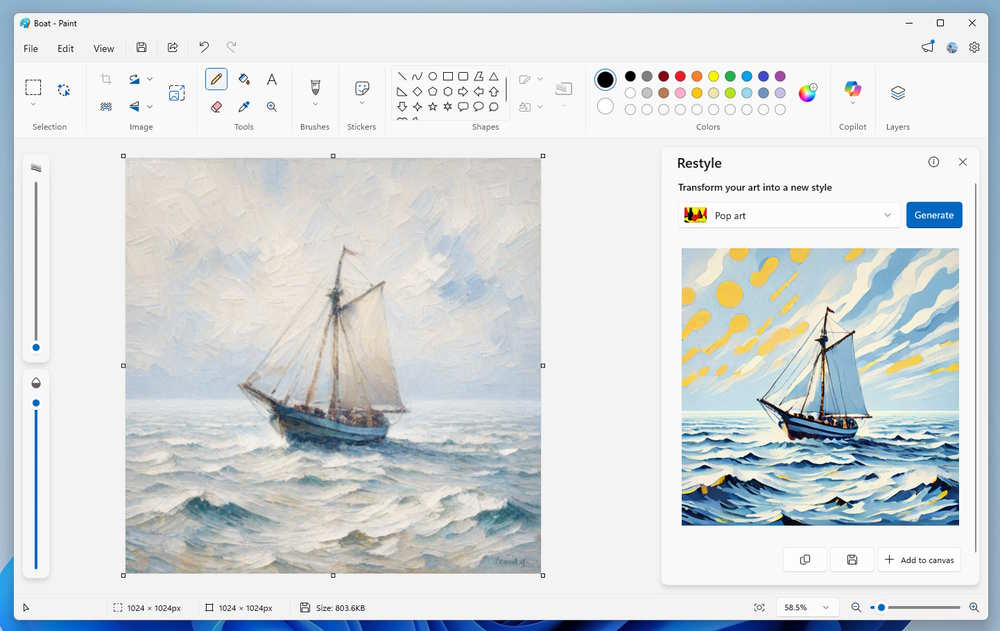
You will need to update Paint to version 11.2509.441.0 and then click Copilot to open the menu. Next, click Restyle and select the art style in the photo to convert. You can choose from pre-installed art styles and create new stylized versions of their images. Finally, click Generate and wait for the AI to create the redesigned image.
Once you are satisfied with the artwork, click Add to canvas, Copy or Save to save the image.
FAQ
What should you know about the restyle tool in paint turns doodles into masterpieces?
In practical terms, Microsoft is introducing Restyle, a new AI-powered feature for the Paint app that lets users change the artistic style of an image directly on the Paint canvas.
Why does the restyle tool in paint turns doodles into masterpieces matter?
The article highlights that this feature allows users to change the art style of images directly on the Paint canvas.
What is the main takeaway?
The main takeaway is that it can be accessed through the Copilot menu in Paint, allowing for enhanced creativity without the need for third-party software.
Related Articles
 About the Paint Tool SAI Tool: What Is the Paint Tool SAI14 minutes read
 How to Use Restyle AI on Instagram to Change Outfits2 minutes read
 How to Use Paint 3D on Windows 10 for Beginners4 minutes read
 Jspaint, an Online Tool to Help You Use Microsoft Paint Wherever You3 minutes read
 Tips to Turn Photos into Works of Art on Photos Windows 113 minutes read
 Instructions on How to Use Paint to Draw and Edit Images on13 minutes read
Reader Comments 0
Sign in with email or Google to join the discussion.