Table of Contents
Remodel AI generates renovation concepts from a photo of a room, building exterior, or outdoor area. It can be useful for comparing styles and communicating an idea, but its images are visual references—not construction plans, measurements, or guarantees that particular products will fit.
The service is available through the official Remodel AI website and mobile app stores. Features, free-use limits, subscriptions, and supported tools can change, so review the current listing before signing up.
What Remodel AI can change
After you upload or photograph a space, the app can generate a redesigned version based on a selected room type and visual style. Its current tool set includes options for interiors, exteriors, landscaping, floors, walls, object removal, furniture replacement, and material or fabric changes.
- Interior redesign: explore alternative looks for kitchens, bedrooms, bathrooms, living rooms, and other spaces.
- Exterior and landscape concepts: test broad ideas for facades, gardens, patios, and curb appeal.
- Walls and flooring: preview different colors, finishes, or surface types.
- Remove or replace: clear objects from a scene or swap furnishings to compare layouts and styles.
- Shopping suggestions: look for furniture or decor inspired by a generated design, where the feature is available.
How to get a more useful result
- Use a clear, well-lit photo. Stand far enough back to capture the room's main surfaces without using an extreme wide-angle view.
- Remove temporary clutter. The model can misread piles, reflections, and partly hidden furniture as permanent features.
- Select the correct space type. Identifying a kitchen as a kitchen gives the tool better context than a generic room setting.
- Start with one design goal. Test a style, wall color, or flooring choice before changing every element at once.
- Generate several versions. AI output varies, and comparing alternatives makes it easier to separate a strong idea from an attractive but impractical image.
Using the paint and surface tools
A paint visualization can help narrow a long list of colors, especially when comparing warm and cool directions. However, screen brightness, camera white balance, daylight, and generated shadows can all change how a color appears. Always test a physical sample on the actual wall before buying paint for an entire room.
The same caution applies to flooring, wallpaper, tile, and fabric. A generated image may alter scale, repeat patterns incorrectly, or hide transitions around doors and fixtures. Use it to choose a direction, then confirm product dimensions, finish, availability, and installation requirements.
Community projects and shopping
Shared before-and-after projects can provide inspiration and show how other people phrase their design goals. Remember that a community image may be AI-generated rather than a completed renovation. Treat it as a concept unless the creator clearly documents the real-world result.
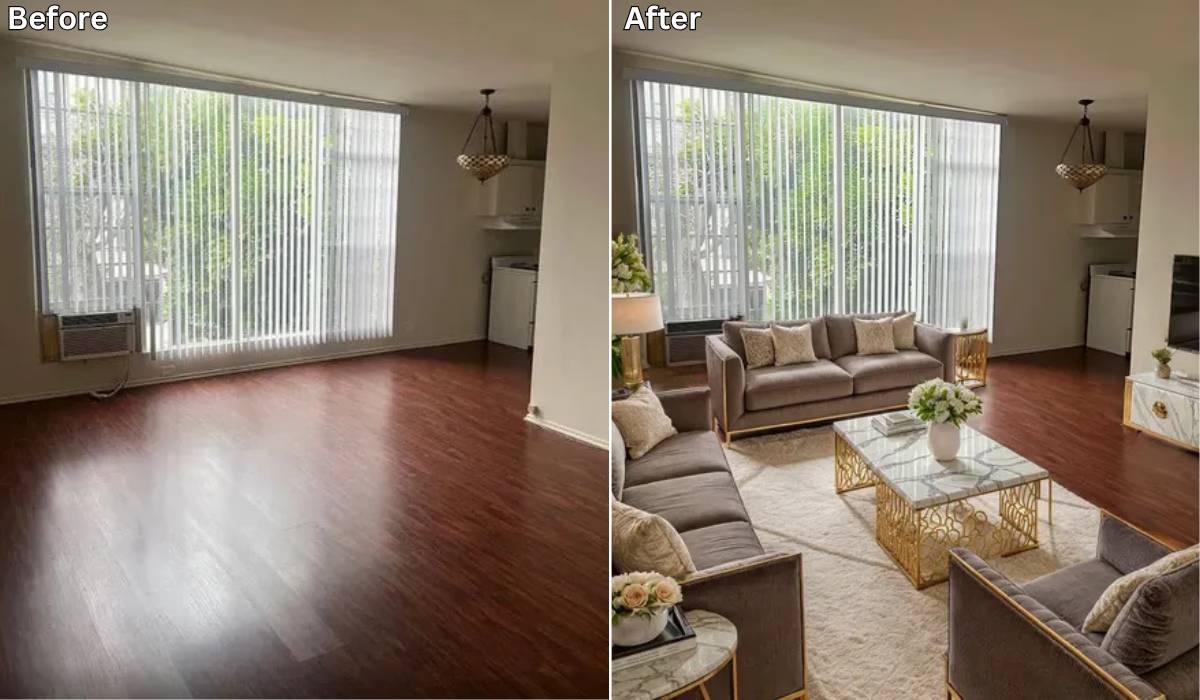
Shopping tools may suggest products that resemble furniture in a generated room. Check measurements, materials, return terms, and retailer details independently; a visual match does not mean an item will fit the space.
Important limitations
- Generated designs may move windows, doors, outlets, plumbing, structural supports, or other fixed elements.
- Room proportions and furniture dimensions may not be accurate.
- The app cannot determine whether a proposed structural change is safe or permitted.
- Images of occupied homes can reveal personal belongings, family photos, addresses, or security details. Crop or remove sensitive information before uploading.
For decorating ideas, Remodel AI can help you compare visual directions quickly. For budgeting, measured drawings, electrical or plumbing work, load-bearing changes, and code compliance, use accurate site measurements and consult an appropriate professional.
Related Articles
 House Flipper: Tips to Become a Home Repair Expert5 minutes read
 How to Use the Google Home Application on a PC5 minutes read
 How to Uninstall the iOS Application Is Not Displayed on the Home6 minutes read
 The App Replaces Android Physical Home Button6 minutes read
 How to Create Virtual Home Keys on Android Phones6 minutes read
 Downloads Needed to Beautify the PC14 minutes read
Reader Comments 0
Sign in with email or Google to join the discussion.