Table of Contents
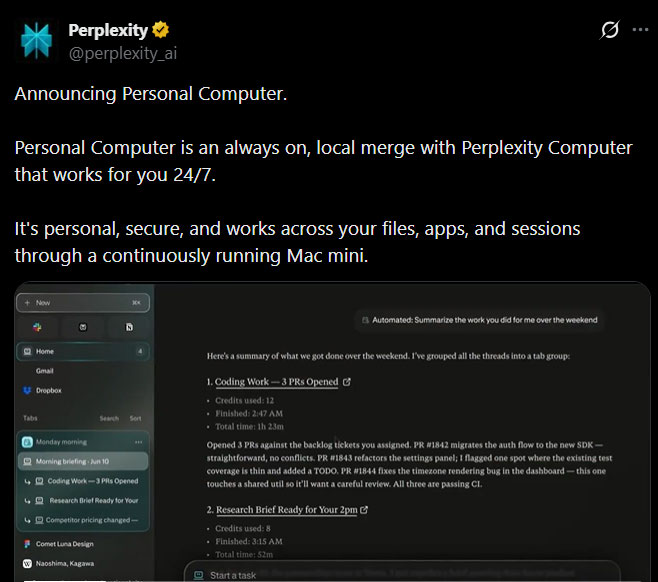
Perplexity Personal Computer extends the company's Computer agent to a Mac. Instead of operating only in a remote browser or cloud workspace, it can work with folders you authorize, supported native apps, and the Comet browser while continuing tasks in the background.
The product was first presented as an always-on system for a dedicated Mac mini. Perplexity later made Personal Computer available through its upgraded macOS app. According to the current official Personal Computer page, it requires macOS 15 Sequoia or later. Availability and subscription access can change, so check the official page rather than relying on the original launch terms.
What Personal Computer can access
Personal Computer can search, read, and write within folders the user connects. It can also interact with native Mac apps such as Mail, Notes, Messages, and Finder, and it can use Perplexity's Comet browser for supported web tasks. A global keyboard shortcut opens the agent without requiring the user to switch to a separate web tab.
This local access is the important difference between Personal Computer and Perplexity Computer's broader cloud-based workflow system. The general Computer product can conduct research, build files, run browser workflows, connect services, and monitor recurring tasks. Personal Computer adds the context and controls of the user's Mac.
If browser-based agents are the main interest, see TipsMake's comparison of AI browsers and their safety tradeoffs. For a narrower research workflow, the guide to AI tools for web research explains where Perplexity's source-focused approach fits.
How the agent handles multi-step work
Users give Computer a goal in natural language. It can divide that objective among background agents, use different models for suitable subtasks, and continue working while the user does something else. Perplexity says its orchestration system can draw on more than 20 models.
Typical uses include:
- searching a connected folder and reorganizing selected files;
- drafting an email based on notes, with the user reviewing it before sending;
- researching a topic and producing a structured report with sources;
- summarizing repository activity or a long communication thread;
- running a recurring monitoring task and reporting when a condition changes;
- using voice instructions to start or refine work on the Mac.
The value comes from combining several steps into one supervised workflow. A vague instruction, however, can produce a broad or incorrect result. Define the target folder, source limits, output format, deadline, and actions that must wait for approval.
Always-on use with a Mac mini
A Mac mini that remains powered on can let Personal Computer continue approved work and accept tasks remotely from an iPhone. This can suit background research, file preparation, or monitoring. It does not mean every Mac must run continuously; the normal desktop app can also be used interactively on a supported Mac.
Long-running access increases the importance of account protection. Perplexity describes 2FA, isolated execution, on-device authorization for sensitive steps, audit history, and a kill switch among its safeguards. Those controls reduce risk but do not remove the need to review permissions and outputs.
Safety checks before giving it access
- Connect the smallest possible folder. Use a task-specific directory rather than an entire home drive.
- Start with reversible work. Ask the agent to create a proposed folder structure or draft files before allowing moves, overwrites, or deletions.
- Keep final actions manual. Review recipients, attachments, messages, purchases, repository changes, and account settings before they are submitted.
- Inspect sources and generated files. An agent can misunderstand a page, follow misleading instructions, or produce incorrect code.
- Remove access that is no longer needed. Revisit connected folders, services, browser sessions, and scheduled tasks after a project ends.
Personal Computer is best viewed as a supervised automation layer, not an independent employee. It can reduce switching and carry forward well-defined tasks, but the user remains responsible for deciding what data it may access and which actions it may complete.
Who should consider it?
The strongest fit is a Mac user with repeatable, multi-step work that currently crosses files, email, a browser, and research tools. Occasional question answering does not require this level of access. Test one low-risk workflow first and compare the time saved with the effort required to review the result.
Before installing it, confirm the current macOS requirement, plan access, usage limits, and data controls on Perplexity's site. Early launch details—such as a waitlist or access restricted to a single subscription tier—may no longer describe the product that is available today.
Related Articles
 OpenAI Launches ChatGPT Agent to Become a Personal Assistant4 minutes read
 How to Use the Space Feature in Perplexity AI7 minutes read
 Perplexity vs ChatGPT: Which AI Assistant Is Better?11 minutes read
 How to Create a Personal Agent in n8n7 minutes read
 How to Write Effective Perplexity Prompts5 minutes read
 Automate Agent Evaluation Using the Power Platform API7 minutes read
Reader Comments 0
Sign in with email or Google to join the discussion.