Table of Contents
If File Explorer recreates every image thumbnail after each restart, first confirm that thumbnails are enabled and that no cleanup utility is deleting the cache. A Registry workaround exists for a specific Windows 10 version 1709 bug, but it should be used only on that legacy release and only after the simpler checks below.
Confirm that Windows is allowed to show thumbnails
- Open File Explorer and select View > Options. On some builds, use the three-dot menu and choose Options.
- Open the View tab.
- Clear Always show icons, never thumbnails, then select Apply.
Next, pause third-party cleanup tools and check Storage Sense or Disk Cleanup settings. Clearing Thumbnails is safe, but Windows must rebuild the cache afterward; repeated automatic cleaning can therefore look like a fault.
Legacy fix for Windows 10 version 1709
The Fall Creators Update, version 1709, had a reported interaction in which the SilentCleanup maintenance task repeatedly cleared the thumbnail cache. If Winver shows a newer release, do not apply this old workaround automatically; investigate cleanup settings, disk corruption, or the user profile instead.
Back up the affected Registry keys or create a restore point first. Incorrect Registry changes can prevent Windows features from working. TipsMake's Windows Registry overview includes backup and restore resources.
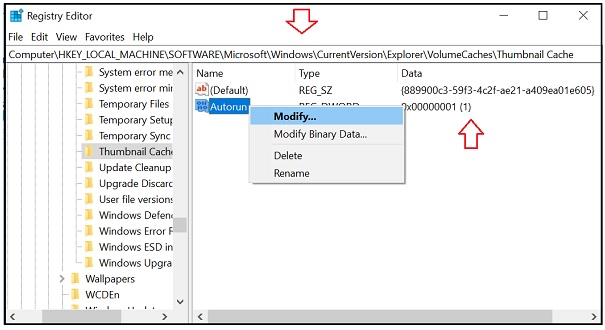
- Press Windows + R, type
regedit, and press Enter. Approve the User Account Control prompt. - Navigate to:
HKEY_LOCAL_MACHINESOFTWAREMicrosoftWindowsCurrentVersionExplorerVolumeCachesThumbnail Cache - Double-click the Autorun DWORD. Record its existing value, then set Value data to 0.
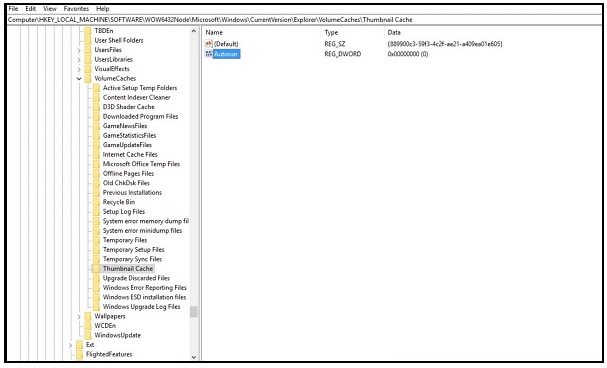
On a 64-bit installation, also check:
HKEY_LOCAL_MACHINESOFTWAREWOW6432NodeMicrosoftWindowsCurrentVersionExplorerVolumeCachesThumbnail Cache
If that key contains an Autorun value set to 1, record the old value and change it to 0.
Close Registry Editor and restart Windows. To reverse the workaround, restore the values you recorded. This change prevents the affected cleanup entries from running automatically, so you may need to clear a corrupt thumbnail cache manually later.
If thumbnails still reset
- Test another Windows account. If thumbnails persist there, the original profile may be damaged.
- Run
sfc /scannowfrom an administrator terminal to check protected system files. - Make sure the system drive has adequate free space and is not being cleaned at every sign-in.
- Do not disable Windows Update as a workaround. Windows 10 reached the end of general support on October 14, 2025; move to a supported Windows release where the hardware permits it.
If File Explorer has broader problems, use the general computer repair checklist to separate a profile or software fault from a storage problem.
Related Articles
 How to Delete and Reset the Cache Thumbnail on Windows 106 minutes read
 Click: How to Clear the Thumbnail Cache in Windows5 minutes read
 Fix Windows Error Without Image, Thumbnail Thumbnail2 minutes read
 Learn About DNS Cache Spoofing and DNS Cache Poisoning8 minutes read
 How to Completely Rebuild the Icon Cache in Windows 8.1 and 103 minutes read
 How to Clear Cache on Mac: Practical Guide6 minutes read
Reader Comments 0
Sign in with email or Google to join the discussion.