Table of Contents
Learning how to access ChatGPT on telegram doesn't have to be complicated. This updated guide presents a clear workflow, practical checks, and troubleshooting advice you can use while completing the process.
Key Takeaways
- Review ChatGPT at your fingertips with chat apps.
- Follow the steps to access ChatGPT in telegram.
- Understand features of ChatGPT on telegram.
ChatGPT at Your Fingertips with Chat Apps
The expansion of ChatGPT into popular messaging apps like WhatsApp and Telegram is a significant step forward in AI accessibility. Its new and unfamiliar interface may have deterred some potential users from interacting with the chatbot while ChatGPT has been widely adopted.
Bringing ChatGPT to chat apps breaks down this barrier. Interacting with ChatGPT now feels more natural, making conversations as intuitive as messaging with regular contacts. It also makes it easier for less tech-savvy users to use AI bots.
How to Access ChatGPT in Telegram
You can also access ChatGPT in Telegram in a slightly different way. Telegram allows you to add ChatGPT, just like any other add-on.
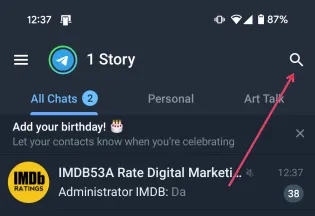
Open the Telegram app and tap on the search icon in the top right corner.
Search for 'ChatGPT bot'.
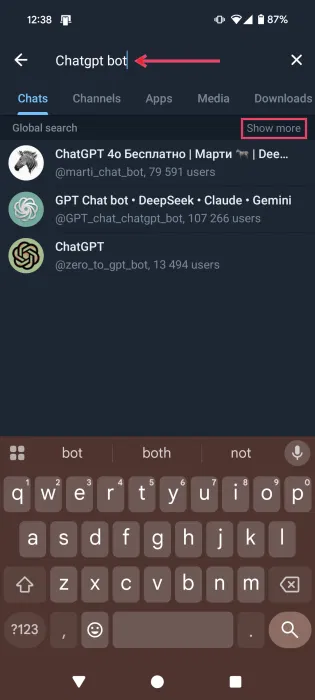
Tap the View More option. This helps you expand the list of results.
Note: This is not an official ChatGPT bot but instead developed by third parties.
Choose one of the options, choose one of the most popular, with many users.
The bot will open a new chat and list what it can do. However, for more options, you will need to subscribe to a premium plan.
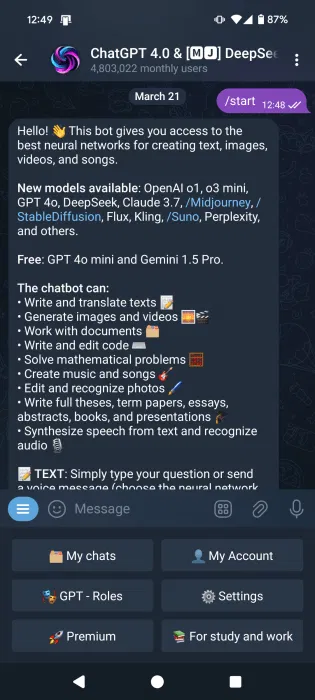
The Telegram ChatGPT bot that the example is using has a menu that allows you to easily access features. For instance, there is a dedicated section called For study and Work that allows you to access a variety of academic writing modes, such as Term Paper, Thesis, and Presentations.
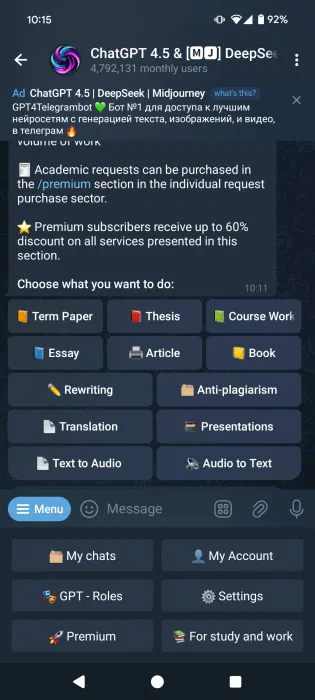
Interact with Telegram's ChatGPT bot via messages if you don't want to explore through the menu.
Features of ChatGPT on Telegram
Depending on the ChatGPT bot you are using on Telegram, the options are as follows:
- Create AI images
- Create songs and music
- Create video
- Share images directly from the chat and ask for more details.
- Interact with ChatGPT bot via audio message.
Advantages of Using ChatGPT via Chat App
Accessing ChatGPT through a chat app offers unprecedented ease of use. Not only can you start a conversation with ChatGPT more easily, but you can also complete your tasks more efficiently.
People love the convenience. You can just switch to ChatGPT and get a quick explanation if something in a conversation is unfamiliar. There is no need to leave WhatsApp or Telegram just to search for an unfamiliar word, movie title or idea on Google. Previously, many people had a dedicated ChatGPT app installed on their phones, but it still required switching apps. People also like having fewer apps on their devices and saving space.
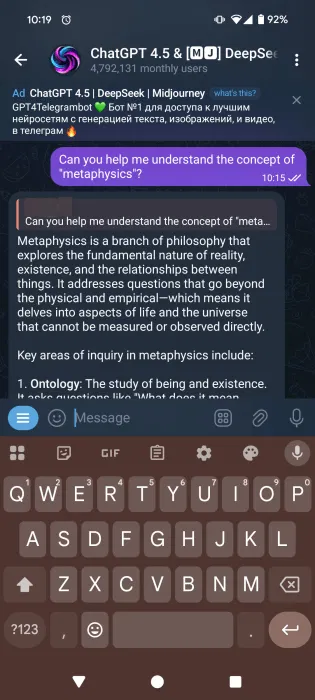
Additionally, ChatGPT can be used for instant translation and brainstorming. You no longer need to search Google to discover more ideas - you can do it all in one place when inspiration strikes.
On Telegram, you can even integrate your ChatGPT bot into group chats, making it much easier to collaborate with teammates. This allows everyone on the team to leverage ChatGPT for a variety of work tasks and increase productivity.
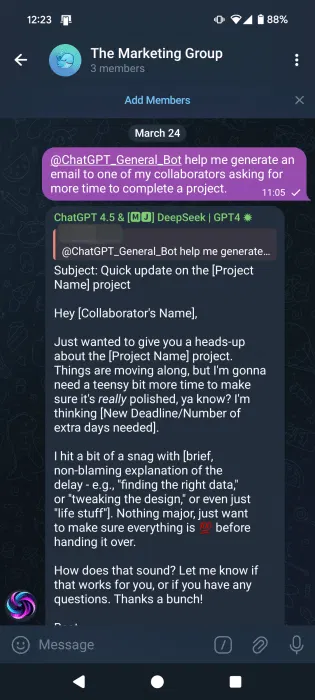
You can easily copy and paste parts of your conversations with the bot and have it analyze them while ChatGPT can't access your chats. This has been especially helpful recently for processing interactions and understanding your own emotions. There are also times when you feel alone and the people around you are unable to provide emotional support. In those moments, chatting with ChatGPT via WhatsApp or Telegram makes talking to AI more natural and even comfortable.
With ChatGPT in your chat app, the possibilities are endless. The article encourages you to tweak the usage to suit your preferences and experiment until you find your ideal workflow.
Final Thoughts
The most reliable way to handle access ChatGPT on telegram is to follow the process in order, verify each important setting, and test the result before moving on. Use the guidance above as a practical reference, then adjust the details for your device, software version, or specific goal.
FAQ
What should I check before I access ChatGPT on telegram?
Use the latest available software, confirm that your device meets the requirements, and make sure you have the necessary permissions, account access, or backup before changing anything.
Why might I be unable to access ChatGPT on telegram?
Common causes include outdated software, missing permissions, incompatible settings, incomplete setup steps, or a temporary network problem. Recheck the process from the beginning and restart the app or device if needed.
Is it safe to access ChatGPT on telegram?
It is generally safe when you use official tools, review every permission, and back up important data before making system-level or account-level changes.
Related Articles
 Is ChatGPT Accessible with a VPN: Main Insights5 minutes read
 Instructions for Using Free Chat Software Telegram on Your Computer4 minutes read
 A Guide to Creating a Telegram Bot That Anyone Can Do6 minutes read
 How to Use Perplexity in Telegram3 minutes read
 US Users Can Now Access ChatGPT via 1-800-chatgpt6 minutes read
 Delete Group on Telegram: Instructions for Deleting Groups on Telegram4 minutes read
Reader Comments 0
Sign in with email or Google to join the discussion.