Table of Contents
A bubble chart plots numeric x and y values like a scatter plot, while a third value controls each bubble's relative size. CanvasJS can add zooming and panning so readers can inspect dense or closely spaced points.
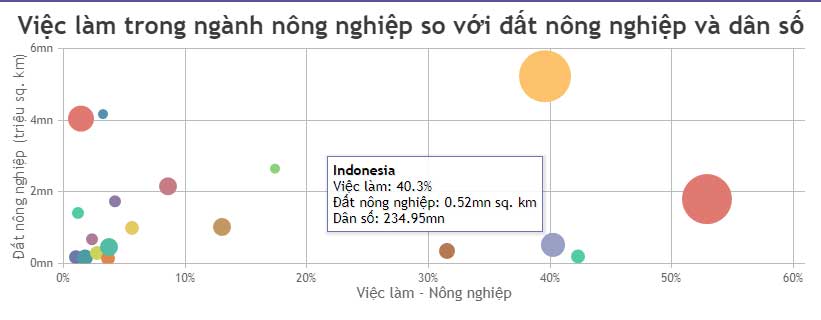
Complete zoomable bubble chart example
The sample below uses demonstration data. The x and y properties position each point, and z determines the bubble's relative area.
<!doctype html>
<html lang="en">
<head>
  <meta charset="utf-8">
  <meta name="viewport"
        content="width=device-width, initial-scale=1">
  <title>Zoomable bubble chart</title>
  <script src="https://cdn.canvasjs.com/canvasjs.min.js"></script>
</head>
<body>
  <div id="chartContainer"
       style="height: 380px; width: 100%;"></div>

  <script>
    window.addEventListener("DOMContentLoaded", function () {
      const chart = new CanvasJS.Chart("chartContainer", {
        animationEnabled: true,
        zoomEnabled: true,
        zoomType: "xy",
        title: {
          text: "Sample bubble chart"
        },
        axisX: {
          title: "X value"
        },
        axisY: {
          title: "Y value"
        },
        toolTip: {
          content: "{name}: x={x}, y={y}, size={z}"
        },
        data: [
          {
            type: "bubble",
            color: "#2563eb",
            fillOpacity: 0.65,
            markerBorderColor: "#1e3a8a",
            markerBorderThickness: 1,
            dataPoints: [
              { x: 10, y: 22, z: 15, name: "Point A" },
              { x: 18, y: 35, z: 25, name: "Point B" },
              { x: 27, y: 28, z: 12, name: "Point C" },
              { x: 36, y: 48, z: 32, name: "Point D" },
              { x: 45, y: 40, z: 20, name: "Point E" },
              { x: 55, y: 58, z: 28, name: "Point F" }
            ]
          }
        ]
      });

      chart.render();
    });
  </script>
</body>
</html>
Enable zooming and panning
The important chart-level settings are:
zoomEnabled: true,
zoomType: "xy"
zoomEnabled: trueturns on zoom and pan interactions.zoomType: "x"limits the interaction to the horizontal axis.zoomType: "y"limits it to the vertical axis.zoomType: "xy"allows both axes to change.
After the reader zooms, CanvasJS displays toolbar controls for switching between zoom and pan modes and for resetting the viewport. The toolbar option can change the toolbar's appearance; it is not required simply to enable the interaction.
How bubble size works
Each bubble data point needs x, y, and z values:
{ x: 18, y: 35, z: 25, name: "Point B" }CanvasJS uses z to determine bubble size. The value is proportional to the bubble's area, not its radius or diameter. This matters because doubling an area-based value should not be interpreted as doubling the visible width.
Use nonnegative, consistently defined z values and explain what the size represents. If bubble size is not meaningful, use a scatter plot instead.
Customize the bubble series
colorsets the series color.fillOpacitymakes overlapping bubbles easier to see.markerBorderColorsets the outline color.markerBorderThicknesscontrols the outline width.toolTip.contentdetermines the values shown when a reader points to a bubble.
Keep opacity high enough that bubbles remain visible but low enough that overlaps can be recognized. A border can preserve the edge of a bubble when several points occupy similar positions.
Design and accessibility tips
- Label each axis and include units.
- Explain the meaning of
znear the chart. - Do not use bubble area to represent values that may be negative without a separate visual rule.
- Provide a table or text alternative when exact values are important.
- Test mouse, touch, and keyboard behavior on the devices your audience uses.
- Avoid calling the interaction “rotation”; CanvasJS zoom and pan change the visible range but do not rotate this two-dimensional chart.
Troubleshoot a blank or unresponsive chart
Confirm that the CanvasJS script loaded, the container ID is correct, and the container has a set height. Check that every data point contains numeric values. If zooming seems to have no effect, add enough variation or enough points for a smaller selected range to be visible.
CanvasJS is a third-party library, so check its current licensing and deployment instructions before production use. See the official CanvasJS zooming and panning documentation and bubble chart overview for option details.
For alternatives, compare these data-visualization tools. These code-sample websites can also help you test and share small JavaScript examples.
Related Articles
 Javascript Code to Create Bubble Chart with Custom Marker2 minutes read
 Javascript: Complete Guide2 minutes read
 Sample JavaScript Code to Create a Chart with a Second Axis3 minutes read
 JavaScript Code to Create a Chart/graph Combining Lines, Areas, and Columns3 minutes read
 Javascript Code to Create OHLC and Line Chart Combo Chart Template2 minutes read
 Javascript Code to Generate Dynamic Line Graphs/Charts2 minutes read
Reader Comments 0
Sign in with email or Google to join the discussion.