Table of Contents
A scatter plot places each observation at an x and y coordinate. It is useful for examining relationships, clusters, gaps, and unusual points in two numeric variables. Unlike a line chart, a scatter plot does not imply that adjacent points should be connected.
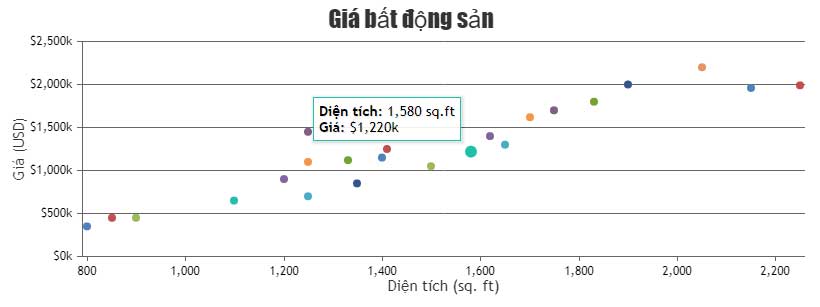
Complete JavaScript scatter plot example
This CanvasJS example plots a small set of demonstration measurements. Replace the values and axis labels with data from your own project.
<!doctype html>
<html lang="en">
<head>
  <meta charset="utf-8">
  <meta name="viewport"
        content="width=device-width, initial-scale=1">
  <title>JavaScript scatter plot</title>
  <script src="https://cdn.canvasjs.com/canvasjs.min.js"></script>
</head>
<body>
  <div id="chartContainer"
       style="height: 360px; width: 100%;"></div>

  <script>
    window.addEventListener("DOMContentLoaded", function () {
      const points = [
        { x: 1, y: 2.2 },
        { x: 2, y: 2.9 },
        { x: 3, y: 3.7 },
        { x: 4, y: 4.1 },
        { x: 5, y: 5.4 },
        { x: 6, y: 5.8 },
        { x: 7, y: 7.1 }
      ];

      const chart = new CanvasJS.Chart("chartContainer", {
        animationEnabled: true,
        zoomEnabled: true,
        title: {
          text: "Sample relationship"
        },
        axisX: {
          title: "X variable",
          includeZero: false
        },
        axisY: {
          title: "Y variable",
          includeZero: false
        },
        toolTip: {
          content: "x: {x}, y: {y}"
        },
        data: [
          {
            type: "scatter",
            markerType: "circle",
            markerSize: 10,
            markerColor: "#2563eb",
            markerBorderColor: "#1e3a8a",
            markerBorderThickness: 1,
            dataPoints: points
          }
        ]
      });

      chart.render();
    });
  </script>
</body>
</html>
How the code is structured
The points array stores the observations. Each object needs numeric x and y properties:
{ x: 4, y: 4.1 }The chart's data array contains a series with type: "scatter". CanvasJS reads the data points and positions each marker on the two axes. Finally, chart.render() draws the chart inside the element whose ID is chartContainer.
Useful scatter-plot options
markerTypesets a symbol such ascircle,square,triangle, orcross.markerSizecontrols the visible marker size.markerColorsets the fill color.markerBorderColorandmarkerBorderThicknessdefine the outline.zoomEnabledlets readers inspect a selected region and then pan or reset the chart.toolTip.contentcontrols the values displayed on pointer hover or touch interaction.
CanvasJS also supports fillOpacity in relevant marker and series configurations. Transparency can help when points overlap, but very low opacity can make sparse data difficult to see.
Add multiple series
To compare groups, add another object to the data array. Give each series a descriptive name, set showInLegend: true, and use both a different color and marker shape.
data: [
  {
    type: "scatter",
    name: "Control",
    showInLegend: true,
    markerType: "circle",
    dataPoints: controlPoints
  },
  {
    type: "scatter",
    name: "Test",
    showInLegend: true,
    markerType: "triangle",
    dataPoints: testPoints
  }
]
Present the data accurately
- Label both axes and include units.
- Do not claim that a visible association proves causation.
- Keep numeric scales honest and explain any transformations.
- Investigate outliers rather than silently removing them.
- Provide the underlying values in a table when exact data is important.
- Do not describe zooming and panning as chart rotation; this example remains a two-dimensional plot.
Troubleshooting
If nothing appears, confirm that the library loaded, the container ID matches, and the container has a nonzero height. Check the browser console for syntax errors and verify that x and y contain numbers rather than formatted strings.
CanvasJS is a third-party library. Review its current license and installation guidance before using it on a production site. The official CanvasJS scatter chart overview documents current options.
For no-code and low-code alternatives, compare these data-visualization tools. To experiment with shareable snippets, see these code-sample websites for programmers.
Related Articles
 Javascript: Complete Guide: Javascript Code That Generates Box and2 minutes read
 JavaScript Code to Create a Scatter Plot with Custom Markers3 minutes read
 Javascript Code to Create Bubble Chart with Custom Marker2 minutes read
 Javascript: Complete Guide2 minutes read
 Sample JavaScript Code to Create a Chart with a Second Axis3 minutes read
 JavaScript Code to Create a Chart/graph Combining Lines, Areas, and Columns3 minutes read
Reader Comments 0
Sign in with email or Google to join the discussion.